HubSpot and WordPress rank at the top of G2 Crowd’s list comparing platforms to create, edit, and publish digital content.
Businesses and marketers who do not have coding skills rely on web content management systems to publish their digital content. There are a number of different products available, so how do you choose which one is best for your business?
G2 Crowd is a popular business software review site that allows users to rate their experiences with different products to help others make better purchasing decisions. It has leveraged hundreds of user reviews and analyzed market-share data to create a rankings grid for web content management systems. Products with 10 or more reviews are ranked and placed into one of four categories:
Leaders offer web content management products that are rated highly by G2 Crowd users and have substantial scale, market share, and global support and service resources.
High Performers provide products that are highly rated by their users, but have not yet achieved the market share and scale of the vendors in the Leader category.
Contenders have significant Market Presence and resources, but their products have received below average user Satisfaction ratings or have not yet received a sufficient number of reviews to validate their products.
Niche products do not have the Market Presence of the Leaders. They may have been rated positively on customer Satisfaction, but have not yet received enough reviews to validate their success.
The top 10 web content management systems, with their score and category, are as follows:
1) HubSpot (89, Leader)
HubSpot is an inbound marketing software company that helps businesses transform their marketing from outbound (cold calls, email spam, trade shows, TV ads, etc) lead generation to inbound lead generation enabling them to “get found” by more potential customers in the natural course of the way they shop and learn.
2) WordPress (86, Leader)
WordPress.orgis web software you can use to create a beautiful website or blog. They like to say that WordPress is both free and priceless at the same time.
3) Drupal (67, Leader)
Drupalis an open source content management platform powering millions of websites and applications.
4) Kenitco (61, High Performer)
Delivering more out-of-the-box functionality than other systems, Kentico makes enterprise-grade, integrated marketing manageable and affordable for businesses of all sizes.
5) Joomla (59, High Performer)
Joomla is a content management system (CMS), which enables you to build websites and powerful online applications.
6) Ingeniux CMS (50, High Performer)
Ingeniux CMS is an enterprise content management platform designed to manage the persuasive web. Easy one-click editing, personalized content, software-as-a-service delivery options, and 100% ASP.NET MVC.
7) Crownpeak (48, Higher Performer)
Crownpeak is the only cloud-first Digital Experience Management (DXM) platform with native Digital Quality Management (DQM). The result is easier, faster and more cost-efficient digital experiences for Marketing and IT teams and their customers.
8) Clickability (46, High Performer)
Clickability helps businesses succeed in a dynamic and competitive environment through internet-scale solutions integrated into a global platform.
9) Evoq Content (46, High Performer)
Evoq Content is DNN’s commercially licensed Content Management System (CMS).
10) idev CMS (44, High Performer)
idev CMS is here to make your life easier. Period. Gone are the days of looking at source code and trying to figure out how to format your website content. With the idev CMS, which is at the core of nearly every Americaneagle.com-built website, your website maintenance headaches will dissolve.
Examine these stats when you analyze your content to improve your content strategy and the effectiveness of future content.
A critical (but often overlooked) element of an effective inbound marketing strategy follows the actual production and distribution of content: analyzing your content. It sounds obvious, but many businesses who are producing content do not take the time — or are unsure how — to evaluate how it has performed over time.
Regularly studying how your blog posts, videos, high-value resources (e.g., case studies), and other content resonates with your audience helps inform your strategy. It tells you what kinds of content succeeds in driving traffic and converting leads, as well as which distribution platforms and patterns are optimal.
Also, keep in mind that digital and social media is constantly evolving. Regular content analysis will dictate where and how you need to accommodate changing user patterns, interests, behaviors, and technologies.
Here are four things that are important to evaluate when you analyze your content.
1) Views
How many times your content has been read, watched, or downloaded is a good indicator of how well it resonates with your audience. It’s important to evaluate individual pieces of content (rather than total website views) so you’ll know exactly what is driving web traffic.
Run such reports on a regular basis, examining how your content has performed over that short interval of time. You’ll want to consider how certain subjects play during the time of publication. You should also keep an eye out for how things have changed over time — for example, a topic that normally drives a lot of traffic that is no longer getting the same attention. Has audience interest changed or been satiated? Is the distribution platform no longer appropriate for that topic?
For blog posts or web pages, make sure to check both pageviews and unique pageviews, as well as bounce rate and time on page. That way, you can rule out any spam traffic or pages that draw a large audience but do not end up keeping them once they start reading. An eye-catching title or well-optimized post can bring the horse to water, but if it’s not drinking, your content isn’t doing its job.
2) Performance over time
It’s equally important to check how individual content has performed over its lifetime.
You may have a blog post that gets an extraordinary number of views the week it is posted but then fails to draw traffic thereafter. If that’s the case, examine what circumstances were in place at the time of the post and how the post fit in that context, then try to replicate that pattern in the future.
On the other hand, if you have a post that continues to draw traffic long after it has been posted, take note. Is content involving similar topics popular as well? Your audience is hungry for information about that subject. Consider other factors: Was it authored by a particular company leader? Is it formatted in a certain way, or did you use certain keywords?
3) Social impact
What kind of content gets the most engagement on social media? Examining the number of likes, shares, comments, and click-throughs on individual posts offers insight into what your followers are interested in. It can also help you evaluate your distribution strategy. Do certain subjects perform better at different times of the day? Get more engagement on one platform? Use individual channel’s analytics features as well as tools like Google Analytics to evaluate the impact of your content on social media.
4) Lead conversion
The reason we create and publish content is to attract new business, so knowing what drives lead generation and conversion is incredibly valuable. If you use marketing software, like HubSpot, this is easier to do. If not, it can be difficult, though not impossible, to understand what content was critical in winning over your customers.
One of the top social media sites for B2B marketers, Twitter can help businesses spread brand awareness and communicate with customers.
When it comes to marketing your B2B company, Twitter could be a fantastic tool to give you a competitive edge. Gone are the days that Twitter is only for teens or simply to pass time on the commute to work.
It’s in the numbers.
According to Social Media Examiner, 66% of marketers are planning to increase their Twitter use, and 58% of marketers want to learn more about it. After all, Twitter is consistently ranked as one of the top three social media sites for B2B marketers, along with Facebook and LinkedIn.
Twitter reports that 50% of users have visited or shopped at the websites of the businesses they follow. Additionally, 43% plan to purchase regularly from the businesses they follow, and 60% of followers make a purchase because of something they saw on Twitter.
The statistics don’t lie. Twitter is incredibly effective in increasing and maintaining your customers’ loyalty and creating new connections.
What exactly is Twitter?
Twitter’s new user FAQs describes it as “a service for friends, family, coworkers etc. to communicate and, most crucially, stay connected with the exchange of frequent, brief messages that are searchable and viewable by all of your followers.” This allows for constant interaction with other Twitter users across the globe, whether they are individual users or companies.
Why your business should be using Twitter
Twitter can be an effective tool for businesses to spread brand awareness and communicate with customers and business partners. Here are 6 reasons why you should be utilizing it.
1) It has a mobile application.
Even if your website is mobile-friendly, having a social media platform that is also easily accessible on a mobile device is extremely important. Reportedly, 70% of executives use their smartphones to learn about a product or service after they first hear about an offer. On Twitter, 83% of users are mobile. It’s becoming the 21st century newspaper. Users check it on their way to or from work, during their lunch break, and in their free time. Tweeting frequently keeps your business top-of-mind while current and potential customers browse their feeds.
2) Its reach is global.
Twitter supports 40+ different languages. If your supply chain includes international suppliers or partners, this feature is the perfect opportunity to reach those users, as well as domestic customers at the same time.
3) It’s excellent for customer service.
Your account will receive notifications any time your company name is mentioned in a tweet, so you can respond instantaneously if a customer has a complaint or concern. This is crucial, since the number of customers expecting a response on social media has doubled since 2013.
4) It makes analyzing your engagement simple.
Twitter Analytics makes it easy to measure your impact and see where you should adjust your strategy. Calculate your engagement, learn about your followers’ usage patterns, and more.
5) It allows for broad networking.
By searching a simple keyword such as “content marketing,” you are presented with hundreds of results, including tweets, hashtags, and different accounts. Follow the ones that seem relatable to begin a network of interest for your business. You can then retweet content that would be of interest to your followers, thus increasing your status as a source for knowledge and information.
6) It reaches your target audience.
Twitter has 310 million monthly active users. That includes the large majority of organizations, from small businesses (79% are on Twitter) to Fortune 500 companies (78% are on Twitter). What’s more, an IDC report found that 75% of B2B buyers and 84% of C-level/VP executives use social media to make purchasing decisions. Your business should be where your customers are, and your business should really be where your customers are researching potential business.
Terms you should know
If you’re going to use Twitter, knowing the lingo is essential.
Tweet: A Twitter update. The personal message you compose to your followers. May include pictures, video, text, or links to other web pages. 140 characters or less.
Hashtag (#): Use to create a community of posts talking about the same thing. For example if you want to see posts about inbound marketing, search #inboundmarketing. Join the conversation by using the same hashtag in your post.
Retweet: Taking someone else’s post and re-posting it to your page so all of your followers see it, too.
Quote tweet: Similar to re-tweeting, except you can add your own message to it as well.
Followers: Someone who subscribes to see your posts on their personal timeline.
Direct message: Send someone you’re following a private message to have a conversation away from your feed.
Twitter handle: @yourusername, what someone uses to tag you in a tweet or can search you by, how you’re identified.
But how do I “tweet”?
Tweets are posts under 140 characters that are posted to your personal page and show up in all of your followers’ Twitter feeds. You can post photos, videos, links, or your own content, so get creative!
To begin writing, click the button in the top right hand corner of your screen that looks like a feather quill on paper.
Retweeting
The button for this looks a bit like the recycling symbol. It’s located below each tweet in your feed. If you like what someone says and want your followers to see it too, click the retweet button, then the retweet option that pops up. The original post will appear on your feed.
When someone retweets you, it is now seen by not only your followers but theirs as well. This is one of the great things about Twitter. It’s very easy for one post to be seen by a very large amount of users.
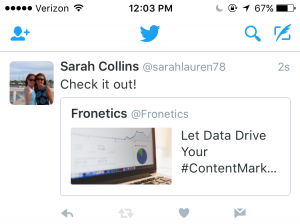
This is how a retweet will appear to your followers, except where it says “you” it will say your twitter account’s name.
Quote tweeting
When you click the retweet button under a post, it gives you the option to either retweet or quote tweet. If you want to add something to the original post you want to retweet, choose the quote tweet option. A window then pops up allowing you to type your own message with the original tweet attached. The difference between this and simply retweeting is that when you retweet, only the original tweet is reposted and not an additional message from you.
Here’s what a quote tweet will look like to your followers:
How to gain followers
Knowing how to create the content you want on your Twitter is only half the battle. Now you have to gain followers to read and help you promote this content. Here are 5 ways to increase your followers and get the results from Twitter you so desire.
1) Promote your username as much as you can.
Add a follow button and/or your Twitter feed to your website and blog, and put the link to your Twitter in your email signature. You can even promote it offline on business cards or around the office.
2) Use your existing customer base.
Upload your email contacts into Twitter and follow your customers. It will let them know you’re thinking about them and prompt them to follow you back.
3) Search keywords and hashtags that relate to your industry and audience.
Use them to join in on conversations and get noticed in Twitter communities surrounding your industry. Users who like what you have to say will be inspired to follow you to get your updates.
4) Have the people who support you offline join in online.
Send out a company-wide email encouraging your employees to follow you on Twitter and retweet your posts.
5) Ask for retweets.
When someone retweets your post, it goes to all of their followers, increasing your reach exponentially. Don’t be afraid to ask your followers and employees for support. Sometimes a contest or incentive works extremely well to get the retweeting going.
The finishing touches
Don’t forget to give your brand a little personality. As Kelly Jo Horton said in her article, 10 Things B2B Marketers Should Be Doing on Twitter, “All work and no play makes your Twitter feed a dull read. Don’t be afraid to have a little fun.” Post a joke or a funny picture, or show what it’s like behind the scenes at your company.
Be conscious of where your followers are located. If they’re in different time zones, make sure your tweets match their schedules as well as your own.
Keep up your audience engagement by making sure your tweets aren’t just a one-way communication. Start conversations with followers. Respond in good time if someone starts one with you.
A positive online connection can be the beginning of a profitable professional relationship. Twitter and its 310 million users are a great place to start making those connections.
Editor’s note: Sarah Collins is a summer intern at Fronetics Strategic Advisors. She is a rising sophomore at James Madison University, College of Business studying Marketing. You can find her on LinkedIn.
HubSpot users also saw 3x more leads and 4.1x web visitors per month after a year using the software.
A study has found that using HubSpot for your inbound marketing can increase sales revenue by 72% in 12 months.
A 2016 MIT Sloan student analysis showed that HubSpot’s inbound marketing software provides users a substantial boost in quality leads, which converted into more sales. In year two of using the software, customers continued to see impressive increases.
The in-depth report was a compilation of customer survey responses and web data gathered over a 24-month period for HubSpot users from 2013 to 2015. It looked at three fundamental aspects of marketing methodology:
Attracting new visitors to the user’s website
Conversion of these visitors into customer leads
Closing those leads into actual sales
Leveraging tools to streamline and magnify marketing and sales efforts is important for all businesses in the supply chain and logistics industries, but it can be especially important if your business is small, or has limited resources. HubSpot proved to be a competitive solution, with cost-effective results that increased leads, customers, and revenue.
Report highlights
Attracting new customers
Users averaged 3x more leads per month after a year.
Websites averaged 4.1x more visitors per month after a year.
Conversion of website visitors into leads
Approximately 83% of the HubSpot customers experienced an increase in their conversion rate of leads into customers.
Size of the business did not matter; all saw significant increases in site traffic and lead conversion rates.
Closing those leads into sales
72% of HubSpot customers saw an increase in sales revenue in one year.
Other findings focused on substantial support in meeting goals and the ease of attracting the right customer persona for optimum results.
96 % of customers surveyed said that HubSpot helped them meet their marketing goals.
68% of customer respondents felt that their efforts generated better quality leads while using HubSpot.
Increased customer satisfaction was reported by 46% of HubSpot users since they began using the program.
Is HubSpot right for your business?
HubSpot is a marketing platform that takes all of the inbound marketing methods that were once separate services and consolidates them into one integrated software package. It provides marketing analytics, lead intelligence, A/B landing page testing, CRM integration, email service integration, eCommerce integration, and API integration.
From one location, you can blog, tweet, optimize, then capture and nurture leads. It drives the right customers to you using extensive research specific to your industry. It pinpoints your competitors and potential customers, including their typical pain points, interests, and questions.
A separate 12-month study conducted by Overgo involving both B2B and B2C businesses compared companies using HubSpot to those who did not. It found:
An average increase of 170% in organic traffic after one year, whereas those using HubSpot saw an average organic traffic increase of 590%.
HubSpot received 125% more (B2B) and 294% more (B2C) leads than companies not using HubSpot. (Several of the B2B companies received fewer leads because their targets are multi-million dollar deals, a much smaller avenue of opportunity.)
The difference was attributed to the tools HubSpot offers its customers, which include:
Ranking opportunities – a feature that shows which keywords offer your business an opportunity to get ranked on the first page of search results.
Conversion opportunities – shows which keywords are attracting a lot of traffic but not converting, then suggests ways to increase conversion.
Long-tail opportunities – suggests keywords where ranking could improve substantially if you add a certain word or phrase.
Competitors – compares your site’s ranking and search volume to your competitors.
Campaigns – helps organize keywords into campaigns for tracking and measurement.
HubSpot’s inbound marketing software has consistently provided a relatively fast and high return on investment for the majority of B2B or B2C companies, no matter their size.
Take a moment to let that sink in. After Google, people are searching YouTube for content. Strike that: Over one billion people are searching YouTube for content.
This has raised the eyebrows of content marketers across many industries, including B2B businesses, who recognize the enormous potential for reaching customers through this medium.
If you haven’t considered distributing content through YouTube, you may soon find yourself scrambling to catch up with your competitors who are. For those who don’t know much about YouTube or are clueless about how it can work for business, here are a few basics to get you started.
What is YouTube?
YouTube is a free video-sharing website and social media platform that allows users to view, upload, share, rate, and comment on content. It was launched in 2005 by three former Paypal employees and purchased by Google in 2006. It now operates as a subsidiary of Google.
You do not have to be a registered user to view content, but you must be registered to upload content. Registered users can also subscribe to content providers’ channels to receive updates when something new is available, and can create playlists of favorite videos to view at any time.
In addition to being available on the YouTube website, YouTube videos can be embedded, shared, or uploaded to other sites (such as Facebook).
Why is it good for business?
YouTube has massive potential for businesses. Here are just five reasons to participate.
Users watch around 3.25 billion hours of video every month.
Videos with over 1 billion views: 10,113
80% of views are from outside the U.S.
More than half of views are from mobile devices.
You can navigate YouTube in 76 different languages.
2) Improved search rankings
YouTube videos are included in Google’s search results, ranking above web pages in certain searches. Potential customers searching for products and services like yours will be more likely to find you in such instances.
3) User experience
Video has become so popular for a reason: People like consuming it. By producing content in this medium, you are offering a user experience that is in high demand.
4) Build your brand
Video is the ideal storytelling platform, and it’s also perfect for how-tos, product demonstrations, and other content that demonstrates your company’s expertise. Show your brand personality and engage your audience while building your reputation as a thought leader in your industry.
5) Track performance metrics
YouTube Analytics makes it easy to see who is watching your videos and how they are engaging with them. Run reports on audience demographics, revenue, engagement, traffic sources, and more.
How do I get started?
There are two avenues for businesses who are looking to reach YouTube’s more-than-3-billion users.
For one, businesses can buy ads that run before other videos, beside playing videos, and in search results. Video ads are not covered in this post, but you can learn more about them here.
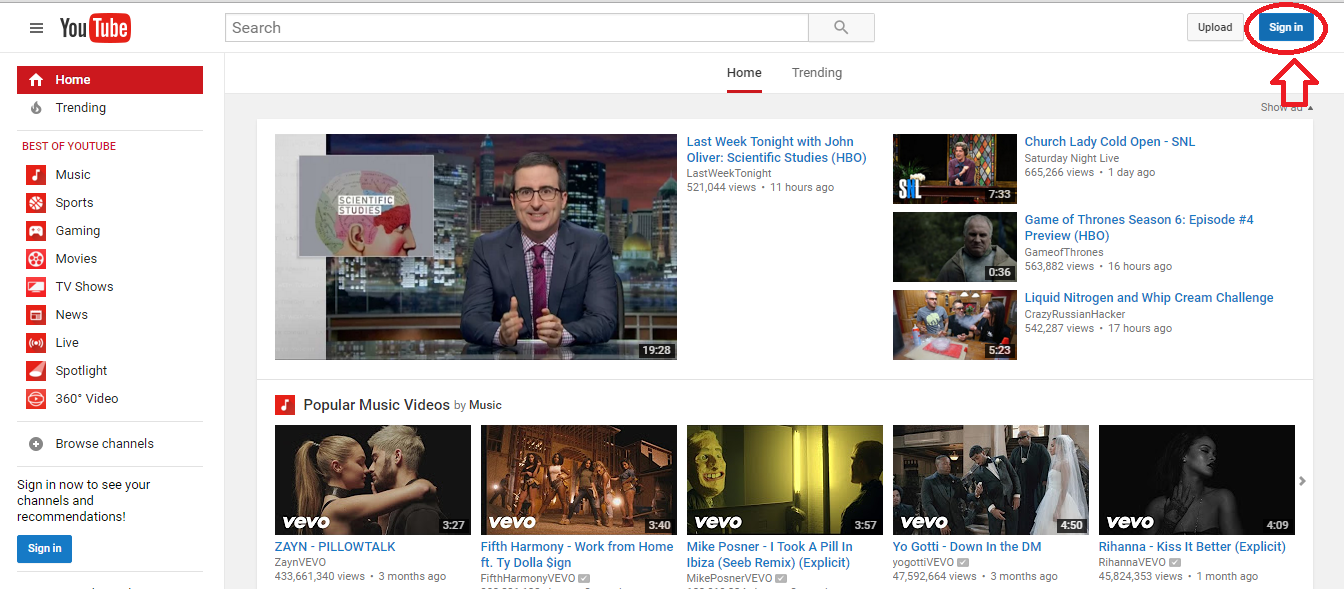
Secondly, businesses can create their own YouTube channel and upload original content as part of their inbound marketing programs. To get started, you will need to sign into your business’ Google account or create one. Find the sign in button at the top-right corner of the YouTube homepage.
With your account, you will own your very own “channel,” on which you will post your content. Branding your channel is an important step, as this will be the face of your company on this platform. Below are some tips.
Anatomy of a branded YouTube channel
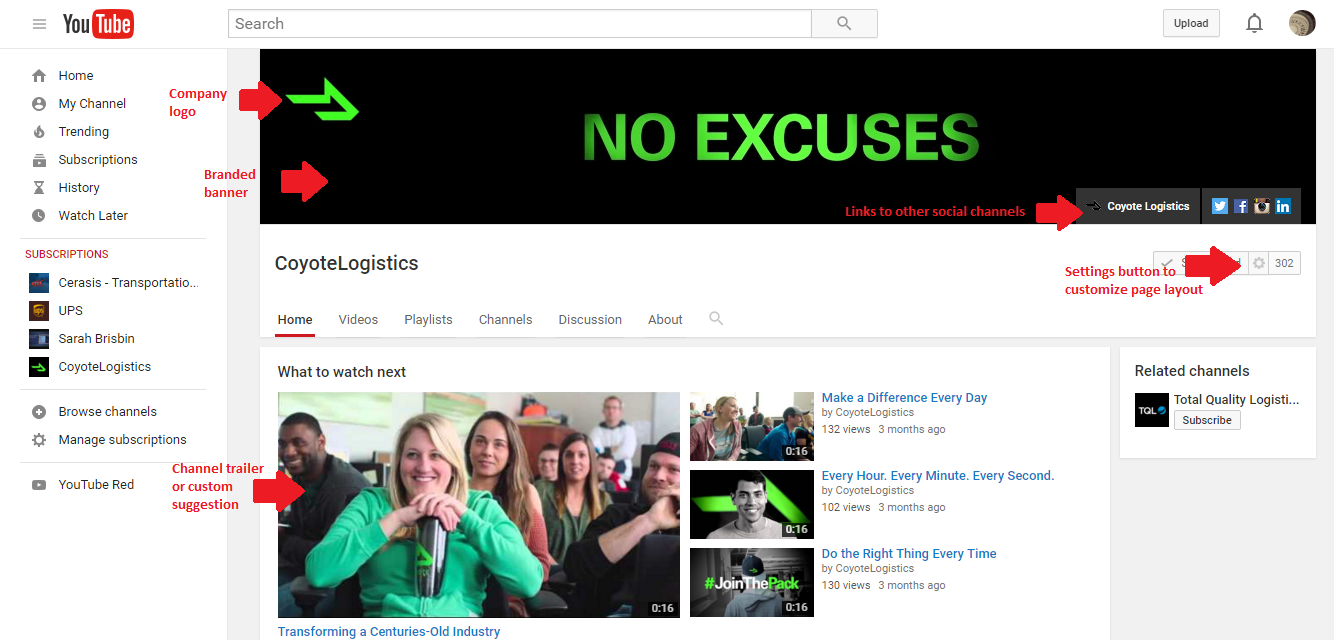
Coyote Logistics, a 3PL provider, has done an excellent job of branding its YouTube channel.
Company Logo
Upload your company’s logo by hovering over the channel icon and clicking the pencil icon when it appears.
Branded Banner
Upload an image that represents your brand and what users will find on your channel. Hover over the channel art, click the “Add channel art” button or the pencil icon in the upper-right corner and select “Edit channel art.” Coyote Logistics makes a bold statement (very representative of its brand personality) here. For the best results on all devices, YouTube recommends uploading a single 2560 x 1440 px image.
Social Icons
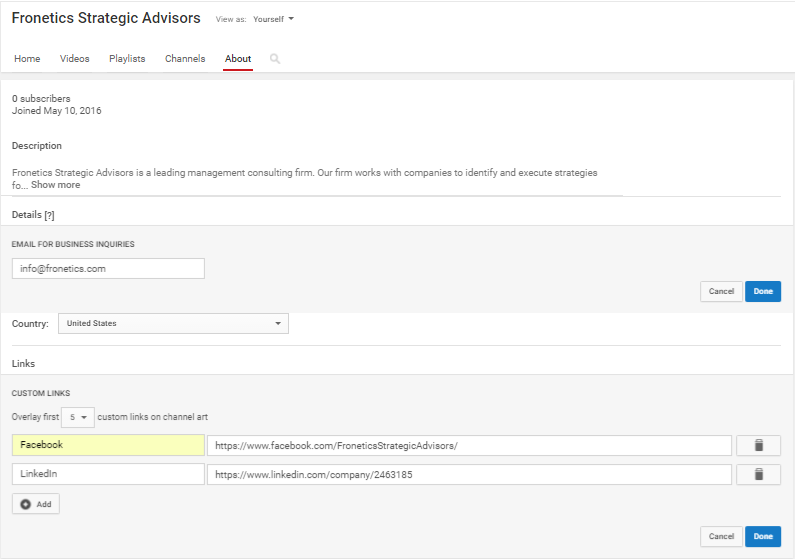
Provide links to your other social channels by hovering over the channel art, clicking the pencil icon in the upper-right corner, and selecting “Edit links.” Add the URLs for each of your channels under “Custom links.”
Customize Layout
Click the customize button to create a layout for your channel. You can add up to 10 “sections,” which allow you to group videos in a particular way. For example, you could add sections of recent uploads, popular uploads, playlists, etc.This helps visitors to decide what to watch — and lets you promote content you wish for visitors to see.
About
Navigate to the About section to add a channel description, business email address, country, and social links (if you haven’t already).
Uploading videos
Once you have your channel set, you’re ready to start adding your original content. YouTube Help has a wealth of resources to help you get started, problem-solve, and learn more. The below video offers an introduction to uploading videos in just a few quick steps.
Other terms to know
Playlist: Playlists let you organize your videos into different categories, like interviews, tips, product demonstrations, etc. Learn more.
Channel trailer: A short video, like a movie trailer, that gives visitors an idea of the kinds of videos they’ll find on your channel. Learn more.
YouTube Red: This is the premium subscription option that allows you to view videos without ads, watch videos offline, and more.