LinkedIn is a goldmine for organizations looking to build professional relationships and generate more quality leads. The 433+ million member base presents an enormous opportunity for your company to earn new business. But once you set up your company page, how can you start attracting those members to follow you? We’ve got 10 steps to get you started.
Keep in mind: Attracting followers can work like a domino effect — if you find the right people, that is. When you form an authentic LinkedIn relationship with someone, someone who is genuinely interested in your business and the content you distribute, that person is more likely to like, comment on, or share your updates. Then that person’s network will see that s/he engaged with your business. Not only does this provide exposure for your company, but also offers an endorsement of sorts. It encourages other people in your followers’ networks to follow you as well.
10 steps to attract LinkedIn followers
1) Entrust your colleagues.
Send around a company-wide email encouraging your employees to add your company to their LinkedIn profiles. When they do, your company name and logo show up on their profiles. Additionally, they automatically become followers of your company page and will receive your updates. If you can encourage them to like, share, and comment on your content, even better.
2) Tell your customers and partners.
Follow your customers and business partners on LinkedIn to prompt them to do the same for you. You can also let them know that you have a company page by including it in customer newsletters, your email signature, or other regular communications with them. Engage with their content on LinkedIn to stay top of mind and to get your business’ name in front of their followers as well.
3) Follow your competitors.
Get insight into what the competition is up to and how they are interacting with their followers. Make sure to like and comment on their content since their networks will see this activity (and, thus, your business’ name). You may even go further by following some of their customers and partners — you never know where a new business relationship might start!
4) Add a follow button to your website, social accounts, and content.
Don’t forget to add LinkedIn to your follow buttons on your website, blog, and other social media profiles. You can also add it to the share widgets on your content assets, like blog posts, emails, and landing pages. Doing so provides potential followers with an easy way to locate your company page or to share your content with their networks.
5) Write a blog post about it.
Announce the launch of your company page with a celebratory blog post. Enrich your post with keywords that resonate with your target audience, so potential customers searching the Internet might come across it and want to connect with you. Make sure to share the post through your other social media channels to encourage your followers there to find you on LinkedIn as well.
6) Join group discussions.
LinkedIn groups facilitate conversations about popular issues and hot topics in your industry. Though company pages cannot participate, individual employees partaking in the discussion represent their companies. (In fact, your company name is displayed under the employee’s name when they start a discussion.) Encourage your executives and other company leaders to find and join groups that relate to your business and to actively participate in dialogue. They can also share company updates or blog posts in these forums. Other group members will recognize their expertise and form a favorable opinion of the company — perhaps favorable enough to follow it.
7) Post regular content.
Keep yourself in your followers’ eyes by posting content at least several times a week. Keep in mind it doesn’t have to be all original content. In fact, it’s a smart idea to mix it up and share articles and posts by others that you find interesting. Users who come across your company page will recognize you as a source for frequent, relevant information, and will want to follow you to stay in the know.
8) Like, share, and comment on others’ content.
The more you interact with different members’ content, the more brand exposure you’ll get. Remember, the connections in members’ networks see details of your interaction in their newsfeeds. The more you interact with different people, the larger your reach.
9) Follow industry news and post on LinkedIn Pulse.
Keep up to date with the latest happenings and topics of conversation in your industry on LinkedIn Pulse. It’s a great way to gain inspiration for content. And posting to Pulse is an excellent way to attract followers. Millions of people browse and engage with Pulse conversations every day, so publishing can offer great exposure for your business.
10) Strategically utilize sponsored updates.
Your content can reach users outside of your company page’s followers and visitors through sponsored updates. The Campaign Manager tool will insert particular posts into a targeted audience’s LinkedIn newsfeeds. You just set your budget and choose cost-per-click or cost-per-1,000 impressions, and voilà! While few companies have the budgets for daily sponsored updates, these campaigns can be really effective at attracting followers when you have particularly compelling content to share.
The $26.2-billion acquisition could result in the customer-targeting solution(s) B2B marketers have been waiting for.
Microsoft announced on June 13 that it would purchase LinkedIn for $26.2 billion, a deal set to close by the end of 2016. Though LinkedIn will operate “as a fully independent entity within Microsoft,” the union will strengthen their shared mission to “connect the world’s professionals to make them more productive and successful.”
Both Sadya Nadella and Jeff Weiner’s letters to their employees beam with excitement over the possibilities for product synergies. “Think about it: How people find jobs, build skills, sell, market and get work done and ultimately find success requires a connected professional world,” writes Nadella. “It requires a vibrant network that brings together a professional’s information in LinkedIn’s public network with the information in Office 365 and Dynamics.”
Obvious opportunity lies in enhancing Microsoft’s existing solutions to improve user experience. For example, videos from Lynda.com, a website for training videos that LinkedIn bought in 2015, could be accessible throughout the Office suite, such as an Excel document.
But for B2B marketers, the most exciting possibilities involve “new opportunities … for monetization through individual and organization subscriptions and targeted advertising,” as Nadella puts it.
New opportunities for monetization
Jenny Sussin, a Gartner research director, proposes that LinkedIn’s value to Microsoft lies in its algorithms and user data. Successful integration into Microsoft’s existing products could be a game-changer for the B2B sphere, in terms of targeting customers.
First let’s consider the algorithms, two of which Sussin claims were the main attraction for Microsoft. “No. 1 was the algorithm that creates the connection graph, the social networking graph,” she says. “No. 2 was the algorithm that determines the information most valuable and most actionable to you.” Essentially, with this acquisition, Microsoft has the ability to map how professionals are connected and determine what content is most relevant to each individual user.
Secondly, LinkedIn has the most comprehensive, up-to-date personal data about its 433+ million global users of any professional network. And that data has not been available to other companies — LinkedIn even refused access to Google for ad sales — until now. The value of this information to any B2B organization is indisputable.
Now consider that there are 1.2 billion users of Office and 4.4 million users of Dynamics CRM. Microsoft can now combine the information it knows about those professionals with LinkedIn’s user data, map their relationships, and offer customized content within these products. Imagine being able to reach your target customer within the very tools s/he uses most every day.
And those are just two of Microsoft’s products. Skype, Yammer, MSN: there is no shortage of targeted advertising opportunities.
Taking on Google?
Perhaps the most exciting of these secondary properties for B2B marketers is Bing, Microsoft’s search engine. Bing Ads are attractive to marketers because of the low cost per conversion. The problem, of course, is volume, as Google dominates the market share.
“Search marketing is great for determining intent — for understanding what a person wants,” Miller explains. “But social media platforms, like LinkedIn, tell us who the person is. Marrying the two pieces of data — who and what — brings us to the sweet spot of marketing and targeting an ideal audience. LinkedIn provides us with demographic targeting based on business and professional user information.”
Targeting could include factors like company size (e.g., spending capabilities), so marketers would not waste impression dollars advertising products that are far beyond the buyer’s price point. Fold in other LinkedIn solutions, like Lead Accelerator, to improve retargeting, and Bing Ads could really compete.
Google may have a leg up in terms of search volume, but without detailed data on users’ professional demographics, Bing could corner the market as the most effective B2B ad targeting platform.
Cause for caution
While the marriage of LinkedIn and Microsoft’s capabilities shows great promise, hold off on celebrating just yet.
Part of LinkedIn’s value to Microsoft derives from user-provided information. And part of Microsoft’s value to B2B marketers lies in its products’ ubiquity. But what if people stopped contributing their personal details to LinkedIn because of the way it was being used across the Microsoft suite? And what if businesses stopped using Microsoft products over privacy or data security concerns?
Here’s why those are both real concerns: Nadella suggests that your LinkedIn newsfeed could show relevant articles based on the projects you’re working on offline. Taking information from my desktop?! That’s problematic from both a personal and proprietary standpoint. Issues around invasion of privacy and the breech of secure business information could present major roadblocks to success.
How would you feel if a software product you researched yesterday appeared in your Outlook today? If, while preparing a PowerPoint for a client meeting, a pop-up suggested you contact a connection in your LinkedIn network who is an expert on the topic? With the deal projected to close before the end of the year, users reactions to these concerns over the next few months could be telling.
A recent report produced by the Content Marketing Institute and MarketingProfs, and sponsored by Brightcove, found that 81% percent of B2B manufacturers in the United States use content marketing. The same report found that the majority of manufacturers do not believe their organization is effective at content marketing.
What are organizations who are not effective missing out on? A lot.
An effective content marketing strategy can:
Build brand awareness
Position your company as a thought leader within the industry
Increase engagement with customers, partners, and stakeholders
Educate and inform customers, partners, and stakeholders
Build trust
Allow you to manage your reputation
Generate leads
How can your organization realize these benefits?
The first step is documenting your strategy. The report found that organizations with a documented strategy in place were 3x more likely to report that their content marketing strategy was effective than organizations without a documented strategy.
Define your goals
Why does your company want to create content? Do you want to shorten your sales cycle? Increase leads? Build brand awareness? You don’t want your content to be just stuff. You don’t want content to be ineffective. Therefore it is important to define what it is you want your content to do for your company.
Define your audience
Who is your target audience? What are their needs? What are their goals? What are their pain points? What do they value most? Where do they go for information? Take your time. Be honest. If you identify and define your audience correctly you will be more likely to reach your target audience and engage them than if you get this step wrong.
Define your metrics
Determine how you are going to track and measure success. Define the metrics that you will track on a daily, weekly, monthly, and yearly basis.
Identify the right distribution channels
When it comes to content, distribution is essential – your content will not reach your target audience and will not be read unless it is distributed. Take the time to identify the distribution channels that are right fit for your company, your content, and your goals.
Create a publishing calendar
A publishing or editorial calendar provides you with a framework to create and distribute content. It helps you create content that is consistent, that is quality, and is tailored to your company’s goals. It is also helpful in terms of managing workflows, meeting deadlines, and managing writer’s block.
Create content
Valuable and relevant content is not a sales pitch. It is not content that pushes your products and services. Rather, it is content that communicates valuable information to customers and prospects so that they have the knowledge to make better informed decisions. Moreover, it is content that establishes your business as a reliable source of knowledge – as the thought-leader within the industry. Be thoughtful when you create content.
Curate content
Content will help you grow your business; by creating and distributing valuable and relevant content in a strategic and consistent manner you can drive profitable customer action. But, it’s not all about you. It’s not all about the content you and/or your business creates. Here’s why content curation is an essential component of a successful content strategy. The internet is a fire hose stream of content. Being able to navigate the deluge of content and identify the content that is valuable to your customers and to your business is essential. The process of identifying and sharing this content is content curation. By consistently being able to identify, make sense of, and share content that is important and relevant to your customers and to your industry you will establish your business as a thought leader and a trusted resource.
Distribute content
Distribute your content via your target distribution channels. Distribute the content consistently over time and at the right time.
Engage with customers and prospects
Once your content has been distributed, engage with your audience. Respond to comments, respond to questions, and provide clarification. Make your content more than words – make it a relationship.
Track and analyze metrics
Track and analyze your metrics on a daily, weekly, monthly, and annual basis. Take a look at what is working and what is not. By tracking and analyzing your metrics you can see, for example, what type of content is most effective and which distribution channels are helping you achieve your goals.
Make adjustments as needed
Your strategy should not be set in stone. Your strategy should be flexible. Look at your metrics, look at the feedback you are getting through your engagement with customers and prospects – make adjustments to your strategy as needed. Remember that when it comes to content it is important to think marathon not sprint. An effective content strategy requires patience and determination. Many companies make the mistake of giving up on a content strategy too early; make a long-term commitment to your strategy.
B2B organizations are leveraging review sites to increase organic traffic and conversion rates. Here’s how.
Consumers regularly turn to review sites to research products and services before they buy. But did you know that businesses can leverage this behavior to increase organic traffic and drive conversions?
B2B organizations are joining third-party review sites precisely for benefits like these. In fact, such memberships are becoming an integral part of some marketing strategies.
Let’s take a look at it works.
Review sites inform buying decisions
Buyers value the opinions of peers and colleagues. In fact, B2B buyers rank it among their top three resources for information about solutions, along with experts and web searches.
It makes sense: User reviews offer an unbiased, credible experience regarding a company’s product or services, so potential customers do not have to rely exclusively on information the organization provides. What’s more, reviewers often share more than just opinions; they frequently include related tips or good-to-knows, which offer extra value for the reader.
Experts equate review sites to short-form versions of case studies, which 83% of B2B buyers report as important when comparing vendors. Reviews offer real-life experiences with the product or service, but are much quicker to read and easy to consume in aggregate than case studies. They are also written from a buyer’s perspective, which resonates much more than, say, technical language and specifications.
Value for businesses
More succinct than a case study and just as credible, user reviews offer compelling testimonials that can attract customers at any point in the buying cycle. Here are a few ways organizations can leverage them to their advantage.
1) Use them as content.
Reviews make excellent lead-nurturing content. A business could share a positive review on social media or integrate it into a blog post. Negative reviews, too, give an organization a chance to address questions or concerns through content. Either way, reviews give insight into what customers are talking about, and this can help inform your content strategy.
2) Build brand awareness.
As more buyers turn to review sites to research products, companies who are members of the review site benefit from having their name in the mix. Even if a potential customer is researching a competitor, that person will likely come across your business name in comparison. That kind of exposure is invaluable as buyers are actively creating their vendor short lists — especially if you have very positive reviews.
3) Build customer trust.
Participating on a business-review site promotes the transparency customers crave. It tells them you are willing to let your customers share the bad as well as the good for all to see. Additionally, positive reviews can boost an organization’s Google seller rating, which appears next to the business name in AdWords ads. The seller rating gives readers insight into how the business rates for quality service before that person ever visits the website and, if the rating is high, establishes instant credibility. And more credibility equals more click-throughs.
4) Increase organic traffic.
Search engines favor reviews, meaning search engine algorithms increase the search ranking of sellers who have favorable ratings on review sites. Consider that 60% of organic clicks go to the top three search results, and that the vast majority of readers won’t search beyond the first page of results. Any boost from positive reviews can increase your organic traffic potential.
5) Drive conversions.
Many organizations are finding reviews enormous valuable for their business in the late stages of the buyer’s journey. Password-management startup Dashlane, for example, reported a 14.5% increase in conversion rates when reviews were added to paid ad landing pages. Because reviews hold such credibility and resonate so strongly with customers, they make for excellent closing content.
Here are a few B2B review platforms to consider joining as part of your marketing strategy.
G2 Crowd: Offers online reviews on B2B marketing services as well as business software.
GetApp: Allows users to search for industry topics as well as specific products.
IT Central Station: Described as a “Yelp or TripAdvisor for enterprise technology.”
TechnologyAdvice: Allows users to perform side-by-side comparisons of solutions within a particular category.
Trustpilot: A community where users can interact with one another regarding particular solutions they use.
TrustRadius: Authenticates each reviewer and validates every review through its research team prior to publishing.
Try writing about these topics on your supply chain blog to engage customers.
Content is an important part of many logistics and supply chain companies’ marketing plans. Yet nearly half (45%) say creating quality content on a consistent basis is their biggest challenge.
If your business is part of the 90% that produces some or all content in-house, you have likely struggled with this from time to time. You know that you shouldn’t pitch your products. But, then, what are you supposed to say on your blog?
Here are some thoughts on what to write about:
1) Offer something of value.
Do you have expert advice on a particular topic? Is there something about your products or your people that would be entertaining to your audience? Do you have access to top-of-their-field specialists that could discuss a particular issue?
2) Share your mission.
What is your company’s mission statement? Pick one aspect and describe why this is important to you/society, or illustrate how your company is living up to it. For example, a green transportation company might create an infographic about the industry’s impact on the environment.
3) Tell a story.
What anecdotes can you share about your business? Are their employees with exceptional stories to share? Customers whose narrative bears repeating? What stories illustrate something about your business? For example, Southwest Airlines’ Nuts About Southwest blog regularly shares customer stories — tugging at the heartstrings with nearly missed births, marriage proposals, and, of course, adorable animals — that illustrate the airline’s commitment to customer service and on-time arrivals.
Use these tools to help you hire talent through LinkedIn.
LinkedIn offers immeasurable opportunity for recruiting premium talent. But how do you begin weeding through the network’s more-than-433-million candidates?
Here are some techniques — both free and fee-based — on using LinkedIn to find professionals who match your company’s open positions.
Organic methods (free)
Share the job in an update
Just as you would share other content, click “Share an update” on the company page Home tab. If you only want a specific audience to see your post, click the “Share with” menu bar just below the update box, and then click “Targeted audience” to define. You can include a link to the job description on your company website or direct applicants to more information on how to apply.
If you have posted a job through the LinkedIn Jobs feature, go to the job page and click the share arrow next to the job title to share as an update.
(Note: You must be a page administrator to share updates on your company page.)
Have your employees share your opening
Encourage your employees to post the news of the open position to spread the word. Jobs that employees share get 30% more applications!
Remember employees are your best brand ambassadors, and sharing the job with their networks also works as an endorsement for your company — it’s like they are saying, “This is a great place to work!”
Make it easy for them by detailing three ways to share:
Share the LinkedIn job post. If you have posted the job through the LinkedIn Post Jobs feature, individuals can share it with their networks (on LinkedIn and elsewhere) by clicking the share arrow next to the job title on the job page.
Share your company update about the opening. Employees can locate the company update about the job opening by navigating to your company page and scanning through your newsfeed. Once located, click “Share” at the bottom. Your company name and a link to your company page will appear prominently at the top of their share.
Share the link to the page on your website with the job description/application. Users can copy and paste the link into the “Share an update” box on the LinkedIn homepage, or use the social share icons (if available) on your website to post it to their newsfeeds.
Mine Group discussions
LinkedIn’s Groups offer a forum for like-minded professionals to discuss current events, industry trends, and other topics related to work life. If you actively participate in these conversations, certain users may have made an impression on you through their insights or informed opinions. You may have even thought that your company could benefit from that person’s knowledge and experience. That’s because Groups are a great source for mining talent.
Say, for example, you notice someone offering an intelligent perspective on emerging technologies in a data warehousing group discussion. It reminds you of an open position with your company. You can use the discussion to further engage with that person about the topic to gain a better understanding of his/her knowledge. And then you can view the user’s profile to learn more about related experience. Connecting with the person will give you further insight into his/her professional interests — and it will allow you to send an InMail with information about the potential fit within your company.
Conduct a good, old-fashioned search
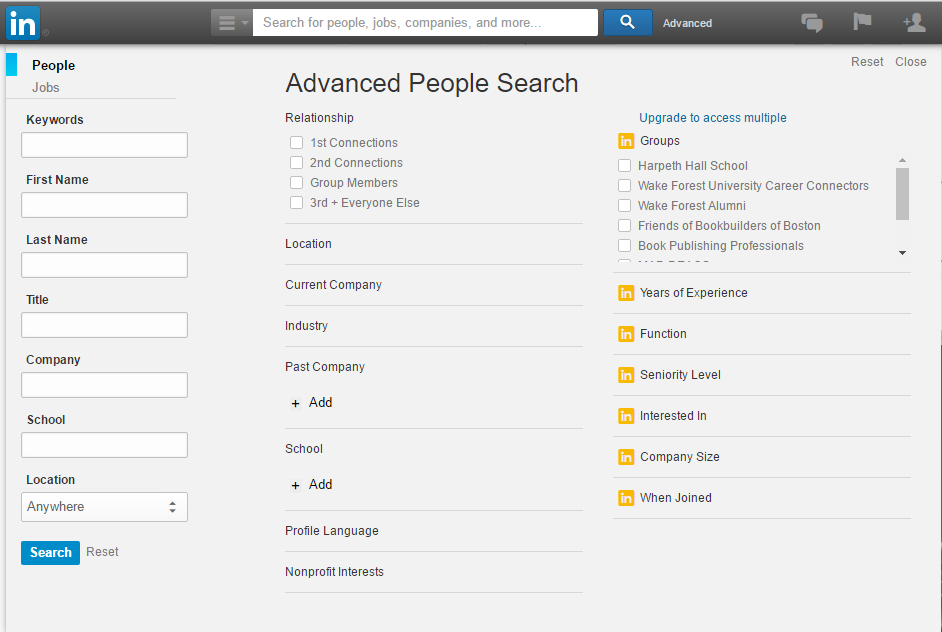
While searching by skills is no longer free, you can still conduct an “Advanced People Search.” Click on “Advanced” next to the Search box above the navigation bar at the top of the site. This allows you to search by location, current and past company, industry, school, title, language, and keywords (e.g., finance, strategy, accounting).
Create a recruitment-focused showcase page
Users who are interested in working for your company can follow this showcase page specifically to keep abreast of opportunities that match their interests. Keep them engaged by sharing company updates related to job openings, company culture, and employee testimonials.
Paid methods
Career Pages
One of the four tabs on your company page, the career page facilitates your interaction with job seekers. This is your employer brand hub, where users will go when they view your jobs or want to learn more about working for your company. You can feature your LinkedIn Job Posts, multimedia (like a video or SlideShare), and employee testimonials. What’s more, you can create dynamic content so that visitors to your page receive personalized messaging and job recommendations based on their location, industry, function, and more.
If you’ve purchased a Silver or Gold Career Page, featured jobs will be displayed on a Careers tab and they will be targeted to the viewer based on relevance to their LinkedIn profile. This is similar to job targeting on the LinkedIn Jobs page, but it only displays jobs at your company.
If your company only has the occasional opening to fill, Post Jobs may be your best option. Individual users can purchase 30-day job postings and then link them to a company page.
Here’s how it works: You create a job posting, making sure to select the correct company name from the dropdown menu. The company logo and link to the company page will be included in the post, and it will appear on the list of jobs on the company page. LinkedIn will automatically advertise your job posting to LinkedIn members with profiles that match, even if they aren’t active job seekers.
With your job post, you also get:
A curated list of members who could be a fit for your hiring needs
5 free InMails to reach out to prospective candidates
Management tools to filter, tag, and share candidates with your team
Insights to see how your job posting is performing
Job Slots
Ideal for those with frequently open positions or multiple roles to fill, Job Slots are essentially recurring job posts with additional benefits. LinkedIn will automatically recommend job posts to candidates who match your open positions. And you’ll have access to management tools to review and filter candidates, take notes, and send InMail. Additionally, you can take advantage of the Feature Jobs on the homepage and on your company’s Career Page.
With Job Slots, you can also:
Attract passive candidates via Jobs You May Be Interested In
Receive a Suggested Professionals curated list
Optimize your job posts with detailed analytics
Build your employer brand with Career Page integration
Improve applicants’ mobile experience with distribution through the LinkedIn Job Search app
LinkedIn Recruiter
LinkedIn Recruiter is the premium talent-recruitment subscription, ideal for large companies that hire for multiple positions year round. Firstly, it gives you access to the names and profiles of all 433+ million LinkedIn users. You can also send anyone messages through InMail, and you can take advantage of custom templates for candidate communications.
Recruiter allows you to use 20+ additional filters (years of experience, seniority, function, etc.) when searching for candidates. And the “Find more people like” feature lets you search for people similar to candidates you already like. You can also save searches and have LinkedIn notify you when someone new meets your qualifications.
Additionally, the Talent Pipeline Management tool lets you build, track, and manage talent searches and hiring with folders, reminders and smart to-do lists. You can also streamline your workflow and team activities with shared projects, searches, profiles, and applicant notes.
Recruiter Lite
Recruiter Lite is a more streamlined version of Recruiter, suited for individual recruiters and hiring managers. You get:
Unlimited visibility of your 3rd-degree network
10 advanced search filters
Saved searches
30 InMails/months
InMail templates
Access to the Projects function
Work with Us Ads
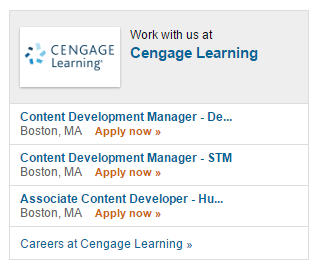
Works with Us Ads dramatically outperform typical banner ads, with up to 50 times higher clickthrough rate. How? Location.
Essentially, Work with Us Ads allow you to own all of the ad space on your employee’s profiles and your company pages. LinkedIn will display your open jobs that are relevant to each particular visitor. You can have the ad drive clickthroughs to your jobs, career page, or your website.
Referrals
Referral recommendations match your employees’ first degree connections to the open roles in your applicant tracking system. It suggests connections for the right open roles, helps your employees share jobs, and keeps them up to date through the entire hiring process.
Which tools do you use to hire talent through LinkedIn, and which do you find are the most effective for your business?