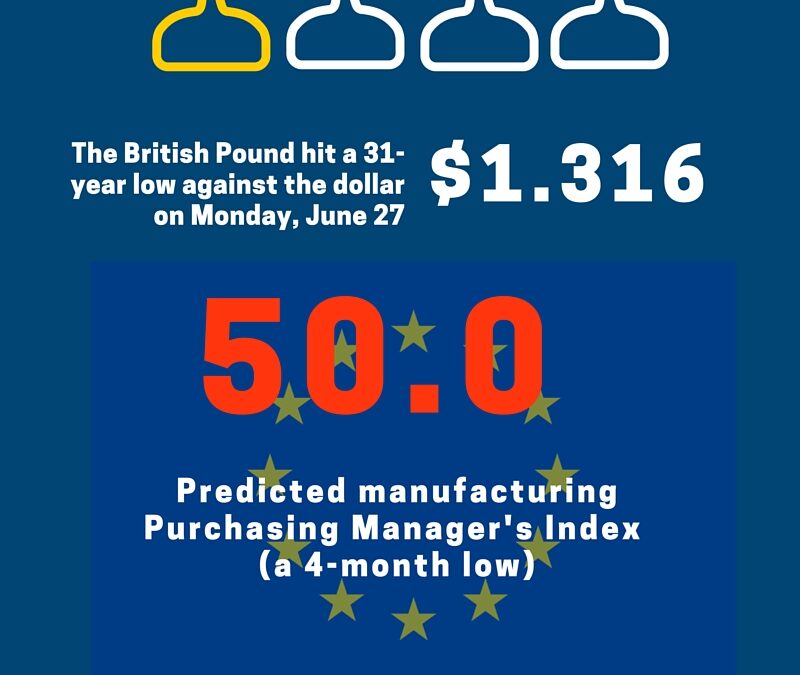
As uncertainty pervades following Brexit, experts speculate about the impact a divorced U.K. and E.U. will have on the global supply chain.
As the Brexit vote roils markets across the globe, uncertainty looms in the air for many businesses. Even U.S.-based organizations without operations or suppliers in Europe are feeling the “significant economic repercussions” of the U.K.’s decision to leave the E.U.
Economists have been scrambling to determine the full impact of the referendum. It seems clear that all aspects of the supply chain will be affected in some way. But we won’t have a clear picture of precisely how prior to the conclusion of the two-year period of negotiation on Britain’s exit terms. Some experts speculate that it could take up to 10 years for new trading relationships with various countries to play out.
For now,“the overriding message for the European logistics and supply chain industry is one of ‘business as usual,’” says Transport Intelligence’s CEO, Prof. John Manners-Bell. “It will be in everyone’s interest to ensure that there is as little disruption to the movement of goods throughout the region as possible.”
In the meantime, here are 8 of the top analyses of Brexit’s impact on the logistics and supply chain industries.
Participating in social media is not about earning followers; it’s about building relationships.
Posting content to social media is a great way to earn followers. But a follower doesn’t necessarily equal a customer. That’s why it’s important to keep in mind that participating in social media is not only about earning a large following; it’s about building relationships with those people.
An article published in Entrepreneur says it best, “Content equals marketing; conversation equals a relationship.” Using social media to converse with people and form relationships is what will ultimately drive sales.
Research from Social Sprout shows that social media messages to brands from customers rose 110% between 2014 and 2015. And that number keeps going up.
So, don’t just hand out your content like a business card and walk away. Customers increasingly expect businesses to converse with them through social networking, so it is critical that your business is online and ready to respond.
Here are five tips to build relationships on social media:
1) Be the person representing a brand.
Represent your company, but be a real person to whom your customers can relate. Do not appear as a brand who is a person; show up as a person who has a brand.
2) Be a real person.
Be personable and real. Open yourself up to conversations that show a bit of the real you. Nothing builds a relationship better than making a genuine connection. In other words, be a real person, not a personality.
3) Show who you are.
In addition to sharing information and knowledge related to your business, don’t be afraid to sprinkle in a bit of what matters to you in your posts. Photos of bring-your-child-to-work day, pets who regularly visit the office, or even your extra-large coffee during a particularly busy week tell a story that your followers can relate to. These kinds of things are excellent starting points for conversation!
4) Show that you care.
To build a relationship of trust, people need to feel that you care about what is important to them. Go beyond just liking, retweeting, or leaving an encouraging message on your followers’ posts. Actually put yourself out there and respond, invite dialog, and demonstrate that they are someone you value.
5) Be a regular.
Show up on a regular basis to interact with your audience and answer questions. And make sure to respond quickly when someone reaches out to you. Don’t underestimate the power of being there when a customer needs you. Remember 7 in 8 messages go unanswered for 72 hours, so if you can be the brand that is always there, you’re head-and-shoulders above the crowd.
Reddit is a gold mine for relevant, engaging content to share with your social media followers.
You probably have heard that Reddit is useful in content marketing. But what, exactly, is it, and how do you use it?
Reddit is a news website/social network in which registered users submit content, such as posts and links, which the community of users (called redditors) curates by voting up or down. The more positive votes, the higher the content will appear on the page. Users also can comment on the content, and their comments are organized by the same up-down voting system. The discussion by redditors is often the most important part of any post.
Content is organized into categories, called subreddits. Subreddits can be as broad as News and Music and as specific as Supply Chain Risk Management and 3-D Printing News. Users can subscribe to a subreddit to have popular posts from that category published on their homepages.
Reddit, which ranks as the 9th most popular website in the U.S. and 31st globally, refers to itself as “the front page of the internet” for a good reason. Whatever the industry, topic, or perspective, there is content about it, ready for you to share.
That’s what makes Reddit great for content marketers, who are always looking for content to distribute to followers to keep them engaged. It is also intuitive to find and share exactly what you need.
5 easy steps to get started on Reddit
1) Sign up
First, you must register. Go to Reddit.com and click the “Sign Up” link in the upper-right-hand corner. Mobile users can download the Reddit app.
2) Get to know the community
After setting up a user account, you begin following a default set of subreddits, including topics like Art, Jokes, and Sports. Access them by clicking the “My Subreddits” dropdown menu on the upper-left corner of the homepage. These default subreddits are great for learning about the community.
3) Customize your subreddits
Find subreddits in your niche. It can take time to browse individual subreddits, but you can slash your search time by creating a multireddit, which is a custom dashboard of content around your particular topic of interest. First, find subreddits you want to include with the subreddit search box . This lets you search for all subreddits related to a keyword (for example, supply chain technology). Narrow down further with advanced search options.
4) Create a multireddit
Next, compile a master list of subreddit names, organized by topic, and save them in a multireddit. So, sign into your account, then go to the Reddit front page, and click on the dotted line on the left side. Click the “Create” button, and type in a name for your multireddit. (You can’t use spaces or symbols in the multireddit name.) When you’re finished, click “Create.” You can then filter the posts you see by those that are:
Hot: Posts that receive the highest engagement (upvotes/comments)
New: The most recent posts
Rising: Posts that are gaining popularity
Controversial: Posts that receive an equal mix of upvotes and downvotes
Once you find a link you would like to share on social media, you can queue up content directly from Reddit using Buffer and/or IFTTT. If you have the Buffer extension installed in your browser, you’ll see its link for each Reddit post. Click the link and schedule the Reddit post in your Buffer queue. You can also set up IFTTT recipes, which connect your Reddit activity to Buffer.
Can you post content on Reddit? Yes, but directly marketing your business and self-promotion is not allowed. Instead, create a presence by being relevant within a specific community. Check out reddiquette and FAQs to learn what posts are acceptable. Essentially, 10% or less of your posts and dialogue should link to your own content.
Posting your content can benefit your business. If your post rises to the front page of Reddit, it can drive more than 200K visitors to your content, get picked up by other websites, and garner a ton of social shares.
One of the top social media sites for B2B marketers, Twitter can help businesses spread brand awareness and communicate with customers.
When it comes to marketing your B2B company, Twitter could be a fantastic tool to give you a competitive edge. Gone are the days that Twitter is only for teens or simply to pass time on the commute to work.
It’s in the numbers.
According to Social Media Examiner, 66% of marketers are planning to increase their Twitter use, and 58% of marketers want to learn more about it. After all, Twitter is consistently ranked as one of the top three social media sites for B2B marketers, along with Facebook and LinkedIn.
Twitter reports that 50% of users have visited or shopped at the websites of the businesses they follow. Additionally, 43% plan to purchase regularly from the businesses they follow, and 60% of followers make a purchase because of something they saw on Twitter.
The statistics don’t lie. Twitter is incredibly effective in increasing and maintaining your customers’ loyalty and creating new connections.
What exactly is Twitter?
Twitter’s new user FAQs describes it as “a service for friends, family, coworkers etc. to communicate and, most crucially, stay connected with the exchange of frequent, brief messages that are searchable and viewable by all of your followers.” This allows for constant interaction with other Twitter users across the globe, whether they are individual users or companies.
Why your business should be using Twitter
Twitter can be an effective tool for businesses to spread brand awareness and communicate with customers and business partners. Here are 6 reasons why you should be utilizing it.
1) It has a mobile application.
Even if your website is mobile-friendly, having a social media platform that is also easily accessible on a mobile device is extremely important. Reportedly, 70% of executives use their smartphones to learn about a product or service after they first hear about an offer. On Twitter, 83% of users are mobile. It’s becoming the 21st century newspaper. Users check it on their way to or from work, during their lunch break, and in their free time. Tweeting frequently keeps your business top-of-mind while current and potential customers browse their feeds.
2) Its reach is global.
Twitter supports 40+ different languages. If your supply chain includes international suppliers or partners, this feature is the perfect opportunity to reach those users, as well as domestic customers at the same time.
3) It’s excellent for customer service.
Your account will receive notifications any time your company name is mentioned in a tweet, so you can respond instantaneously if a customer has a complaint or concern. This is crucial, since the number of customers expecting a response on social media has doubled since 2013.
4) It makes analyzing your engagement simple.
Twitter Analytics makes it easy to measure your impact and see where you should adjust your strategy. Calculate your engagement, learn about your followers’ usage patterns, and more.
5) It allows for broad networking.
By searching a simple keyword such as “content marketing,” you are presented with hundreds of results, including tweets, hashtags, and different accounts. Follow the ones that seem relatable to begin a network of interest for your business. You can then retweet content that would be of interest to your followers, thus increasing your status as a source for knowledge and information.
6) It reaches your target audience.
Twitter has 310 million monthly active users. That includes the large majority of organizations, from small businesses (79% are on Twitter) to Fortune 500 companies (78% are on Twitter). What’s more, an IDC report found that 75% of B2B buyers and 84% of C-level/VP executives use social media to make purchasing decisions. Your business should be where your customers are, and your business should really be where your customers are researching potential business.
Terms you should know
If you’re going to use Twitter, knowing the lingo is essential.
Tweet: A Twitter update. The personal message you compose to your followers. May include pictures, video, text, or links to other web pages. 140 characters or less.
Hashtag (#): Use to create a community of posts talking about the same thing. For example if you want to see posts about inbound marketing, search #inboundmarketing. Join the conversation by using the same hashtag in your post.
Retweet: Taking someone else’s post and re-posting it to your page so all of your followers see it, too.
Quote tweet: Similar to re-tweeting, except you can add your own message to it as well.
Followers: Someone who subscribes to see your posts on their personal timeline.
Direct message: Send someone you’re following a private message to have a conversation away from your feed.
Twitter handle: @yourusername, what someone uses to tag you in a tweet or can search you by, how you’re identified.
But how do I “tweet”?
Tweets are posts under 140 characters that are posted to your personal page and show up in all of your followers’ Twitter feeds. You can post photos, videos, links, or your own content, so get creative!
To begin writing, click the button in the top right hand corner of your screen that looks like a feather quill on paper.
Retweeting
The button for this looks a bit like the recycling symbol. It’s located below each tweet in your feed. If you like what someone says and want your followers to see it too, click the retweet button, then the retweet option that pops up. The original post will appear on your feed.
When someone retweets you, it is now seen by not only your followers but theirs as well. This is one of the great things about Twitter. It’s very easy for one post to be seen by a very large amount of users.
This is how a retweet will appear to your followers, except where it says “you” it will say your twitter account’s name.
Quote tweeting
When you click the retweet button under a post, it gives you the option to either retweet or quote tweet. If you want to add something to the original post you want to retweet, choose the quote tweet option. A window then pops up allowing you to type your own message with the original tweet attached. The difference between this and simply retweeting is that when you retweet, only the original tweet is reposted and not an additional message from you.
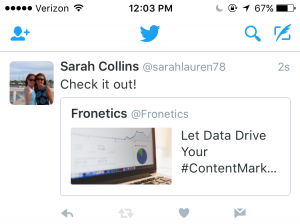
Here’s what a quote tweet will look like to your followers:
How to gain followers
Knowing how to create the content you want on your Twitter is only half the battle. Now you have to gain followers to read and help you promote this content. Here are 5 ways to increase your followers and get the results from Twitter you so desire.
1) Promote your username as much as you can.
Add a follow button and/or your Twitter feed to your website and blog, and put the link to your Twitter in your email signature. You can even promote it offline on business cards or around the office.
2) Use your existing customer base.
Upload your email contacts into Twitter and follow your customers. It will let them know you’re thinking about them and prompt them to follow you back.
3) Search keywords and hashtags that relate to your industry and audience.
Use them to join in on conversations and get noticed in Twitter communities surrounding your industry. Users who like what you have to say will be inspired to follow you to get your updates.
4) Have the people who support you offline join in online.
Send out a company-wide email encouraging your employees to follow you on Twitter and retweet your posts.
5) Ask for retweets.
When someone retweets your post, it goes to all of their followers, increasing your reach exponentially. Don’t be afraid to ask your followers and employees for support. Sometimes a contest or incentive works extremely well to get the retweeting going.
The finishing touches
Don’t forget to give your brand a little personality. As Kelly Jo Horton said in her article, 10 Things B2B Marketers Should Be Doing on Twitter, “All work and no play makes your Twitter feed a dull read. Don’t be afraid to have a little fun.” Post a joke or a funny picture, or show what it’s like behind the scenes at your company.
Be conscious of where your followers are located. If they’re in different time zones, make sure your tweets match their schedules as well as your own.
Keep up your audience engagement by making sure your tweets aren’t just a one-way communication. Start conversations with followers. Respond in good time if someone starts one with you.
A positive online connection can be the beginning of a profitable professional relationship. Twitter and its 310 million users are a great place to start making those connections.
Editor’s note: Sarah Collins is a summer intern at Fronetics. She is a rising sophomore at James Madison University, College of Business studying Marketing. You can find her on LinkedIn.
HubSpot users also saw 3x more leads and 4.1x web visitors per month after a year using the software.
A study has found that using HubSpot for your inbound marketing can increase sales revenue by 72% in 12 months.
A 2016 MIT Sloan student analysis showed that HubSpot’s inbound marketing software provides users a substantial boost in quality leads, which converted into more sales. In year two of using the software, customers continued to see impressive increases.
The in-depth report was a compilation of customer survey responses and web data gathered over a 24-month period for HubSpot users from 2013 to 2015. It looked at three fundamental aspects of marketing methodology:
Attracting new visitors to the user’s website
Conversion of these visitors into customer leads
Closing those leads into actual sales
Leveraging tools to streamline and magnify marketing and sales efforts is important for all businesses in the supply chain and logistics industries, but it can be especially important if your business is small, or has limited resources. HubSpot proved to be a competitive solution, with cost-effective results that increased leads, customers, and revenue.
Report highlights
Attracting new customers
Users averaged 3x more leads per month after a year.
Websites averaged 4.1x more visitors per month after a year.
Conversion of website visitors into leads
Approximately 83% of the HubSpot customers experienced an increase in their conversion rate of leads into customers.
Size of the business did not matter; all saw significant increases in site traffic and lead conversion rates.
Closing those leads into sales
72% of HubSpot customers saw an increase in sales revenue in one year.
Other findings focused on substantial support in meeting goals and the ease of attracting the right customer persona for optimum results.
96 % of customers surveyed said that HubSpot helped them meet their marketing goals.
68% of customer respondents felt that their efforts generated better quality leads while using HubSpot.
Increased customer satisfaction was reported by 46% of HubSpot users since they began using the program.
Is HubSpot right for your business?
HubSpot is a marketing platform that takes all of the inbound marketing methods that were once separate services and consolidates them into one integrated software package. It provides marketing analytics, lead intelligence, A/B landing page testing, CRM integration, email service integration, eCommerce integration, and API integration.
From one location, you can blog, tweet, optimize, then capture and nurture leads. It drives the right customers to you using extensive research specific to your industry. It pinpoints your competitors and potential customers, including their typical pain points, interests, and questions.
A separate 12-month study conducted by Overgo involving both B2B and B2C businesses compared companies using HubSpot to those who did not. It found:
An average increase of 170% in organic traffic after one year, whereas those using HubSpot saw an average organic traffic increase of 590%.
HubSpot received 125% more (B2B) and 294% more (B2C) leads than companies not using HubSpot. (Several of the B2B companies received fewer leads because their targets are multi-million dollar deals, a much smaller avenue of opportunity.)
The difference was attributed to the tools HubSpot offers its customers, which include:
Ranking opportunities – a feature that shows which keywords offer your business an opportunity to get ranked on the first page of search results.
Conversion opportunities – shows which keywords are attracting a lot of traffic but not converting, then suggests ways to increase conversion.
Long-tail opportunities – suggests keywords where ranking could improve substantially if you add a certain word or phrase.
Competitors – compares your site’s ranking and search volume to your competitors.
Campaigns – helps organize keywords into campaigns for tracking and measurement.
HubSpot’s inbound marketing software has consistently provided a relatively fast and high return on investment for the majority of B2B or B2C companies, no matter their size.
Today’s customers expect value, quality, and speed. Focusing on how your can deliver on those promises is what will win you business.
Remember that great advice: focus on yourself, not on what others are doing. According to an article in Harvard Business Review, the greatest challenge your company faces today is not keeping up with your competitors, but keeping up with your customers’ expectations.
This is not to discount the importance of watching business trends and monitoring the competition. But, your primary focus should be on what your customers need and expect and if you are providing it.
What do customers expect?
In today’s digital age, your customers’ expectations wash away traditional boundaries. According to a report in The Economist Group, customers compare and contrast their digital experiences across all industries, even those that offer totally different products or services.
Do you stand out above the crowd? Ask yourself this:
Do you offer value, quality, and speed? Customers used to be willing to trade off one to get the other. Those days are gone. Today’s customer dictates that they want it all: lowest price, good quality, and fast delivery.
Do you offer what the “big guy” does in terms of product, service, and ease, but with the care of a small business people trust? The size of your business does not matter in a digital marketplace. But, you must offer the scope, scale, and influence associated with being big, while maintaining the creativity and personal service characteristic of smaller businesses.
Do you focus on helping customers to meet their objectives and needs? Do you share a purpose? According to an article in Harvard Business Review, what you provide ideally is not something you are going to do to them, or for them, but with them. It’s a journey you take together.
Do you offer an intuitive sales funnel? Customers expect you to be where they are, deliver what they want, when they want it, and how they want it. If they are shopping your site, leave, and come back later, they want to pick up where they left off. They demand intuitive ease and ultimate convenience while they shop.
Do you offer personalized customer experiences? Remember what happened every time Norm entered that television bar called Cheers? Your customers want you to know their name when they return, as well as their unique individual preferences, and they also want you to make relevant recommendations for products or services they may like.
Do your social media interactions inform and help customers? Your posts should not deliver a sales pitch. Social media content should be educational, entertaining, or support the needs and interests of your audience.
There are new rules businesses must follow today in creating the ideal digital journey for their customers. Focus your attention on exceeding customer expectations and answering to their unique needs, not on your competition.
 As uncertainty pervades following Brexit, experts speculate about the impact a divorced U.K. and E.U. will have on the global supply chain.
 As uncertainty pervades following Brexit, experts speculate about the impact a divorced U.K. and E.U. will have on the global supply chain.