5 Tips Supply Chain Managers Need to Build Landing Pages That Convert [Infographic]

5 Tips Supply Chain Managers Need to Build Landing Pages That Convert [Infographic]

landing pages that convert

Landing pages are a fundamental tool in converting website visitors into leads. They’re what convince your visitors that they absolutely must download your fabulous resource offer. Yet often times they’re treated as the annoying little sibling to high-value content pieces – tagging along almost as if an after-thought. In reality, landing pages have just as much, and possibly even more importance than the content offer. Besides, what good is your best resource if it’s landing page stinks?

Here are five tips supply chain managers need to build landing pages that are sure to convert visitors into leads.

5 things supply chain managers need for landing pages that convert

6 digital and content marketing tasks to outsource

6 digital and content marketing tasks to outsource

outsource content

Outsourcing isn’t new to the business world. It goes back as far as the Industrial Revolution. Before then, it was common practice for businesses to perform all functions of product and service delivery, from product manufacturing through to product delivery. Sometime in the mid-1800s, independent architects, engineers, and legal professionals began to operate in larger U.S. cities taking on project-based work for a number of clients.

More than a hundred and fifty years later, outsourcing has become a staple business tool, offering benefits for employees and employers alike. Employers enjoy a reduction (or cost savings) in operating costs, improve their focus on core competencies, and employees are free to concentrate on their highest and best use.

With tech now advancing faster than ever, your business should be looking to leverage outsource partners to support your digital efforts.

Here are our picks for 6 digital and content marketing tasks you should consider outsourcing:

1. Strategy

A 2014 study of B2B marketers found that companies who have a documented content strategy in place are more likely to consider their efforts to be effective than companies who do not have a documented strategy in place (60 percent vs. 11 percent).

Identify an outsource partner that can deliver a content strategy that is aligned with your business goals and objectives and one that is results driven.

2. Content creation

Effective content is not only aligned with your business goals and objectives, it is also quality content.  Finding an outsource partner that excels at content creation drive profitable customer action.  When it comes to finding the right outsource partner, put a premium on quality content, and remember the adage: you get what you pay for.

3. Social media

It’s important to recognize social media as the important business tool it is. As such, you should draw on the expertise of a social media outsourcing partner. These firms know what works and what doesn’t because they’re active every day on multiple platforms managing accounts for multiple clients. And it’s not just posting every now and then. A good social media partner will craft and publish great original content, but they’ll also curate great content from relevant sources, like industry partners. Outsourcing these tasks to the pros helps build a strong following and brand awareness for your company.

4. Web development and design

Because your company’s website is the primary digital tool of communication with customers and prospects, it literally pays to have web design and development functions performed by a knowledgeable professional. Hosting that capability in-house can be costly, though. Besides saving you thousands on employee compensation, outsource partners can often bring with them niche specialties, for instance, something like usability engineering isn’t something you would necessarily get from an in-house generalist.

5. eCommerce

Focus on your core product offerings rather than investing time, money, and resources into building and maintaining an eCommerce platform. Because it receives and stores sensitive information, eCommerce platforms need to be constantly updated and secured. Couple that with product line changes, future business growth, and changing  platform needs, and it quickly becomes a full-time job that comes with a hefty in-house expense.

6. Projects that are outside your scope of expertise

It’s possible that projects will come up that require a skill set, like graphic design, which lies outside your company’s range of expertise. It’s far better to find a partner with this expertise rather than try to create an on-demand capacity to provide the service. Your clients will benefit from stellar work performed by a knowledgeable practitioner and you’ll enjoy cost savings by not committing to a long-term employee salary.

You may also like:


When it comes to marketing we work with our clients to create and execute strategies that drive success and elevate their brand position within the industry.  Unlike other firms, we align marketing programs with business objectives and, through a data driven approach, are able to deliver results with a targeted ROI. Our team is comprised of strategists, marketing professionals, writers, designers, and experts in social media.  Together we leverage our experience to increase brand awareness, position our clients as thought leaders, drive meaningful engagement with prospects and customers, and help businesses grow.


How to Make Your Supply Chain Website Mobile Friendly

How to Make Your Supply Chain Website Mobile Friendly

Last updated: November 18, 2024

Having a mobile-friendly website isn’t just an option in 2025 — it’s a necessity. With mobile devices accounting for over 60% of web traffic and search engines increasingly considering mobile-friendliness in results, supply chain businesses can’t afford to neglect the mobile user experience. This guide will walk you through the essential steps to optimize your supply chain website for mobile users in 2025.

Why Mobile-First Matters More Than Ever

The shift to mobile-first design has been dramatic over the past few years. Users now expect seamless experiences across all devices, and search engines prioritize mobile-friendly websites in their rankings. A poorly optimized mobile site can lead to:

  • Higher bounce rates
  • Lower conversion rates
  • Decreased search engine rankings
  • Reduced customer trust
  • Lost business opportunities

Essential Mobile Optimization Strategies for 2025

1. Implement Responsive Design 2.0

While responsive design has been around for years, modern implementations require more sophistication. Your website should:

– Use fluid grid systems that adapt to any screen size
– Implement dynamic typography that scales properly
– Utilize container queries for more granular control
– Employ adaptive loading patterns based on device capabilities
– Leverage CSS subgrid for complex nested layouts

2. Optimize Performance

Speed is crucial for mobile users. Focus on these performance metrics:

– Aim for a Core Web Vitals score in the top 75th percentile
– Keep First Contentful Paint (FCP) under 1.8 seconds
– Ensure Largest Contentful Paint (LCP) occurs within 2.5 seconds
– Maintain Cumulative Layout Shift (CLS) below 0.1
– Optimize Time to Interactive (TTI) to under 3.8 seconds

3. Embrace Progressive Web App (PWA) Features

PWAs continue to bridge the gap between web and native apps. Implement:

– Offline functionality
– Push notifications
– App-like navigation
– Home screen installation
– Background sync capabilities

4. Focus on Touch-Friendly Navigation

Mobile users interact with their devices differently than desktop users. Ensure your design accounts for:

– Touch targets of at least 44×44 pixels
– Adequate spacing between interactive elements
– Gesture-based navigation options
– Easy-to-reach navigation elements
– Clear visual feedback for interactions

5. Optimize Media for Mobile

Media optimization is crucial for mobile performance:

– Implement responsive images using srcset and sizes attributes
– Use next-gen image formats like WebP and AVIF
– Employ lazy loading for images and videos
– Optimize video delivery with adaptive bitrate streaming
– Consider reduced motion preferences

6. Implement Smart Content Prioritization

Mobile users need quick access to essential information:

– Use progressive disclosure techniques
– Implement collapsible sections for lengthy content
– Prioritize critical content above the fold
– Use accordion patterns for complex information
– Consider implementing content parity with context

Advanced Mobile Optimization Techniques

1. Leverage AI-Driven Personalization

Modern mobile experiences can benefit from AI:

– Implement predictive loading based on user behavior
– Use AI to optimize image compression
– Employ machine learning for content recommendations
– Utilize AI-powered chatbots for mobile support
– Implement smart search with natural language processing

2. Focus on Mobile Security

Security concerns are paramount for mobile users:

– Implement biometric authentication options
– Use HTTPS everywhere
– Enable two-factor authentication
– Implement Content Security Policy (CSP)
– Regular security audits for mobile-specific vulnerabilities

3. Optimize for Voice Search

Voice search optimization is increasingly important:

– Implement structured data markup
– Focus on conversational keywords
– Optimize for featured snippets
– Ensure fast loading times for voice results
– Create voice-friendly navigation options

Testing and Monitoring

Regular testing is crucial for maintaining mobile optimization:

Tools to Use:

  • Google Mobile-Friendly Test
  • Chrome DevTools’ Device Mode
  • GTmetrix Mobile Testing
  • Real Device Testing Labs
  • User Session Recording Tools

Metrics to Monitor:

  • Mobile conversion rates
  • Page load times on different devices
  • Mobile-specific bounce rates
  • User engagement metrics
  • Mobile search rankings

Common Mobile Optimization Mistakes to Avoid

1. Neglecting Mobile Forms

Keep forms short and simple
– Use appropriate input types
– Implement auto-fill where possible
– Provide clear error messages
– Use smart keyboards for different input types

2. Poor Touch Targets

– Avoid placing touch targets too close together
– Make buttons and links easily tappable
– Provide clear visual feedback
– Consider thumb zones in design
– Test with different hand sizes

3. Ignoring Mobile Context

– Consider user location and context
– Optimize for on-the-go usage
– Account for varying network conditions
– Design for different lighting conditions
– Consider device capabilities

Future-Proofing Your Mobile Strategy

As we move forward in 2025, consider these emerging trends:

– 5G optimization opportunities
– Augmented Reality (AR) integration
– Foldable device compatibility
– AI-driven personalization
– Enhanced privacy features

Conclusion

Mobile optimization is an ongoing process that requires regular attention and updates. By implementing these strategies, you’ll create a mobile-friendly supply chain website that not only meets current standards but is also prepared for future developments. Remember that mobile users have different needs and expectations than desktop users, and your website should cater to both audiences effectively.

Regular testing, monitoring, and updating your mobile optimization strategy will ensure your business website remains competitive and provides an excellent user experience across all devices. As mobile technology continues to evolve, staying current with best practices and emerging trends will be crucial for maintaining a strong online presence.


Is your business making the most of its web presence?

Get a free website audit

Discover untapped opportunities and places you may be losing leads with our free website audit.

8 reasons why your business needs to harness the power of the internet

8 reasons why your business needs to harness the power of the internet

As of January 2015 nearly half (3.01 billion) of the world’s population (7.21 billion) were active internet users. Population growth from the previous year was up 1.6%, active internet users were up 21%, and social media users were up 12%. These are big leaps, and continued growth is predicted. These numbers are a good thing, not only for people like Mark Zuckerberg, but also for business.

Here are 8 reasons why your business needs to harness the power of the internet:

worldwide internet explosion


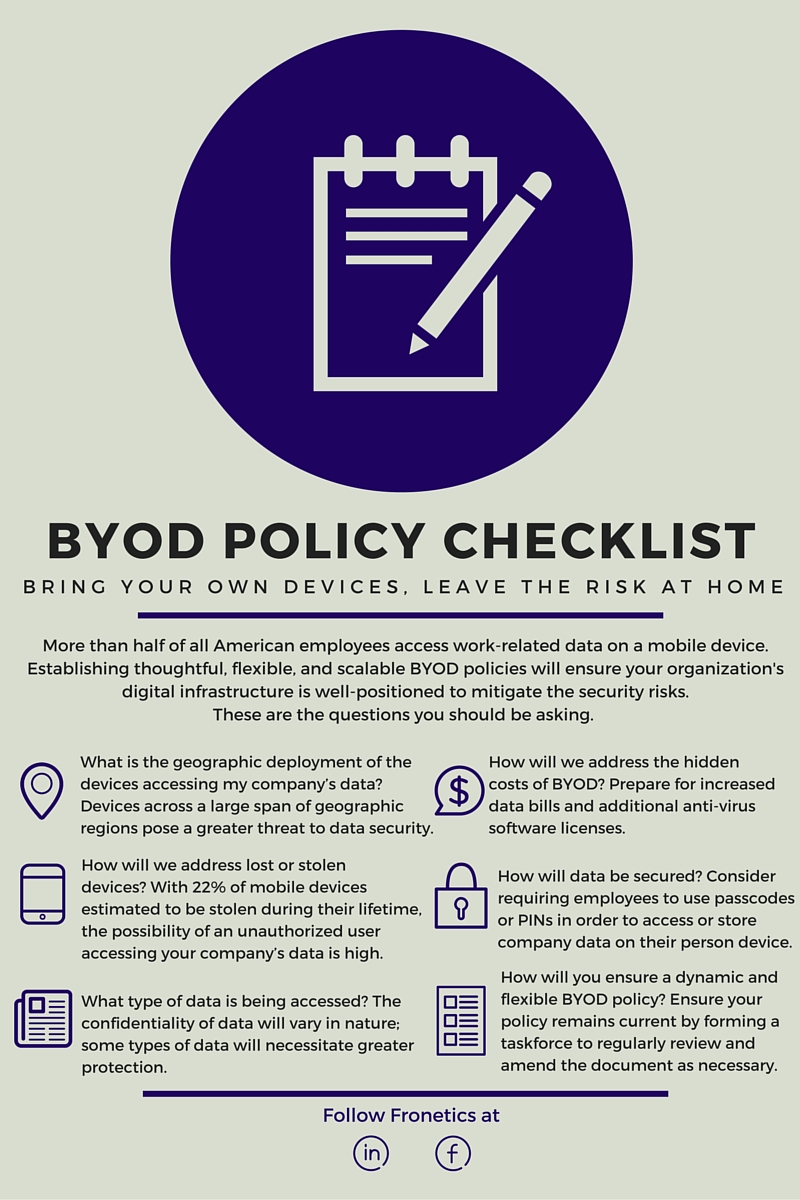
How to Keep Your Company Data Safe in a BYOD Environment [Infographic]

How to Keep Your Company Data Safe in a BYOD Environment [Infographic]

While the Bring Your Own Device (BYOD) concept has quickly gained traction in the business world, many companies have been slow to address its threat to their data privacy. Even for companies that have recognized the need to prioritize digital security, many have struggled to establish policies that support personal device use while protecting their data. And that’s risky given the high level of connectedness many employees now enjoy – with or without formal guidelines or policies. It leaves businesses open to enormous potential for data leaks.

To avoid the potential leak of data, your company should establish policies on the use of personal and mobile devices such as tablets, smart phones, and laptops that may be used to access your company’s computing and communications systems. Here are six crucial items to consider as you set out to mitigate the risks of your own BYOD culture.

BYOD policy


Why Your Company Should Have a BYOD Policy

Why Your Company Should Have a BYOD Policy

Personal connected devices – our laptops, cell phones, and tablets – are arguably the most complicit tools in the recent blurring of the parameters between personal and work life. And while most businesses have generally recognized the benefit of allowing employees to use their personal devices for work purposes, the bring-your-own-device (BYOD) revolution has certainly thrown a curve ball to those responsible for safeguarding company data. Although corporate finance groups are singing the praises of the trend due to its inherent reduction in costs, it’s not all rosy in the BYOD world. That’s why it’s crucial to format a corporate strategy policy that will protect your company from a potentially dangerous data-leak train wreck.

Here’s why: Employees are now widely accessing corporate data from their own computer, a tablet, even their mobile phone. With so many of us bringing more and more smart devices inside our office environments and hooking them to our corporate networks, the potential for data leakage grows exponentially. When anti-virus and digital security software company BitDefender set out to explore the connectedness of typical American workers last year, they found that over half stored work-related data on their personal devices. Shockingly, almost 40 percent of them had nothing in place to prevent unauthorized access to their device. Further, in a study conducted by the University of Glasgow, 63 percent of used smart devices purchased through second-hand stores and eBay-like marketplaces still had data on them. This data included personal information as well as sensitive business information.

The problem is there’s no chain of custody in the BYOD world. Think about it. When the corporations owned your cellphone and your PC or laptop, they controlled its issue to you, how you used it, what software you put on it, and when and how it was turned in and destroyed. A solid internal tracking of electronic assets coupled with a solid electronic asset disposal solution provider meant that, for the most part, the corporate digital assets were safe. In the BYOD world, the corporation does not own the IT equipment. Personal smart devices are being linked to corporate IT environments. This mating of personal and professional equipment and data is happening everywhere. Your corporate data is being commingled with secure and non-secure access points to the Web, cloud, etc. Not to mention the fact that those devices metaphorically walk in and out of your office every day, and you have no control.

Companies are scrambling to address this issue in a number of ways. Some have addressed the problem via software solutions at the enterprise level (think Blancco or BlackBerry enterprise), some at the device level (think solutions like Apple Find My Device, etc.), and some at the human resources and legal levels with policies and procedures that prohibit users’ use of corporate information. But the truth is, without a chain of custody model incorporated with these solutions, once the corporate data is accessed or downloaded, it’s already gone — you just don’t know it yet.

The reality is that it’s going to take some time for the corporate world to catch up with what some have called the “semi-private information revolution” like the cloud, Facebook, or social media. Secure file sharing, essential for an organization’s BYOD guidelines, is one of the best options available. Services are now available to help with cloud encryption and it’s changing the way we share and monitor files. Encrypting data is crucial and minimizes the risk of sharing sensitive data and having it tampered with. Rely on your electronic asset disposal provider to help your company develop a strategy and process that is aligned with your corporate information sharing guidelines. Right now, your corporate data is only as safe as the process that you create.


Fronetics Strategic Advisors is a leading management consulting firm. Our firm works with companies to identify and execute strategies for growth and value creation.

We advise and work with companies on their most critical issues and opportunities: strategy, marketing, organization, talent acquisition, performance management, and M&A support.