by Elizabeth Hines | Jul 20, 2016 | Blog, Content Marketing, Marketing, Strategy

AdWords’ upcoming updates will make it easier for local companies to earn the top spot on local search, which can drive significant new business.
Google AdWords has made it easier for local businesses to get their names in front of people searching for products and services like theirs. The update involves changes to the so-called “3-pack,” or the listing of three related local businesses on a search results page. It’s also known as the local pack.
Let me explain: When you use Google to search for a product, service, or provider, a map appears in your search results overlaid with three nearby businesses related to your search query. For example, I searched for a “granite provider,” and got the following results:

There is a pay-per-click ad above the map, followed by three organic listings (the 3-pack), and then the organic results of the search query.
Many consumers rely on the 3-pack to discover businesses in their area that offer the products and services they are seeking. And businesses get the benefit of many additional leads and customers when they appear in the 3-pack. This can be particularly significant for small businesses.
Moz conducted an thought-provoking experiment last August (when Google reduced the number of businesses listed below the map from seven to three). Users were instructed to conduct a search query, and Moz tracked where they clicked. The results were as follows:
- 44% clicked on a local businesses listed in the 3-pack
- 19% clicked on one of the pay-per-click ads above the map
- 29% clicked on an organic result below the 3-pack
While the experiment isn’t totally representative of users who are searching for local providers — given they were provided a search query — it does suggest that users are more likely to click through to businesses appearing in the 3-pack than elsewhere.
How can I get my business in the 3-pack?
Here’s where things get really interesting.
Currently, businesses who are aware of this phenomenon compete for these three coveted spots by spending lots of time, money, and effort optimizing their pages and outside factors (such as listings in local directories) to improve their chances of ranking in the 3-pack. Needless to say, small businesses with limited resources and know-how — those that could benefit most from appearing in the 3-pack — rarely have the opportunity.
But this is about to change. Google has been hinting at plans to include ads in the 3-pack. At a recent marketing expo, an executive confirmed that the team had been testing different variations of a reinvented 3-pack. He explicitly mentioned both one ad/two organic local listings and one ad/three organic local listings but noted testing was still underway.
Either way, businesses advertising in AdWords will soon have the opportunity to appear as the first listing in the 3-pack. The requirements are very simple. A business must:
- Link a Google My Business account to an AdWords account
- Add a local search extension
Google has not released the official roll-out date or other details, but one thing is certain: It is more crucial than ever for small businesses to utilize AdWords to drive new business. The reinvented 3-pack has major potential for local companies, and the reasonable cost of AdWords campaigns makes it a no-brainer, especially for small businesses with limited time and expertise for search marketing campaigns.
Related posts:
by Elizabeth Hines | Jul 19, 2016 | Blog, Content Marketing, Data/Analytics, Marketing, Social Media

This is part three of a three-part series on Twitter for B2B. See part one, Twitter for B2B, and part two, Tweet This: 20 Ideas for Twitter Content for the Supply Chain.
Leverage insights from Twitter’s analytics dashboard to improve audience engagement, reach, and content development.
Twitter is among the most popular social media platforms for companies in the logistics and supply chain industries. In fact, 95% report that Twitter is somewhat or very impactful on business. Yet 81% say that information on tracking and measuring ROI would be helpful to their business’ use of social media.
Fortunately, Twitter offers users a free tool that details how your tweets are performing and what your audience is interested in. In fact, Twitter Analytics can help you better understand your followers and refine your Twitter strategy to increase your engagement.
Here are the basic features of Twitter Analytics that you need to know.
Account home
Your account homepage offers a high-level overview of your Twitter activity in the last 28 days as compared to the previous period. This dashboard also provides information about your activity in the current month, including:
- Total tweets, impressions, profile visits, new followers, and mentions
- Your top follower, who has the most reach in your network each month
- Which tweet mentioning your name (“mention”) had the most engagement
Scroll down to see the same details for previous months.
Tweet activity
This dashboard provides metrics for each tweet in the last 28 days. You can see impressions, engagement, and engagement rate by tweet. Click on an individual tweet to get the details on engagement broken down by likes, link clicks, retweets, or replies. You can also see the day-by-day breakdown of total lkes, link clicks, retweets, and replies.
Audience insights
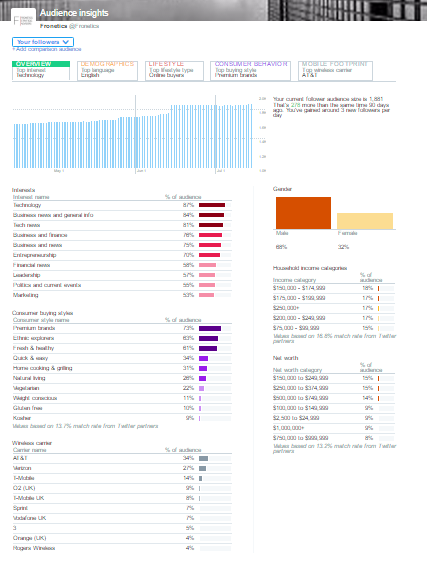
This is one of the most useful dashboards for insight on your followers, their behaviors, and interests. Smart marketers can use this information to better understand the kinds of content that resonates best with their audience.
The dashboard is broken down into 5 tabs:
1) Overview
See how your audience has grown over time, as well as gender breakdown, household income and net worth. Other features include:
- Interests (e.g., technology, politics, financial news, etc.)
- Consumer buying style (e.g., premium brands, gluten-free, healthy living, etc.)
- Wireless carrier
2) Audience demographics
This tab tell you about:
- Gender
- Country and region
- Language
- Household income, net worth, and home value
3) Lifestyle
Get insight into your followers regarding:
4) Consumer behavior
Learn about your followers’ buying styles:
- Aftermarket auto buyer type (including the last time they purchased a vehicle)
- Consumer buying style
- Consumer goods purchases
5) Mobile footprint
Discover information about your followers’ mobile behaviors:
- Wireless carrier
- Device categories (device type) and mobile/desktop breakdown
In addition to seeing this information for your followers, you can also filter by organic audience and the entire Twitter community to compare.
Events
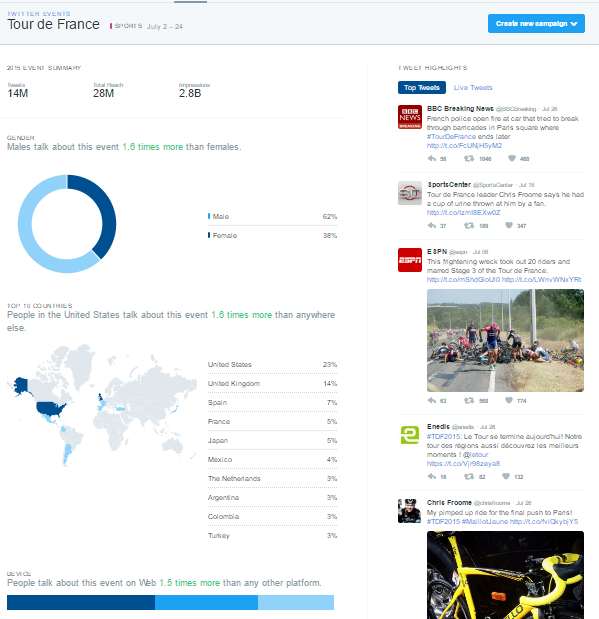
Events gives you insights into how the Twitter community is discussing certain events or trends, like the Republican National Convention, Tour de France, Independence Day: Resurgence, or Throwback Thursday. Click on an event to learn about the audience that’s engaging in conversation about that topic.
Videos
The videos dashboard collects metrics on your video content. In addition to views, learn how long users are watching your videos and where users stop watching.
Twitter cards
Twitter cards allow you to include rich media in your tweets, and this dashboard helps you track how that content is being shared. You can view the following features:
- Snapshot: An overview of how your content is performing on Twitter
- Change over time
- Sources: The most popular platforms from which users send tweets linking to your content (e.g., TweetDeck, Twitter for iPhone)
- Best practices: Personalized tips for improving your content’s performance
Campaign dashboard
If you are using Twitter Ads, the campaign dashboard allows you to track the results of your ad campaigns. Check how your ads are performing in terms of:
- Impressions: This is how many times your ads have been seen by Twitter users.
- Results: These are the actions that are tied to your objectives. For example, if your goal is website visits, the results tracked will be link clicks.
- Engagement rate: This is the number of impressions for your ads, divided by the number of results.
- Cost per result: This is how much you’re paying, on average, for each relevant action people are taking from your ads.
You can see these results across all campaigns, or segmented by:
- Your different objectives: See the average results for your website clicks campaigns, or the average results for your followers’ campaigns.
- Individual campaigns: See how specific campaigns are performing against your goals.
- Individual tweets: See which combinations of copy and creative are contributing the most to your campaigns.
- Targeting criteria: See which of your targeted audiences are responding the most to your ads.
Other features
Conversion tracking
Set up conversion tracking to follow what happens after users view your ads. This way, when users click on one of your links, retweet, like, or simply see your tweet and then go to your site, you’ll know where they came from.
Get high-performing tweets in front of a larger audience with Quick promote. Choose your tweet; click “Promote;” target a location (worldwide, country, state/province/region or metro area); and select your budget.
Related posts:

by Elizabeth Hines | Jul 13, 2016 | Blog, Content Marketing, Marketing
Using search marketing as part of your content strategy can increase web traffic and, thus, visibility for your business.
Search marketing, formerly “search engine marketing,” uses both paid (SEM) and unpaid strategies (SEO) to increase traffic to your business’ website. These two efforts work together to improve the likelihood that potential customers searching the internet will find your content.
Let me explain. When an individual searches for something on a search engine like Bing, Google, or Yahoo, the query brings him/her to a Search Engine Results Page, or “SERP.” Since we read from top to bottom, the person first sees the results that fall at the top of the SERP. Studies overwhelmingly show that the further down on the page that a link falls, the less likely someone will click it. What’s more, people rarely click on results beyond the first page. Thus, it is critical to rank as highly as possible on SERPs to entice potential customers to click through to your site.
So, how do you rise to the top? This is where search marketing fits into your content strategy.
SEO (Unpaid)
SEO (search engine optimization) is optimizing your content to improve how it ranks in search engine listings. This requires gaining a basic understanding of how and why search engines classify webpages and then catering to those factors where possible.
The search engine’s goal is to bring the most relevant results to someone who enters a search query. They use complex algorithms to determine how relevant a website is based on the query. So, if you type “best restaurant in Boston,” the search engine will scan the entirety of the internet to bring you a list of websites, in order, that are most likely give you an idea of the best Boston restaurants.
Each engine’s algorithm is slightly different, highly sensitive, and a closely held secret to keep websites from maliciously optimizing their content. Google, for instance, uses about 200 factors in its search algorithm, some of which are public knowledge, and most of which are not. This makes SEO somewhat of an art.
The best bet for optimizing your content is to consider those known factors while remaining true to your content. You want the people who are looking for you to find you. Here are some tips.
1) Use keywords throughout your content.
Algorithms crawl the internet to scan text of all kinds (websites, PDFs, documents, etc.) to find content that matches search queries. Identify several keywords that someone who is looking for products or services like yours might use in a search query, and use them throughout your content. It is likely even more effective when you use keywords in URL titles, headings and subheads, and paragraphs near the beginning of the page.
2) Use keywords in meta tags.
Webpages contain data, called meta tags, that search engines read to understand the main idea of the page. These are invisible to the average reader (unless you know where to look). Most important for SEO are the title tag and the meta description.
3) Distribute content through social media.
Social media is increasingly important to search algorithms because these platforms help determine what content people are using and engaging with organically. Post on your social media channels with links back to your website to improve your social media referral traffic metric and, thus, your SEO.
4) Encourage inbound links.
To understand how trustworthy and authoritative a particular website is on a certain subject, algorithms consider inbound links, or other sites linking to the website. HubSpot has some excellent advice on how to grow inbound links.
5) Make your site mobile-friendly.
As web traffic increasingly derives from mobile devices, search engines are rewarding websites that are mobile-friendly. If your website is not responsive or, at least, optimized for mobile, your search ranking will suffer.
6) Create frequent, quality content.
When you regularly publish content that is valuable to your target audience, search engines will “learn” that you are a trustworthy publisher with up-to-date information. Also, the more your content resonates with your target audience, the more they will post and share it, which means more referral traffic and inbound links, which likewise increase SEO.
SEM (Paid)
Search marketing through paid methods like pay-per-click (PPC) or paid advertising helps get your content in front of your target audience, regardless of how it would rank organically. Google AdWords is the most popular paid search platform used by marketers, followed by Bing Ads.
Google AdWords will show your advertisement to people who search with predetermined keywords. You pay per click, meaning you pay a fee for every person who clicks on your advertisement, regardless of how many people Google shows your ad to.
You can imagine that a number of advertisers vie for the same keywords. Google actually auctions off ad space with each search, ranking ads by bid (how much you are willing to pay per click) and quality score (does your content answer the searcher’s need?). To increase the success of your PPC you should:
- Identify relevant keywords that potential customers might use when searching for your products or services.
- Conduct comprehensive research of keywords with tools like Keyword Planner.
- Speak your audience’s language with dynamic keyword insertion.
- Determine which words you wish to bid on, and create groupings of these words to pair with ads.
- Identify and eliminate irrelevant words unlikely to appear in keyword searches.
Remember, search engines cater to the searcher. So, the more relevant your content is to someone who is searching for you, the more likely they will find you and want to do business with you.
Related posts:

by Elizabeth Hines | Jul 12, 2016 | Blog, Marketing, Strategy
Editor’s note: Sarah Collins is a summer intern at Fronetics Strategic Advisors. She is a rising sophomore at James Madison University, College of Business studying Marketing. You can find her on LinkedIn.
Aligning Sales and Marketing helps companies achieve 20% higher annual growth rates and improves deal closings by 67%.
“What do you think you’ll do with that?” is the question that, more often than not, succeeds me stating that I’m a marketing major. Uh, market? I guess? I’m the kind of student that usually has it all figured out. There’s always a game plan, so to speak, but this time around I had some figuring out to do.
That’s where Fronetics came into play for me. I went into my first intern experience looking at it as a giant learning opportunity. As I began, one of the first things that surprised me was that there were sales people in a marketing office. Little did I know, this is the ideal situation in the industry. Finally, the advice that a mentor gave me — “Take sales classes. You’ll thank me later.” — made sense. Marketing and Sales are like the Batman and Robin of the business world: Results are best when they’re working together.
What’s the reasoning behind aligning Sales and Marketing?
Through my research, I’ve learned that aligning Sales and Marketing goes back to a basic business concept, the buyer process: awareness, consideration, decision. The ultimate goal in business is essentially the same across the board. Sell and provide your product or service to your target audience. In order to achieve this, it’s best to focus on what the buyers’ immediate needs are at each individual stage of the buying process, and Marketing and Sales excel at different stages of this process.
It relates back to my economics class. Countries will always specialize in what they have the comparative advantage in because, when those two countries trade, they both end up with more than what they would have produced on their own. So Marketing and Sales specialize in their own stages of the buying process, and, in the end, they’re both better off.
HubSpot gives a great example. It wouldn’t make any sense for Sales to try to sell the product to a lead that has entered the awareness stage. At that point, the lead is only looking for specific information. It’s a strength to know where the customer is at and who is best fit to assist.
Why should you believe me?
According to ZoomInfo, only 8% of companies have strong alignment between their sales and marketing departments. Those that are aligned correctly statistically achieve a 20% higher annual growth rate and are 67% better at closing deals. As Articulate Marketing puts it, people are too informed in this day and age to tolerate even the slightest gap in what different departments tell them. The sales process has changed because the internet has given people access to so much information, and companies need to adapt accordingly.
Marketing and Sales are still two different entities.
While the two departments desperately need to be aligned well, there is no denying that they are, in fact, different. Sales generally has short term, tangible goals — such as new-client generation — while marketers are looking farther ahead at goals that aren’t quite as easy to measure.
The movie The Wolf of Wall Street offers a fantastic demonstration of how Sales works. Jordan Belfort (Leonardo Dicaprio) asks his friend Brad to sell him a pen. Brad simply says, “Write this down.” Mr. Belfort now has an immediate need for the pen. Salespeople have the ability to create this need for the buyer.
In an article by the Tronvig Group titled The Difference Between Sales and Marketing, James Heaton states that, in contrast to Sales, “Marketing should put forth an offer that meets the buyer’s needs right at the place and time of the sales opportunity. The most effective marketing is therefore about communication, not manipulation.” It’s when these differences between Sales and Marketing finally begin to work together that all the bases are covered, and the magic begins to happen.
How should companies align Sales and Marketing?
There are two main ways: strategically and physically.
Strategic Alignment
You can ask Sales and Marketing to collaborate in defining a lead generation strategy. This way the two departments aren’t getting frustrated with each other. Marketo highlighted three ways to do so.
- Lead Scoring can be incredibly helpful in understanding which leads are most interested and how good of a fit their company is for your business. These scores are only helpful if Sales and Marketing have worked together to create mutual understanding of the system.
- Lead Generation Metrics need to be understood by both. It won’t work if marketing doesn’t understand what is qualified as a SAL (Sales Accepted Lead) and SQL (Sales Qualified Lead), or if Sales doesn’t understand what makes up an MQL (Marketing Qualified Lead). A mutual understanding will increase efficiency because each department knows exactly what the other is looking for.
- Service Level Agreements can ease the process by outlining each phase of the cycle. For example, when an MQL is handed off to the Sales team, how long does the Sales team have to get in contact? What if they don’t at all? If the system becomes automated enough, you can expect a higher level of performance because the system will provide documentation on how someone became an MQL, and sales will have a record off their contact.
Physical Alignment, aka the Office
The physical layout of the office is also crucial. A study done in 2015 by CEB found that when employees are satisfied with their physical work space, they are 16% more productive and 18% more likely not to quit. Harvard Business Review found the open-concept office, having Sales and Marketing in the same space, resulted in more successful communications. One pharmaceutical company even found that the sales jump was more than 20%, $200 million in revenue.
The statistics are all there showing how detrimental or incredibly helpful aligning Sales and Marketing teams can be.
So have I exactly figured out the answer to my question? Not completely, but there’s still time. What I have learned is that the only choice to make regarding Marketing and Sales is that there is no room for competition between them, and I should definitely be mixing a sales class into a semester or two. Learning early that Sales and Marketing are both essential to each other and gaining experience in both skillsets could be just the competitive edge I need for my future. Lucky for me, there’s three more years of learning to be had.
Related posts:

by Elizabeth Hines | Jul 11, 2016 | Blog, Content Marketing, Logistics, Marketing, Social Media, Supply Chain

This is part two of a three-part series on Twitter for B2B. See part one, Twitter for B2B, and part three, How to Use Twitter Analytics.
If you’re not sure what else to tweet, try these 20 ideas.
Twitter is an excellent platform for sharing news and reaching your customers, but it sure can be a lot of work. Our recent social experiment showed us that engagement is highest for Fronetics when we tweet around 40 times a day. That takes a lot of time and energy — not to mention, a lot of content.
You, too, may find yourself frequently strapped for quality tweeting material. We’ve got some ideas to not only fill your feed but to keep your followers interested and engaged.
A few things to remember
Keep in mind the 4-1-1 rule, an idea popularized by Content Marketing Institute founder Joe Pulizzi and Tippingpoint Labs: “For every one self-serving tweet, you should re-tweet one relevant tweet and, most importantly, share four pieces of relevant content written by others.” This prevents your Twitter account from seeming too self-promoting, which quickly will turn off followers, and it reinforces your business’ position as a helpful source of information and knowledge.
Remember, also, that you don’t have to tweet just text. You can also share photos, videos, Slideshares, and links. Mix it up to keep things interesting.
With that said, here are 20 ideas to get you tweeting.
Tweet this
1) Release news.
Twitter has become the new newswire, where stories break and people turn for to-the-minute information. It’s a great place to offer updates about product releases, changes in service, or other company announcements. But also you can share news that might affect your followers or your supply chain: severe weather, acts of terror, or economic or political events.
2) Share company or industry data.
We’ve written before about the potential for data-as-content. Tweeting stats, data, and other numbers relevant to your audience is a great way to get started. You can type out the information in less than 140 characters or create a quick infographic or image.
3) Mine Reddit.
Reddit is an endless source for content of any kind. Create a multireddit with industry-specific subreddits so you can quickly browse what’s trending to share with your audience.
4) Recycle an old blog post.
Be it a week or a few years later, there’s no shame in reposting content after some time has gone by. Maybe it’s relevant to current events. Maybe it got overshadowed by another breaking story or event when it was originally posted. Maybe it did really well the first time, and it’s still relevant. Regardless, tweeting about an old post can drive new traffic to some of your best content. You can always frame it as “ICYMI” (in case you missed it) or a “Best of” post.
5) Praise your suppliers.
Sharing a positive experience with a business partner is great exposure for the partner and good karma for you. It also shows your audience that your behind-the-scenes operations are running smoothly, which reinforces confidence in your products or services.
6) Share a meme.
An internet meme is a humorous piece of media (most often a photo) shared online from user to user. Show your brand’s personality by posting one that will make your followers smile.

7) Thank inspiring speakers from an industry conference.
Did someone give a particularly interesting presentation? Tag them and thank them. Maybe they’ll follow you or retweet you, giving you lots of exposure.
8) Throw it back.
Post an old photo or an old tweet on a Thursday to participate in Throwback Thursday (#TBT). “Old” doesn’t have to mean decades ago, by the way. People frequently use content from earlier in the year — even earlier in the week.
9) Reveal your favorite follow.
Do you really enjoy news or content from another user? Share that person’s Twitter handle with a quick explanation of the kind of tweets followers can expect. You’re offering valuable information to your audience — and you’ll get excellent exposure for your business if the user has a large following and engages with your tweet by liking or retweeting it.
10) Celebrate holidays.
Wish your followers happy and safe holidays, and show photos of your employees celebrating special events. Remember holidays aren’t limited to major religious or patriotic days of observance. International Women’s Day, Bring Your Child to Work Day, and National Ice Cream Month can inspire content. Days of the Year is a great resource for little-known holidays. Did you know that July 11 is International Town Criers Day?

11) Comment on trending topics.
See what people in your network are talking about. The Trends column on the left of the homepage shows popular topics of conversation tailored to you based on your followers and accounts you follow. If a trending topic involves something you have experience with, offer insight and information to help position your company as a thought leader in the industry.
12) Retweet your executives.
Get exposure for your management team or other content spokespeople in your company by retweeting them.
13) Quote someone famous.
Everyone can relate to inspirational quotes. Tweet your favorites or create graphics to share. Or, follow leaders and thinkers you admire and retweet particularly poignant thoughts.

14) Praise an industry leader.
Tag someone to tell them that you liked their book, article, or post. Congratulate newly appointed executives of competitors and business partners. Recognize someone for a courageous business decision, successful quarter, or outstanding support of a charitable organization.
15) Hold a contest.
Build excitement about a product by asking followers to post photos of creative alternative uses with the hashtag #HowNotToUse. Have them share their best recipes using your wholesale food products. Or ask for submissions to name your newest cargo ship. (Boaty McBoatface?) Whether you give a prize or not, people are competitive by nature and will enjoy participating.
16) Answer an FAQ.
Ask your customer service team for a list of customers’ most frequently asked questions and regularly tweet out answers.
17) Ask a question.
Whether “What do you think of our new product?” or “Do you have plans for the long weekend?” there’s no better way to get a response than to ask a question.
18) Conduct a poll.
If you’re looking for a specific answer, use the poll button to see what your followers are thinking. It can be related to your business or just for fun. Try both and see where you get the most engagement!
19) Share photos of company events.
Days of service, employee milestone celebrations, executive retreats: photos help followers attach faces to your business name. It also gives them a behind-the-scenes look at company culture and builds a positive image of your employer brand.
20) Retweet what your network is sharing.
Share helpful, informative, or entertaining content from the users you follow. You not only offer value to your followers, you also let the user know you like their content and prompt them to do the same for you.
Related posts:
by Elizabeth Hines | Jul 5, 2016 | Blog, Data/Analytics, Marketing, Social Media, Strategy
Gauge the effectiveness of your social media strategy using these four data points in Google Analytics.
Measuring the impact social media has on business is important to those in the logistics and supply chain industries. In fact, a recent Fronetics survey found that 81% of respondents reported that information on proving social media ROI would be helpful to their companies.
You can waste a lot of time trying to track down information on your various social accounts, or you can find all the most pertinent information with one tool. The best part is that your company is probably already using it. (And it’s free!)
Google Analytics is an incredible tool for businesses large and small looking to gain insight into the who, when, and where of their web traffic. And while it may seem intimidating to the novice, it’s very easy to use once you know where to find what you’re looking for.
Step 1: Look at where your traffic is coming from.
Is it social media? Google Analytics will provide an overview of the overall traffic sources that deliver visitors to your website. Included in this report will be traffic from social media. This high-level view of your traffic that includes:
- Search (people clicking through from Google or Bing)
- Social (Twitter, Facebook, etc.)
- Direct (people typing your site in their browser or bookmarks)
- Referral (people clicking links from other sites to get to you)
- Email
- Paid search
- Other
To access this report in Google Analytics, go to Acquisition > All Traffic > Channels.
Go a step further and review the volume of traffic that comes from specific social media networks, by clicking on Acquisition > Social > Network Referrals.
It’s important to have a diverse mix of traffic sources, which should be reflected in the traffic sources report. If you find that a large portion of your traffic comes exclusively from one source, especially if that source is not social media, it is time to reconsider your social media strategy. Similarly, if you are finding that one network is driving most of your traffic, you should look into when and what you are posting in the non-performing channels.
Step 2: Determine revenue derived from posts.
Make sure to include links back to your site when you post on social media so that Google Analytics can track and analyze them. You’ll want to add a UTM code (aka UTM parameter), which is text added to the end of a URL (after the ?) to identify the success of a campaign. As an example, the UTM code is boldface below:
“https://fronetics.com/microsoft-linkedin-product-synergies-floor-b2b-marketers/?utm_content=36244275&utm_medium=social&utm_source=facebook”
You can set unique UTMs for all of your social media, per channel, or even per update. By analyzing your different UTM parameters, you can determine which URLs are most effective in driving users to your content.
Set UTM parameters through Google’s URL Builder. once your parameters are set, you can go to Acquisition > Campaigns > All Campaigns to see the revenue from any individual UTM tag, like a post or tweet.
Step 3: Look at how your content is being digested.
Analytics allows you to see how long a visitor stayed on your site, (use the Duration goal to find out). Examine how content resonates with the social media audience by using Set up the Pages/Screens per Session goal, or learn how many times visitors from social media play website video with Create an Event goal for specific tracking.
Step 4: What is social media bringing you in conversions?
Google Analytics has conversion funnel reports that show how much social media is contributing to conversions. To set up conversion funnels in Google Analytics:
- Use the Goals section and connect any type of conversion event.
- Access your funnel report through Conversions > Multi-Channel Funnels > Top Conversion Paths.
These four insights from Google Analytics can help you determine how effective your social media strategy is in terms of traffic, direct revenue, visitor behavior, and conversions. Use this information to continually refine your strategy and get the most out of your social media presence/
Related posts: