by Elizabeth Hines | Aug 11, 2016 | Blog, Content Marketing, Marketing
HubSpot and WordPress rank at the top of G2 Crowd’s list comparing platforms to create, edit, and publish digital content.
Businesses and marketers who do not have coding skills rely on web content management systems to publish their digital content. There are a number of different products available, so how do you choose which one is best for your business?
G2 Crowd is a popular business software review site that allows users to rate their experiences with different products to help others make better purchasing decisions. It has leveraged hundreds of user reviews and analyzed market-share data to create a rankings grid for web content management systems. Products with 10 or more reviews are ranked and placed into one of four categories:
- Leaders offer web content management products that are rated highly by G2 Crowd users and have substantial scale, market share, and global support and service resources.
- High Performers provide products that are highly rated by their users, but have not yet achieved the market share and scale of the vendors in the Leader category.
- Contenders have significant Market Presence and resources, but their products have received below average user Satisfaction ratings or have not yet received a sufficient number of reviews to validate their products.
- Niche products do not have the Market Presence of the Leaders. They may have been rated positively on customer Satisfaction, but have not yet received enough reviews to validate their success.
The top 10 web content management systems, with their score and category, are as follows:
1) HubSpot (89, Leader)
HubSpot is an inbound marketing software company that helps businesses transform their marketing from outbound (cold calls, email spam, trade shows, TV ads, etc) lead generation to inbound lead generation enabling them to “get found” by more potential customers in the natural course of the way they shop and learn.
2) WordPress (86, Leader)
WordPress.org is web software you can use to create a beautiful website or blog. They like to say that WordPress is both free and priceless at the same time.
3) Drupal (67, Leader)
Drupal is an open source content management platform powering millions of websites and applications.
4) Kenitco (61, High Performer)
Delivering more out-of-the-box functionality than other systems, Kentico makes enterprise-grade, integrated marketing manageable and affordable for businesses of all sizes.
5) Joomla (59, High Performer)
Joomla is a content management system (CMS), which enables you to build websites and powerful online applications.
6) Ingeniux CMS (50, High Performer)
Ingeniux CMS is an enterprise content management platform designed to manage the persuasive web. Easy one-click editing, personalized content, software-as-a-service delivery options, and 100% ASP.NET MVC.
7) Crownpeak (48, Higher Performer)
Crownpeak is the only cloud-first Digital Experience Management (DXM) platform with native Digital Quality Management (DQM). The result is easier, faster and more cost-efficient digital experiences for Marketing and IT teams and their customers.
8) Clickability (46, High Performer)
Clickability helps businesses succeed in a dynamic and competitive environment through internet-scale solutions integrated into a global platform.
9) Evoq Content (46, High Performer)
Evoq Content is DNN’s commercially licensed Content Management System (CMS).
10) idev CMS (44, High Performer)
idev CMS is here to make your life easier. Period. Gone are the days of looking at source code and trying to figure out how to format your website content. With the idev CMS, which is at the core of nearly every Americaneagle.com-built website, your website maintenance headaches will dissolve.
To learn more about the rankings grid, methodology, and the programs, visit G2 Crowd’s website.
Related posts:

by Elizabeth Hines | Aug 2, 2016 | Blog, Content Marketing, Marketing, Strategy
Content marketing can help with lead generation and nurturing, but your business still needs a solid sales staff to close deals.
Content marketing helps generate a steady influx of quality leads and provides relevant information to prospects as they move down the sales funnel. Content can even help close a deal.
But forget any notion about content marketing replacing the work of your sales staff. The two must work together to convert leads into customers.
Even quality leads do not typically turn into sales on their own. You need a sales staff to take those opportunities and cultivate them into new business.
What content marketing does vs. your sales staff
Content marketing and sales staff provide different touch points for leads at distinct stages of the buying cycle. Here are a few examples:
Forming a relationship
- Content marketing opens up dialogue with potential customers. Often the first signs of customers’ interest appear after they read one of your blog posts, when they open and click through an email, or they share your company’s posts on social media channels.
- Your sales staff keeps that positive contact going to the next level. They develop it into a conversation. That person who read your blog post now has a relationship with a person in your company.
Providing information
- Content marketing can reach a potential customer early, while they are looking for solutions. B2B buyers report spending more time conducting research, using more expert content such as vendor websites, user reviews, and social media, before making a purchase. Your business should be producing content in order to make the short list of buyers who are looking for products and services like yours.
- Your sales staff answers those important first questions. When a customer reaches out with a query, s/he is likely 60% through the sales process. The customer has done a fair amount of research, and the sales rep must speak specifically to the customer’s needs — in a way that generic content can’t — to keep them interested and moving down the funnel.
Advocating for your brand
- Content marketing increases brand awareness for your business. It helps elevate your brand position within the industry and keeps your business top of mind, even when potential customers aren’t ready to make a purchase.
- Your sales staff is the advocate for your brand when a customer is preparing to make a purchase. They should be proactive in pursuing business when customers show interest in your content or when they reach out with questions. They drive dialogue and get to know customers and how your business can help them.
The content marketing, sales staff partnership
Curating and creating great content will generate quality leads for your company. But, your sales staff is vital to building relationships with potential customers and closing the sale.
Related posts:

by Elizabeth Hines | Jun 27, 2016 | Blog, Marketing, Social Media
This is part one of a three-part series on Twitter for B2B. See part two, Tweet This: 20 Ideas for Content for the Supply Chain, and part three, How to Use Twitter Analytics.
One of the top social media sites for B2B marketers, Twitter can help businesses spread brand awareness and communicate with customers.
When it comes to marketing your B2B company, Twitter could be a fantastic tool to give you a competitive edge. Gone are the days that Twitter is only for teens or simply to pass time on the commute to work.
It’s in the numbers.
According to Social Media Examiner, 66% of marketers are planning to increase their Twitter use, and 58% of marketers want to learn more about it. After all, Twitter is consistently ranked as one of the top three social media sites for B2B marketers, along with Facebook and LinkedIn.
Twitter reports that 50% of users have visited or shopped at the websites of the businesses they follow. Additionally, 43% plan to purchase regularly from the businesses they follow, and 60% of followers make a purchase because of something they saw on Twitter.
The statistics don’t lie. Twitter is incredibly effective in increasing and maintaining your customers’ loyalty and creating new connections.
What exactly is Twitter?
Twitter’s new user FAQs describes it as “a service for friends, family, coworkers etc. to communicate and, most crucially, stay connected with the exchange of frequent, brief messages that are searchable and viewable by all of your followers.” This allows for constant interaction with other Twitter users across the globe, whether they are individual users or companies.
Why your business should be using Twitter
Twitter can be an effective tool for businesses to spread brand awareness and communicate with customers and business partners. Here are 6 reasons why you should be utilizing it.
1) It has a mobile application.
Even if your website is mobile-friendly, having a social media platform that is also easily accessible on a mobile device is extremely important. Reportedly, 70% of executives use their smartphones to learn about a product or service after they first hear about an offer. On Twitter, 83% of users are mobile. It’s becoming the 21st century newspaper. Users check it on their way to or from work, during their lunch break, and in their free time. Tweeting frequently keeps your business top-of-mind while current and potential customers browse their feeds.
2) Its reach is global.
Twitter supports 40+ different languages. If your supply chain includes international suppliers or partners, this feature is the perfect opportunity to reach those users, as well as domestic customers at the same time.
3) It’s excellent for customer service.
Your account will receive notifications any time your company name is mentioned in a tweet, so you can respond instantaneously if a customer has a complaint or concern. This is crucial, since the number of customers expecting a response on social media has doubled since 2013.
4) It makes analyzing your engagement simple.
Twitter Analytics makes it easy to measure your impact and see where you should adjust your strategy. Calculate your engagement, learn about your followers’ usage patterns, and more.
5) It allows for broad networking.
By searching a simple keyword such as “content marketing,” you are presented with hundreds of results, including tweets, hashtags, and different accounts. Follow the ones that seem relatable to begin a network of interest for your business. You can then retweet content that would be of interest to your followers, thus increasing your status as a source for knowledge and information.
6) It reaches your target audience.
Twitter has 310 million monthly active users. That includes the large majority of organizations, from small businesses (79% are on Twitter) to Fortune 500 companies (78% are on Twitter). What’s more, an IDC report found that 75% of B2B buyers and 84% of C-level/VP executives use social media to make purchasing decisions. Your business should be where your customers are, and your business should really be where your customers are researching potential business.
Terms you should know
If you’re going to use Twitter, knowing the lingo is essential.
- Tweet: A Twitter update. The personal message you compose to your followers. May include pictures, video, text, or links to other web pages. 140 characters or less.
- Hashtag (#): Use to create a community of posts talking about the same thing. For example if you want to see posts about inbound marketing, search #inboundmarketing. Join the conversation by using the same hashtag in your post.
- Retweet: Taking someone else’s post and re-posting it to your page so all of your followers see it, too.
- Quote tweet: Similar to re-tweeting, except you can add your own message to it as well.
- Followers: Someone who subscribes to see your posts on their personal timeline.
- Direct message: Send someone you’re following a private message to have a conversation away from your feed.
- Twitter handle: @yourusername, what someone uses to tag you in a tweet or can search you by, how you’re identified.
But how do I “tweet”?
Tweets are posts under 140 characters that are posted to your personal page and show up in all of your followers’ Twitter feeds. You can post photos, videos, links, or your own content, so get creative!
To begin writing, click the button in the top right hand corner of your screen that looks like a feather quill on paper.
Retweeting
The button for this looks a bit like the recycling symbol. It’s located below each tweet in your feed. If you like what someone says and want your followers to see it too, click the retweet button, then the retweet option that pops up. The original post will appear on your feed.
When someone retweets you, it is now seen by not only your followers but theirs as well. This is one of the great things about Twitter. It’s very easy for one post to be seen by a very large amount of users.
This is how a retweet will appear to your followers, except where it says “you” it will say your twitter account’s name.

Quote tweeting
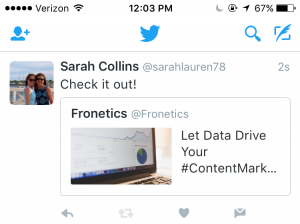
When you click the retweet button under a post, it gives you the option to either retweet or quote tweet. If you want to add something to the original post you want to retweet, choose the quote tweet option. A window then pops up allowing you to type your own message with the original tweet attached. The difference between this and simply retweeting is that when you retweet, only the original tweet is reposted and not an additional message from you.
Here’s what a quote tweet will look like to your followers:
How to gain followers
Knowing how to create the content you want on your Twitter is only half the battle. Now you have to gain followers to read and help you promote this content. Here are 5 ways to increase your followers and get the results from Twitter you so desire.
1) Promote your username as much as you can.
Add a follow button and/or your Twitter feed to your website and blog, and put the link to your Twitter in your email signature. You can even promote it offline on business cards or around the office.
2) Use your existing customer base.
Upload your email contacts into Twitter and follow your customers. It will let them know you’re thinking about them and prompt them to follow you back.
3) Search keywords and hashtags that relate to your industry and audience.
Use them to join in on conversations and get noticed in Twitter communities surrounding your industry. Users who like what you have to say will be inspired to follow you to get your updates.
4) Have the people who support you offline join in online.
Send out a company-wide email encouraging your employees to follow you on Twitter and retweet your posts.
5) Ask for retweets.
When someone retweets your post, it goes to all of their followers, increasing your reach exponentially. Don’t be afraid to ask your followers and employees for support. Sometimes a contest or incentive works extremely well to get the retweeting going.
The finishing touches
- Don’t forget to give your brand a little personality. As Kelly Jo Horton said in her article, 10 Things B2B Marketers Should Be Doing on Twitter, “All work and no play makes your Twitter feed a dull read. Don’t be afraid to have a little fun.” Post a joke or a funny picture, or show what it’s like behind the scenes at your company.
- Be conscious of where your followers are located. If they’re in different time zones, make sure your tweets match their schedules as well as your own.
- Keep up your audience engagement by making sure your tweets aren’t just a one-way communication. Start conversations with followers. Respond in good time if someone starts one with you.
A positive online connection can be the beginning of a profitable professional relationship. Twitter and its 310 million users are a great place to start making those connections.
Editor’s note: Sarah Collins is a summer intern at Fronetics Strategic Advisors. She is a rising sophomore at James Madison University, College of Business studying Marketing. You can find her on LinkedIn.
Related posts:

by Elizabeth Hines | Jun 23, 2016 | Blog, Content Marketing, Marketing, Strategy, Supply Chain
HubSpot users also saw 3x more leads and 4.1x web visitors per month after a year using the software.
A study has found that using HubSpot for your inbound marketing can increase sales revenue by 72% in 12 months.
A 2016 MIT Sloan student analysis showed that HubSpot’s inbound marketing software provides users a substantial boost in quality leads, which converted into more sales. In year two of using the software, customers continued to see impressive increases.
The in-depth report was a compilation of customer survey responses and web data gathered over a 24-month period for HubSpot users from 2013 to 2015. It looked at three fundamental aspects of marketing methodology:
- Attracting new visitors to the user’s website
- Conversion of these visitors into customer leads
- Closing those leads into actual sales
Leveraging tools to streamline and magnify marketing and sales efforts is important for all businesses in the supply chain and logistics industries, but it can be especially important if your business is small, or has limited resources. HubSpot proved to be a competitive solution, with cost-effective results that increased leads, customers, and revenue.
Report highlights
Attracting new customers
- Users averaged 3x more leads per month after a year.
- Websites averaged 4.1x more visitors per month after a year.
Conversion of website visitors into leads
- Approximately 83% of the HubSpot customers experienced an increase in their conversion rate of leads into customers.
- Size of the business did not matter; all saw significant increases in site traffic and lead conversion rates.
Closing those leads into sales
- 72% of HubSpot customers saw an increase in sales revenue in one year.
Other findings focused on substantial support in meeting goals and the ease of attracting the right customer persona for optimum results.
- 96 % of customers surveyed said that HubSpot helped them meet their marketing goals.
- 68% of customer respondents felt that their efforts generated better quality leads while using HubSpot.
- Increased customer satisfaction was reported by 46% of HubSpot users since they began using the program.
Is HubSpot right for your business?
HubSpot is a marketing platform that takes all of the inbound marketing methods that were once separate services and consolidates them into one integrated software package. It provides marketing analytics, lead intelligence, A/B landing page testing, CRM integration, email service integration, eCommerce integration, and API integration.
From one location, you can blog, tweet, optimize, then capture and nurture leads. It drives the right customers to you using extensive research specific to your industry. It pinpoints your competitors and potential customers, including their typical pain points, interests, and questions.
A separate 12-month study conducted by Overgo involving both B2B and B2C businesses compared companies using HubSpot to those who did not. It found:
- An average increase of 170% in organic traffic after one year, whereas those using HubSpot saw an average organic traffic increase of 590%.
- HubSpot received 125% more (B2B) and 294% more (B2C) leads than companies not using HubSpot. (Several of the B2B companies received fewer leads because their targets are multi-million dollar deals, a much smaller avenue of opportunity.)
The difference was attributed to the tools HubSpot offers its customers, which include:
- Ranking opportunities – a feature that shows which keywords offer your business an opportunity to get ranked on the first page of search results.
- Conversion opportunities – shows which keywords are attracting a lot of traffic but not converting, then suggests ways to increase conversion.
- Long-tail opportunities – suggests keywords where ranking could improve substantially if you add a certain word or phrase.
- Competitors – compares your site’s ranking and search volume to your competitors.
- Campaigns – helps organize keywords into campaigns for tracking and measurement.
HubSpot’s inbound marketing software has consistently provided a relatively fast and high return on investment for the majority of B2B or B2C companies, no matter their size.
Related posts:

by Elizabeth Hines | Jun 20, 2016 | Blog, Current Events, Marketing, Social Media, Strategy
The $26.2-billion acquisition could result in the customer-targeting solution(s) B2B marketers have been waiting for.
Microsoft announced on June 13 that it would purchase LinkedIn for $26.2 billion, a deal set to close by the end of 2016. Though LinkedIn will operate “as a fully independent entity within Microsoft,” the union will strengthen their shared mission to “connect the world’s professionals to make them more productive and successful.”
Both Sadya Nadella and Jeff Weiner’s letters to their employees beam with excitement over the possibilities for product synergies. “Think about it: How people find jobs, build skills, sell, market and get work done and ultimately find success requires a connected professional world,” writes Nadella. “It requires a vibrant network that brings together a professional’s information in LinkedIn’s public network with the information in Office 365 and Dynamics.”
Obvious opportunity lies in enhancing Microsoft’s existing solutions to improve user experience. For example, videos from Lynda.com, a website for training videos that LinkedIn bought in 2015, could be accessible throughout the Office suite, such as an Excel document.
But for B2B marketers, the most exciting possibilities involve “new opportunities … for monetization through individual and organization subscriptions and targeted advertising,” as Nadella puts it.
New opportunities for monetization
Jenny Sussin, a Gartner research director, proposes that LinkedIn’s value to Microsoft lies in its algorithms and user data. Successful integration into Microsoft’s existing products could be a game-changer for the B2B sphere, in terms of targeting customers.
First let’s consider the algorithms, two of which Sussin claims were the main attraction for Microsoft. “No. 1 was the algorithm that creates the connection graph, the social networking graph,” she says. “No. 2 was the algorithm that determines the information most valuable and most actionable to you.” Essentially, with this acquisition, Microsoft has the ability to map how professionals are connected and determine what content is most relevant to each individual user.
Secondly, LinkedIn has the most comprehensive, up-to-date personal data about its 433+ million global users of any professional network. And that data has not been available to other companies — LinkedIn even refused access to Google for ad sales — until now. The value of this information to any B2B organization is indisputable.
Now consider that there are 1.2 billion users of Office and 4.4 million users of Dynamics CRM. Microsoft can now combine the information it knows about those professionals with LinkedIn’s user data, map their relationships, and offer customized content within these products. Imagine being able to reach your target customer within the very tools s/he uses most every day.
And those are just two of Microsoft’s products. Skype, Yammer, MSN: there is no shortage of targeted advertising opportunities.
Taking on Google?
Perhaps the most exciting of these secondary properties for B2B marketers is Bing, Microsoft’s search engine. Bing Ads are attractive to marketers because of the low cost per conversion. The problem, of course, is volume, as Google dominates the market share.
But with LinkedIn’s data and algorithms, Bing could become “what search is sorely lacking today for B2B targeting,” says Marketing Mojo CEO Janet Driscoll Miller.
“Search marketing is great for determining intent — for understanding what a person wants,” Miller explains. “But social media platforms, like LinkedIn, tell us who the person is. Marrying the two pieces of data — who and what — brings us to the sweet spot of marketing and targeting an ideal audience. LinkedIn provides us with demographic targeting based on business and professional user information.”
Targeting could include factors like company size (e.g., spending capabilities), so marketers would not waste impression dollars advertising products that are far beyond the buyer’s price point. Fold in other LinkedIn solutions, like Lead Accelerator, to improve retargeting, and Bing Ads could really compete.
Google may have a leg up in terms of search volume, but without detailed data on users’ professional demographics, Bing could corner the market as the most effective B2B ad targeting platform.
Cause for caution
While the marriage of LinkedIn and Microsoft’s capabilities shows great promise, hold off on celebrating just yet.
Part of LinkedIn’s value to Microsoft derives from user-provided information. And part of Microsoft’s value to B2B marketers lies in its products’ ubiquity. But what if people stopped contributing their personal details to LinkedIn because of the way it was being used across the Microsoft suite? And what if businesses stopped using Microsoft products over privacy or data security concerns?
Here’s why those are both real concerns: Nadella suggests that your LinkedIn newsfeed could show relevant articles based on the projects you’re working on offline. Taking information from my desktop?! That’s problematic from both a personal and proprietary standpoint. Issues around invasion of privacy and the breech of secure business information could present major roadblocks to success.
How would you feel if a software product you researched yesterday appeared in your Outlook today? If, while preparing a PowerPoint for a client meeting, a pop-up suggested you contact a connection in your LinkedIn network who is an expert on the topic? With the deal projected to close before the end of the year, users reactions to these concerns over the next few months could be telling.
Related posts: