by Jennifer Hart Yim | Jul 9, 2019 | Blog, Content Marketing, Logistics, Marketing, Social Media, Supply Chain
LinkedIn a great place for businesses to make relevant LinkedIn users aware of their brand. However, there are common mistakes that companies make on LinkedIn.
LinkedIn is a powerful social network to connect with industry professionals, especially for B2B(business to business). People use LinkedIn to connect with coworkers and industry peers, get business advice, and even find new jobs. It’s a great place for businesses to make relevant LinkedIn users aware of their brand. However, just like Facebook and Twitter, there are common mistakes that companies make on LinkedIn.
Here are 9 LinkedIn for business strategies to avoid, as well as how to remedy them.
1. You Don’t Answer Questions.
The “Answers” section of LinkedIn, where people go to ask their business-related questions, is a place where businesses establish themselves as industry experts and even find new customers. These questions are categorized by industry; anything from finance & accounting to marketing & sales. Avoiding answering questions because you’re too shy or don’t want to invest the time is such a missed opportunity. Take a few minutes each day to look at the new questions in your industry, and see if there is a question you can provide a helpful answer to.
2. You’re Overly Self-Promotional when Answering Questions.
If you were in a bind and reached out to a community of peers for help, would you want the only response to be “Give me your money”? Of course not. You’d hope for honest and valuable guidance. The “Answers” section of LinkedIn is a fantastic place to find potential customers who have publicly revealed that they have a problem your service/product would solve. Instead of proclaiming that they should hire or buy from you to reach a solution, offer useful advice and let them know to contact you directly if they have more questions. This way, you’ll be building a relationship that will gain their trust, and then they’ll be more likely to turn into a customer.
3. You Don’t Join or Participate in Groups.
If you haven’t joined any relevant groups on LinkedIn, you’re missing out on a few things. First, being in a group lets you share links with that group, so you can share links to your own blog or site (in a very non-spammy fashion, of course). Second, you can find out the latest industry news, because other professionals post helpful links to groups constantly. Also, they’re a great place to find industry peers to connect with, whether to find new customers or even find fellow industry bloggers who could potentially link to you.
4. Your Profile is Blank/Incomplete.
Since you’ll be answering Questions and joining Groups with your personal account, you should make sure your own profile is complete so that you can gain people’s trust and establish authority. If people can’t learn anything about you in your profile, they won’t want to connect with you. Describe your role at your current and previous companies, and provide links to your website and any relevant profiles (i.e. Twitter).
5. Your Company Page is Blank.
Your company page has the potential to gain LinkedIn followers who will see your blog posts, company profile updates, and job openings appear in their LinkedIn newsfeed. But if your company description isn’t filled in, it might prevent people from following you, or even from finding you in the first place. Make sure you optimize your company page by including relevant keywords and links to your website.
6. You Don’t Promote Your LinkedIn Page on Your Website.
Keeping your company’s LinkedIn profile page a secret from your website visitors isn’t a good idea since these are the people most likely to actually follow you. Add a LinkedIn icon to your website to increase awareness of your presence on LinkedIn. Make it easy for your visitors to find out how to connect with you on social media.
7. You Ignore Connection Invitations.
Once you provide value in Answers and Groups, people will start inviting you to connect with them on LinkedIn. Don’t just ignore these invitations. Unlike Facebook, don’t feel like you need to personally know everyone that you connect with. LinkedIn automatically sorts your connections based on how you know them; whether through a current or previous job, or through a group, so don’t be concerned about having a network that’s too big to keep track of.
8. You Don’t Post Status Updates
It might seem like overkill to post updates on Facebook, Twitter, and LinkedIn. But it’s not. LinkedIn is a more professional social networking site than Facebook and Twitter, so it’s likely that you’ll have different followers here who will benefit from seeing your updates. It’s ok to re-purpose content across all of the social channels, as long as you’re not duplicating the content.
What would be your #9? Let me know in the comments below!
This article was written by Diana Urban, marketing manager at BookBub and the former Head of Conversion Marketing in HubSpot. Diana is a results-driven marketer and content strategist who’s passionate about inbound marketing at startups.
Related posts:


by Jennifer Hart Yim | Jun 12, 2019 | Blog, Marketing, Marketing Automation, Social Media
Automation can make your social media marketing more efficient and effective, allowing you more time to develop and execute other marketing campaigns. Here are 11 social media marketing mistakes to avoid.
Social media automation is quite a controversial marketing topic. The critics cry, “Social media is supposed to be social!” The supporters retort, “It’s all about efficiency!” Surely, there’s a middle ground, right? Just look at those adorable little robot eyes. Automation can’t be all bad, right?
We certainly agree. Social media automation can be done right. Just avoid the following 11 awful social media automation mistakes, and you’ll be good to go.
11 Awful Social Media Automation Mistakes Marketers Should Stop Making
1. You’re Scared of It.
Are you one of those social media automation critics we mentioned in the intro? Stop being such a fraidy cat … you’re missing out! When done right, automation can make your social media marketing more efficient and effective, allowing you more time to develop and execute other marketing campaigns and promotions. We’ve even developed a simple, customizable social media scheduling template and blog post guide to help you organize and plan your social media updates for the most popular social networks. Just avoid the rest of the mistakes on this list, and you’re golden. Guilty social automation conscience begone!
2. You’re Using Way Too Much of It.
Remember: too much of anything is usually bad, and the overuse of social media automation is usually what makes the automation critics cringe the most. First, you need to find the right balance of updates for each of the social networks you’re participating in. This involves testing and optimization to determine your ideal publishing frequency, and it usually involves pushing the limit a little bit. Try increasing the number of updates you currently publish and gauge your fans’/followers’ reactions. You might be surprised that you can update more than you thought and that you get a nice little lead bumps as a bonus!
Remember, the half-life ( the time it takes a link to receive half the clicks it will ever receive after it’s reached its peak) of a link shared on Twitter is only 2.8 hours, which means it’s acceptable to publish fairly frequently. On Facebook, updates last a little bit longer, so you don’t need to publish quite as much. Our social media publishing template recommends starting with 8 tweets a day, 4 Facebook updates, and 3 LinkedIn updates. Which leads us to our next mistake …
3. You Leave No Room for Ad Hoc Updates.
Don’t automate so much content in social media that you’re really pushing it if something last minute pops up that you really want to post an update about on your social networks. Things come up. You’re behind on your leads goal and you just created an awesome new ebook that you want to promote via social? You shouldn’t feel guilty about popping in a tweet or two about it in addition to your scheduled, automated updates. Or maybe you did some awesome newsjacking and you want your fans and followers to know about it right away. Don’t overdo it with the scheduled updates that you have to sacrifice those last-minute opportunities that arise.
4. You’re Setting it and Forgetting It.
Schedule and automate your social media updates and there’s no reason to check your social media accounts until the next batch of updates needs to be uploaded to HootSuite, right? WRONG. Do this, and you should be subjected to the wrath of social media automation critics. Just because you’re automating some updates, doesn’t mean you’re off the hook for monitoring the conversation — and participating in it. You still need to monitor the discussion happening around your content, answering your fans’ and followers’ questions, and, that’s right … engaging. In real time, or close to it. And with all the social media monitoring tools available to make it easier to do, there’s no excuse not to.
5. You’re Hiring an Agency to Manage It and Not Properly Setting Expectations.
Let’s relive the story of a former HubSpot employee who fell victim to some very unfortunate, poorly executed social media automation. What happened was, AT&T hired a marketing agency to execute its Ticket Chasers Twitter campaign for March Madness. The intent of the campaign was to target people who would be interested in the content of the program with personalized tweets: bloggers (who would get the word out about Ticket Chasers), people who live in the cities in which the Ticket Chasers promotion is occurring, and people who mention basketball or March Madness. Except what ended up happening was the agency targeting people that fit these criteria even if they weren’t followers of AT&T — and a very spammy Twitter presence.
The lesson is this: If you’re going to outsource any type of automation, make sure you set some very clear and specific expectations with your agency up front — both for what constitutes proper targeting and automation, and how frequently the campaign should be monitored so there could be a quick response if something goes awry.
6. Your Scheduled Updates Even SOUND Robotic.
Just because you’re scheduling automated updates doesn’t mean it has to sound like a robot wrote the copy. Spend some time carefully crafting your social media updates, and for goodness’ sake, infuse some personality into them! It should sound like a human took the time to craft the update because a human did take the time to create them, right?
7. Your Content Is Stale or Unremarkable.
Nothing indicates a low-quality social media presence like unremarkable content. Whether you’re manually updating your social networks or using automation to make your social media marketing more efficient, it’s all about the content of your updates. Share awesome content that your audience cares about, and they won’t mind that you may have scheduled it in advance. If you’re using HubSpot’s free social media scheduling template, keep your content repository tab stocked with a mix of awesome evergreen content that never gets stale and can be re-promoted over time, as well as new content and offers you create over time.
8. Your Timing Is Way Off.
Just scheduling updates all willy nilly without strategizing about timing? Think about it. Should that online coupon you’re sharing really get tweeted on the 12th when it expires on the 11th? Probably not. Be careful — nothing smells like stinky automation more than careless planning and timing. Should that offer, which just so happens to be targeted at your international prospects in Mumbai, be posted to your Facebook business page at 5 PM ET? Remember, it’s 2:30 AM in Mumbai. Be sure you’re scheduling your updates for times that make sense for your audience, and don’t be afraid to do some testing and experimentation to determine exactly what that optimal timing is.
9. You Treat Scheduled Updates the Same Way on All Social Networks.
Not all social networks are the same, so don’t treat your updates like they’re one-size-fits-all. Each has its own guidelines, tone, and different types of users, so make sure you tailor your updates to appeal to each social network’s nuances. For example, your Twitter updates need to fit within 280 characters, but snippets that accompany links you share on LinkedIn and Facebook can be much longer. And LinkedIn caters to a much more professional audience than, say, Facebook. And remember, you can reuse a lot of the same content across social networks; it’s how you frame and position that content that should be tweaked.
10. You’re Not Measuring Results and Adjusting Accordingly.
Trying to pick your best content for your automated updates? Attempting to determine the optimal timing and frequency of your updates for each social network? You’re probably going to need to rely on your analytics for all those things, don’t you think? Make use of your marketing analytics to identify the content and offers that tend to perform well in social media so you can promote more of the types of content that work, and nix the types that don’t. Track your leads and referral traffic from social media, coupled with qualitative data on how your fans/followers react to timing and frequency, so you can optimize those techniques as well.
11. You’re Not Adding Sharing Links to Your Content.
That’s right — think of it as social media automation enablement. Adding social media sharing links/buttons to all your content, whether it’s a web/landing page, blog post, within an ebook, in an email, makes it easy for your audience to spread your content for you, and expand your reach. It’s sort of like automating evangelism! It might sound sneaky, but your audience will probably appreciate that you’ve done some of the work involved in sharing content for them. People are always looking for social sharing fodder, and if your content is awesome, it’ll make them look like a valuable social media connection who shares great stuff!
Are you making effective use of social media automation? What else would you add to this list of social automation mistakes?
This article was written by Pamela Vaughan. Pamela is a Principal Marketing Manager, Website CRO & Copywriting at HubSpot. She is best known for introducing the concept of historical optimization, which increased organic search traffic and leads for HubSpot’s blog by more than 200%.
Related posts:

by Elizabeth Hines | Mar 8, 2018 | Blog, Content Marketing, Logistics, Marketing, Strategy, Supply Chain
Use these 4 steps to determine the topic clusters that will be best for driving organic traffic to your business’ website.
You’ve determined your pillar content and written your pillar pages. Now what? It’s time to develop topics clusters.
Topic clusters show search engines that your website contains breadth and depth on a particular subject, which will help them decide to show your page over others in a user’s search for that subject.
Determining what topic clusters to use can be overwhelming — as can figuring out how to optimize blog posts that contain cluster content. Let’s take a step back and think a little about what a topic cluster is.
HubSpot Academy has a great succinct summary: “Topic clusters are comprised of a pillar page and subtopic content that you’ve compiled for each of your core topics.”
So how do you go about developing topic clusters? We’ve put together a four-step guide to get you started.
4 steps to developing topic clusters
1) Choose your topic.
This is all about determining where you can or strive to be a thought leader. Pick topics that are fundamental to your business, places where you can be a resource for potential buyers and industry peers. Define these topics with a name that summarizes the content it will address.
Chances are, you’ll have some supporting content already. Conducting a content audit will help you determine how much you have in place already.
2) Compile subtopics.
HubSpot recommends having “6-8 subtopics that address specific questions your customers may be exploring related to the core topic of your pillar page.” Other sources recommend between 10-20 subtopics. It depends on how broad your main topic is. (But if you can come up with more than 20 subtopics, your topic is definitely too broad!)
Conduct a brainstorming session with your team to think about relevant content that your target buyers would seek out when researching products and solutions.
Simple Marketing Now blogger Christine B. Whittemore suggests starting with identifying the problems your buyer persona faces. “Map out 5-10 core problems that your core persona has. Use research… to truly understand your buyer persona problems, including the world used to describe them.”
3) Develop pillar pages.
Now that you have a list of topics and subtopics, you need to develop your pillar pages. These pages will extensively — and broadly — cover each main topic, and they will include links to each subtopic.
Inbound Marketing Specialist Sarah Seward suggests using “relevant pictures, high-quality and interesting content, compelling headers, and any additional, related resources, such as a custom graphic visually demonstrating your expertise on a topic.”
4) Create!
Now it’s time to create your content (or brush up existing content you discovered in your audit). Be sure to link pages covering your subtopics to your pillar pages, using the correct anchor text. That means hyperlinking words that are relevant to the topic and subtopics.
Additionally, you can link subtopics together where appropriate. The more often you can create relevant links, the better.
Now repeat this process until you’ve created several topic clusters that best define your business. This SEO strategy will help ensure that prospective customers that are searching for products or services like yours will be more likely to visit your website and patronize your business.
Related posts:

by Elizabeth Hines | Sep 19, 2017 | Blog, Content Marketing, Marketing, Strategy
B2B software company Text Request took 4 steps to grow organic traffic, a key component of any content marketing strategy.
We content marketers are always keeping an eye on organic traffic. It’s an indicator of success (though by no means the only one). Basically it lets you know how many of your website’s visitors found you by using a search engine. If you’re consistently publishing quality content that has value to your prospective customers, you should see a steady rise in organic traffic to your website.
But many B2B companies struggle with generating organic traffic to their websites. In fact, 61% of companies list generating traffic as their biggest marketing challenge in the 2017 State of Inbound Report. Over half (55%) list growing traffic to their website as a top priority in the next 12 months.
So how did Text Request, a B2B texting software company, grow organic traffic by 120% in 5 months? Marketing Director Kenneth Burke outlines the four simple steps the team took to drive this growth.
4 steps to growing organic traffic
1. Start with simple changes.
Text Request started with very basic steps to begin driving more traffic to its website. These changes included technical updates to their website, increased site speed, and a new content strategy. The updates to their website made the site more appealing to viewers, and the increased site speed led to a lower bounce rate. Of course, a documented content strategy should be a priority for any company hoping to grow its digital footprint.
2. Create 10x content.
The term ‘10x content’ was coined by Moz founder Rand Fishkin. Essentially, you create content that is ten times better than that which appears in the top search results for that subject. Sounds overwhelming. But think about it in terms of three specific audiences:
- Me: If you wouldn’t consider the content you’re creating valuable, then it most likely won’t add value for others.
- Targets: In order to add value and answer questions and/or inform prospects on a topic, understand what your target audience is lacking and fill that need.
- Competitors: By creating content that is better than the competition, you validate yourself as an industry leader.
3. Revamp existing content.
Content published months or even years ago doesn’t have to fade out. Updating older content gives these posts a renewed value. This is an important part of our content strategy here at Fronetics.
As part of his mission to increase organic traffic, Burke dug through older content to find posts he could revamp, updating as many as 60 posts in 5 months. That may seem like a lot. But, oftentimes, updating older content is easier than starting from scratch — especially if the topics are still relevant and just need updated statistics and research. By revising outdated material, Burke is “confident that they made a huge impact on our organic search traffic.”
4. Strive for backlinks.
Backlinks are incoming links to pages on your website from other websites. If the websites linking to your content are of high quality, search engines will start to consider your website more valuable — otherwise, why would these quality sites link to you? Thus, backlinks are an important component of a search engine optimization strategy.
Understanding their importance in driving organic traffic, Burke worked to improve the amount of backlinks to Text Request’s website. “From December to May, we grew our total number of backlinks by about 60%, which, in addition to driving referral traffic, boosted our standing with search engines.”
Most of the backlinks came from three specific places: HARO, guest posts, and earned links. Most important to earning backlinks was the research Text Request published in its content, which other companies found valuable — valuable enough to cite and link to in their content. These links were validation that the 10x content strategy was paying off for Text Request.
Results
With these four simple steps, Text Request saw a 120% growth in organic traffic to its website. The company more than doubled traffic in five months. More traffic = increased brand awareness = more prospective customers and leads = more sales.
While Burke was able to get pretty dramatic results very quickly, it’s important to note that improvements to your website’s search engine optimization do, most often, take some time to unfold. But, over time, results of your work will continue to amplify
Related posts:

by Elizabeth Hines | Jun 27, 2016 | Blog, Marketing, Social Media
This is part one of a three-part series on Twitter for B2B. See part two, Tweet This: 20 Ideas for Content for the Supply Chain, and part three, How to Use Twitter Analytics.
One of the top social media sites for B2B marketers, Twitter can help businesses spread brand awareness and communicate with customers.
When it comes to marketing your B2B company, Twitter could be a fantastic tool to give you a competitive edge. Gone are the days that Twitter is only for teens or simply to pass time on the commute to work.
It’s in the numbers.
According to Social Media Examiner, 66% of marketers are planning to increase their Twitter use, and 58% of marketers want to learn more about it. After all, Twitter is consistently ranked as one of the top three social media sites for B2B marketers, along with Facebook and LinkedIn.
Twitter reports that 50% of users have visited or shopped at the websites of the businesses they follow. Additionally, 43% plan to purchase regularly from the businesses they follow, and 60% of followers make a purchase because of something they saw on Twitter.
The statistics don’t lie. Twitter is incredibly effective in increasing and maintaining your customers’ loyalty and creating new connections.
What exactly is Twitter?
Twitter’s new user FAQs describes it as “a service for friends, family, coworkers etc. to communicate and, most crucially, stay connected with the exchange of frequent, brief messages that are searchable and viewable by all of your followers.” This allows for constant interaction with other Twitter users across the globe, whether they are individual users or companies.
Why your business should be using Twitter
Twitter can be an effective tool for businesses to spread brand awareness and communicate with customers and business partners. Here are 6 reasons why you should be utilizing it.
1) It has a mobile application.
Even if your website is mobile-friendly, having a social media platform that is also easily accessible on a mobile device is extremely important. Reportedly, 70% of executives use their smartphones to learn about a product or service after they first hear about an offer. On Twitter, 83% of users are mobile. It’s becoming the 21st century newspaper. Users check it on their way to or from work, during their lunch break, and in their free time. Tweeting frequently keeps your business top-of-mind while current and potential customers browse their feeds.
2) Its reach is global.
Twitter supports 40+ different languages. If your supply chain includes international suppliers or partners, this feature is the perfect opportunity to reach those users, as well as domestic customers at the same time.
3) It’s excellent for customer service.
Your account will receive notifications any time your company name is mentioned in a tweet, so you can respond instantaneously if a customer has a complaint or concern. This is crucial, since the number of customers expecting a response on social media has doubled since 2013.
4) It makes analyzing your engagement simple.
Twitter Analytics makes it easy to measure your impact and see where you should adjust your strategy. Calculate your engagement, learn about your followers’ usage patterns, and more.
5) It allows for broad networking.
By searching a simple keyword such as “content marketing,” you are presented with hundreds of results, including tweets, hashtags, and different accounts. Follow the ones that seem relatable to begin a network of interest for your business. You can then retweet content that would be of interest to your followers, thus increasing your status as a source for knowledge and information.
6) It reaches your target audience.
Twitter has 310 million monthly active users. That includes the large majority of organizations, from small businesses (79% are on Twitter) to Fortune 500 companies (78% are on Twitter). What’s more, an IDC report found that 75% of B2B buyers and 84% of C-level/VP executives use social media to make purchasing decisions. Your business should be where your customers are, and your business should really be where your customers are researching potential business.
Terms you should know
If you’re going to use Twitter, knowing the lingo is essential.
- Tweet: A Twitter update. The personal message you compose to your followers. May include pictures, video, text, or links to other web pages. 140 characters or less.
- Hashtag (#): Use to create a community of posts talking about the same thing. For example if you want to see posts about inbound marketing, search #inboundmarketing. Join the conversation by using the same hashtag in your post.
- Retweet: Taking someone else’s post and re-posting it to your page so all of your followers see it, too.
- Quote tweet: Similar to re-tweeting, except you can add your own message to it as well.
- Followers: Someone who subscribes to see your posts on their personal timeline.
- Direct message: Send someone you’re following a private message to have a conversation away from your feed.
- Twitter handle: @yourusername, what someone uses to tag you in a tweet or can search you by, how you’re identified.
But how do I “tweet”?
Tweets are posts under 140 characters that are posted to your personal page and show up in all of your followers’ Twitter feeds. You can post photos, videos, links, or your own content, so get creative!
To begin writing, click the button in the top right hand corner of your screen that looks like a feather quill on paper.
Retweeting
The button for this looks a bit like the recycling symbol. It’s located below each tweet in your feed. If you like what someone says and want your followers to see it too, click the retweet button, then the retweet option that pops up. The original post will appear on your feed.
When someone retweets you, it is now seen by not only your followers but theirs as well. This is one of the great things about Twitter. It’s very easy for one post to be seen by a very large amount of users.
This is how a retweet will appear to your followers, except where it says “you” it will say your twitter account’s name.

Quote tweeting
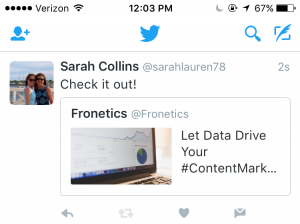
When you click the retweet button under a post, it gives you the option to either retweet or quote tweet. If you want to add something to the original post you want to retweet, choose the quote tweet option. A window then pops up allowing you to type your own message with the original tweet attached. The difference between this and simply retweeting is that when you retweet, only the original tweet is reposted and not an additional message from you.
Here’s what a quote tweet will look like to your followers:
How to gain followers
Knowing how to create the content you want on your Twitter is only half the battle. Now you have to gain followers to read and help you promote this content. Here are 5 ways to increase your followers and get the results from Twitter you so desire.
1) Promote your username as much as you can.
Add a follow button and/or your Twitter feed to your website and blog, and put the link to your Twitter in your email signature. You can even promote it offline on business cards or around the office.
2) Use your existing customer base.
Upload your email contacts into Twitter and follow your customers. It will let them know you’re thinking about them and prompt them to follow you back.
3) Search keywords and hashtags that relate to your industry and audience.
Use them to join in on conversations and get noticed in Twitter communities surrounding your industry. Users who like what you have to say will be inspired to follow you to get your updates.
4) Have the people who support you offline join in online.
Send out a company-wide email encouraging your employees to follow you on Twitter and retweet your posts.
5) Ask for retweets.
When someone retweets your post, it goes to all of their followers, increasing your reach exponentially. Don’t be afraid to ask your followers and employees for support. Sometimes a contest or incentive works extremely well to get the retweeting going.
The finishing touches
- Don’t forget to give your brand a little personality. As Kelly Jo Horton said in her article, 10 Things B2B Marketers Should Be Doing on Twitter, “All work and no play makes your Twitter feed a dull read. Don’t be afraid to have a little fun.” Post a joke or a funny picture, or show what it’s like behind the scenes at your company.
- Be conscious of where your followers are located. If they’re in different time zones, make sure your tweets match their schedules as well as your own.
- Keep up your audience engagement by making sure your tweets aren’t just a one-way communication. Start conversations with followers. Respond in good time if someone starts one with you.
A positive online connection can be the beginning of a profitable professional relationship. Twitter and its 310 million users are a great place to start making those connections.
Editor’s note: Sarah Collins is a summer intern at Fronetics Strategic Advisors. She is a rising sophomore at James Madison University, College of Business studying Marketing. You can find her on LinkedIn.
Related posts: