by Elizabeth Hines | Aug 2, 2016 | Blog, Content Marketing, Marketing, Strategy
Content marketing can help with lead generation and nurturing, but your business still needs a solid sales staff to close deals.
Content marketing helps generate a steady influx of quality leads and provides relevant information to prospects as they move down the sales funnel. Content can even help close a deal.
But forget any notion about content marketing replacing the work of your sales staff. The two must work together to convert leads into customers.
Even quality leads do not typically turn into sales on their own. You need a sales staff to take those opportunities and cultivate them into new business.
What content marketing does vs. your sales staff
Content marketing and sales staff provide different touch points for leads at distinct stages of the buying cycle. Here are a few examples:
Forming a relationship
- Content marketing opens up dialogue with potential customers. Often the first signs of customers’ interest appear after they read one of your blog posts, when they open and click through an email, or they share your company’s posts on social media channels.
- Your sales staff keeps that positive contact going to the next level. They develop it into a conversation. That person who read your blog post now has a relationship with a person in your company.
Providing information
- Content marketing can reach a potential customer early, while they are looking for solutions. B2B buyers report spending more time conducting research, using more expert content such as vendor websites, user reviews, and social media, before making a purchase. Your business should be producing content in order to make the short list of buyers who are looking for products and services like yours.
- Your sales staff answers those important first questions. When a customer reaches out with a query, s/he is likely 60% through the sales process. The customer has done a fair amount of research, and the sales rep must speak specifically to the customer’s needs — in a way that generic content can’t — to keep them interested and moving down the funnel.
Advocating for your brand
- Content marketing increases brand awareness for your business. It helps elevate your brand position within the industry and keeps your business top of mind, even when potential customers aren’t ready to make a purchase.
- Your sales staff is the advocate for your brand when a customer is preparing to make a purchase. They should be proactive in pursuing business when customers show interest in your content or when they reach out with questions. They drive dialogue and get to know customers and how your business can help them.
The content marketing, sales staff partnership
Curating and creating great content will generate quality leads for your company. But, your sales staff is vital to building relationships with potential customers and closing the sale.
Related posts:

by Elizabeth Hines | Jul 29, 2016 | Blog, Content Marketing, Marketing, Strategy, Supply Chain
Here I share some of our best performing content from the first half of this year.
Auditing your content and adjusting your strategy is an important part of an effective content marketing program. I like to do an in-depth look at how our content is performing every six months.
As I was evaluating our most popular articles in the first half of 2016, one of the things that struck me was how well they spoke to our content strategy. The top 10 blog posts reflect the topics that we know are most interesting and valuable to our readers. This reinforces the importance of 1) creating a strategy based on your target audience, 2) developing content around that strategy.
While the list itself is interesting, I think the articles are worth sharing again because of their quality and value. So, in case you missed them, here are our top blog posts from the first half of 2016.
Fronetics’ 10 most popular supply chain articles in 2016 (so far)
1) Four Supply Chain Companies that Excel at Social Media
These four organizations have it down when it comes to social media. Consistent posts inform and engage their followers. Who are they and what are they doing that is working? Read the full article.
2) Diversity and Leadership: An Interview with Arrow Electronics’ Kendrea Durr-Smith
Kendrea Durr-Smith runs a unique team as director of global trade compliance at Arrow Electronics. Her department works with people of all different cultures and backgrounds, while recent changes at Arrow with respect to trade management and compliance have given her team exciting, new responsibilities. Read the full article.
3) Top Logistics and Supply Chain Blogs of 2016
Companies in the supply chain and logistics industries are realizing the enormous benefits that a quality content marketing strategy, including regular posts to a company blog, can offer. These three companies, in particular, are publishing content that not only drives business to their websites, but also fuels conversation about industry best practices, trends, and issues. Read the full article.
4) Shipping company Eimskip Places a High Value on Culture and Art; It’s Paid Off
Iceland’s oldest shipping company regularly hosts local artists on voyages between its headquarters in Portland, ME, and Reykjavik. The practice reflects Eimskip’s great efforts to integrate itself into all aspects of the communities in which it operates. Read the full article.
5) 3 Key Tips for Creating Valuable and Compelling Content
This guest post by Jennifer Cortez, director or marketing communications at Transplace, discusses her company’s approach to content development. Read the full article.
6) Getting to First Base with a Social Network
Guest author Tania Seary is founder of Procurious, a global online network for supply chain and procurement professionals. In this article, she discusses some of the key decisions leadership made along the way to build the company from the ground up. Read the full article.
7) Social Media Facts for B2B Companies
Understanding how users are engaging with social media is important for businesses hoping to reach consumers with these tools; however, the information is hard to track down. Here are eight of the most recent, relevant statistics and facts about social media for B2B organizations. Read the full article.
8) Amazon Loves Logistics? The E-Commerce Giant’s Next $400B Opportunity
Amazon’s recent activity suggests it plans to move into the logistics space as a 3PL provider. This article examines why such speculation is valid and how it might disrupt the estimated $400 billion fulfillment market. Read the full article.
9) EBN’s Hailey McKeefry on Women in the Supply Chain Industry
This interview with EBN Editor in Chief Hailey McKeefry examines the gender gap in the supply chain industry in light of her own career path. McKeefry also offers advice to women considering entering the industry. Read the full article.
10) Women in Manufacturing and the Supply Chain: Disparity and Opportunity
A McKinsey & Company report found that diverse companies financially outperform companies that are not diverse by 15%. And in terms of gender diversity, specifically, research shows that when women are in positions of leadership, companies perform better — much better. How can the supply chain capitalize on that information and impact the bottom line? Read the full article.
Runner-up posts:
by Elizabeth Hines | Jul 19, 2016 | Blog, Content Marketing, Data/Analytics, Marketing, Social Media

This is part three of a three-part series on Twitter for B2B. See part one, Twitter for B2B, and part two, Tweet This: 20 Ideas for Twitter Content for the Supply Chain.
Leverage insights from Twitter’s analytics dashboard to improve audience engagement, reach, and content development.
Twitter is among the most popular social media platforms for companies in the logistics and supply chain industries. In fact, 95% report that Twitter is somewhat or very impactful on business. Yet 81% say that information on tracking and measuring ROI would be helpful to their business’ use of social media.
Fortunately, Twitter offers users a free tool that details how your tweets are performing and what your audience is interested in. In fact, Twitter Analytics can help you better understand your followers and refine your Twitter strategy to increase your engagement.
Here are the basic features of Twitter Analytics that you need to know.
Account home
Your account homepage offers a high-level overview of your Twitter activity in the last 28 days as compared to the previous period. This dashboard also provides information about your activity in the current month, including:
- Total tweets, impressions, profile visits, new followers, and mentions
- Your top follower, who has the most reach in your network each month
- Which tweet mentioning your name (“mention”) had the most engagement
Scroll down to see the same details for previous months.
Tweet activity
This dashboard provides metrics for each tweet in the last 28 days. You can see impressions, engagement, and engagement rate by tweet. Click on an individual tweet to get the details on engagement broken down by likes, link clicks, retweets, or replies. You can also see the day-by-day breakdown of total lkes, link clicks, retweets, and replies.
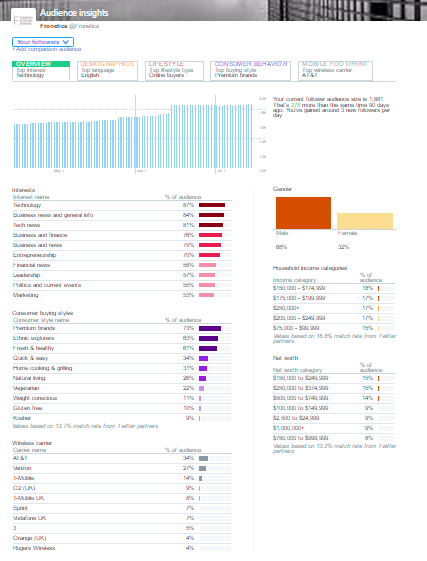
Audience insights
This is one of the most useful dashboards for insight on your followers, their behaviors, and interests. Smart marketers can use this information to better understand the kinds of content that resonates best with their audience.
The dashboard is broken down into 5 tabs:
1) Overview
See how your audience has grown over time, as well as gender breakdown, household income and net worth. Other features include:
- Interests (e.g., technology, politics, financial news, etc.)
- Consumer buying style (e.g., premium brands, gluten-free, healthy living, etc.)
- Wireless carrier
2) Audience demographics
This tab tell you about:
- Gender
- Country and region
- Language
- Household income, net worth, and home value
3) Lifestyle
Get insight into your followers regarding:
4) Consumer behavior
Learn about your followers’ buying styles:
- Aftermarket auto buyer type (including the last time they purchased a vehicle)
- Consumer buying style
- Consumer goods purchases
5) Mobile footprint
Discover information about your followers’ mobile behaviors:
- Wireless carrier
- Device categories (device type) and mobile/desktop breakdown
In addition to seeing this information for your followers, you can also filter by organic audience and the entire Twitter community to compare.
Events
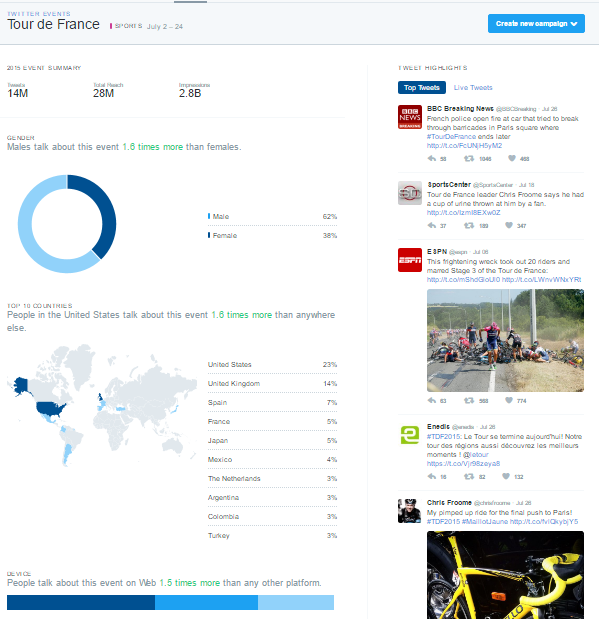
Events gives you insights into how the Twitter community is discussing certain events or trends, like the Republican National Convention, Tour de France, Independence Day: Resurgence, or Throwback Thursday. Click on an event to learn about the audience that’s engaging in conversation about that topic.
Videos
The videos dashboard collects metrics on your video content. In addition to views, learn how long users are watching your videos and where users stop watching.
Twitter cards
Twitter cards allow you to include rich media in your tweets, and this dashboard helps you track how that content is being shared. You can view the following features:
- Snapshot: An overview of how your content is performing on Twitter
- Change over time
- Sources: The most popular platforms from which users send tweets linking to your content (e.g., TweetDeck, Twitter for iPhone)
- Best practices: Personalized tips for improving your content’s performance
Campaign dashboard
If you are using Twitter Ads, the campaign dashboard allows you to track the results of your ad campaigns. Check how your ads are performing in terms of:
- Impressions: This is how many times your ads have been seen by Twitter users.
- Results: These are the actions that are tied to your objectives. For example, if your goal is website visits, the results tracked will be link clicks.
- Engagement rate: This is the number of impressions for your ads, divided by the number of results.
- Cost per result: This is how much you’re paying, on average, for each relevant action people are taking from your ads.
You can see these results across all campaigns, or segmented by:
- Your different objectives: See the average results for your website clicks campaigns, or the average results for your followers’ campaigns.
- Individual campaigns: See how specific campaigns are performing against your goals.
- Individual tweets: See which combinations of copy and creative are contributing the most to your campaigns.
- Targeting criteria: See which of your targeted audiences are responding the most to your ads.
Other features
Conversion tracking
Set up conversion tracking to follow what happens after users view your ads. This way, when users click on one of your links, retweet, like, or simply see your tweet and then go to your site, you’ll know where they came from.
Get high-performing tweets in front of a larger audience with Quick promote. Choose your tweet; click “Promote;” target a location (worldwide, country, state/province/region or metro area); and select your budget.
Related posts:

by Elizabeth Hines | Jul 13, 2016 | Blog, Content Marketing, Marketing
Using search marketing as part of your content strategy can increase web traffic and, thus, visibility for your business.
Search marketing, formerly “search engine marketing,” uses both paid (SEM) and unpaid strategies (SEO) to increase traffic to your business’ website. These two efforts work together to improve the likelihood that potential customers searching the internet will find your content.
Let me explain. When an individual searches for something on a search engine like Bing, Google, or Yahoo, the query brings him/her to a Search Engine Results Page, or “SERP.” Since we read from top to bottom, the person first sees the results that fall at the top of the SERP. Studies overwhelmingly show that the further down on the page that a link falls, the less likely someone will click it. What’s more, people rarely click on results beyond the first page. Thus, it is critical to rank as highly as possible on SERPs to entice potential customers to click through to your site.
So, how do you rise to the top? This is where search marketing fits into your content strategy.
SEO (Unpaid)
SEO (search engine optimization) is optimizing your content to improve how it ranks in search engine listings. This requires gaining a basic understanding of how and why search engines classify webpages and then catering to those factors where possible.
The search engine’s goal is to bring the most relevant results to someone who enters a search query. They use complex algorithms to determine how relevant a website is based on the query. So, if you type “best restaurant in Boston,” the search engine will scan the entirety of the internet to bring you a list of websites, in order, that are most likely give you an idea of the best Boston restaurants.
Each engine’s algorithm is slightly different, highly sensitive, and a closely held secret to keep websites from maliciously optimizing their content. Google, for instance, uses about 200 factors in its search algorithm, some of which are public knowledge, and most of which are not. This makes SEO somewhat of an art.
The best bet for optimizing your content is to consider those known factors while remaining true to your content. You want the people who are looking for you to find you. Here are some tips.
1) Use keywords throughout your content.
Algorithms crawl the internet to scan text of all kinds (websites, PDFs, documents, etc.) to find content that matches search queries. Identify several keywords that someone who is looking for products or services like yours might use in a search query, and use them throughout your content. It is likely even more effective when you use keywords in URL titles, headings and subheads, and paragraphs near the beginning of the page.
2) Use keywords in meta tags.
Webpages contain data, called meta tags, that search engines read to understand the main idea of the page. These are invisible to the average reader (unless you know where to look). Most important for SEO are the title tag and the meta description.
3) Distribute content through social media.
Social media is increasingly important to search algorithms because these platforms help determine what content people are using and engaging with organically. Post on your social media channels with links back to your website to improve your social media referral traffic metric and, thus, your SEO.
4) Encourage inbound links.
To understand how trustworthy and authoritative a particular website is on a certain subject, algorithms consider inbound links, or other sites linking to the website. HubSpot has some excellent advice on how to grow inbound links.
5) Make your site mobile-friendly.
As web traffic increasingly derives from mobile devices, search engines are rewarding websites that are mobile-friendly. If your website is not responsive or, at least, optimized for mobile, your search ranking will suffer.
6) Create frequent, quality content.
When you regularly publish content that is valuable to your target audience, search engines will “learn” that you are a trustworthy publisher with up-to-date information. Also, the more your content resonates with your target audience, the more they will post and share it, which means more referral traffic and inbound links, which likewise increase SEO.
SEM (Paid)
Search marketing through paid methods like pay-per-click (PPC) or paid advertising helps get your content in front of your target audience, regardless of how it would rank organically. Google AdWords is the most popular paid search platform used by marketers, followed by Bing Ads.
Google AdWords will show your advertisement to people who search with predetermined keywords. You pay per click, meaning you pay a fee for every person who clicks on your advertisement, regardless of how many people Google shows your ad to.
You can imagine that a number of advertisers vie for the same keywords. Google actually auctions off ad space with each search, ranking ads by bid (how much you are willing to pay per click) and quality score (does your content answer the searcher’s need?). To increase the success of your PPC you should:
- Identify relevant keywords that potential customers might use when searching for your products or services.
- Conduct comprehensive research of keywords with tools like Keyword Planner.
- Speak your audience’s language with dynamic keyword insertion.
- Determine which words you wish to bid on, and create groupings of these words to pair with ads.
- Identify and eliminate irrelevant words unlikely to appear in keyword searches.
Remember, search engines cater to the searcher. So, the more relevant your content is to someone who is searching for you, the more likely they will find you and want to do business with you.
Related posts:
by Elizabeth Hines | Jun 28, 2016 | Blog, Content Marketing, Marketing, Social Media
Reddit is a gold mine for relevant, engaging content to share with your social media followers.
You probably have heard that Reddit is useful in content marketing. But what, exactly, is it, and how do you use it?
Reddit is a news website/social network in which registered users submit content, such as posts and links, which the community of users (called redditors) curates by voting up or down. The more positive votes, the higher the content will appear on the page. Users also can comment on the content, and their comments are organized by the same up-down voting system. The discussion by redditors is often the most important part of any post.
Content is organized into categories, called subreddits. Subreddits can be as broad as News and Music and as specific as Supply Chain Risk Management and 3-D Printing News. Users can subscribe to a subreddit to have popular posts from that category published on their homepages.
Reddit, which ranks as the 9th most popular website in the U.S. and 31st globally, refers to itself as “the front page of the internet” for a good reason. Whatever the industry, topic, or perspective, there is content about it, ready for you to share.
That’s what makes Reddit great for content marketers, who are always looking for content to distribute to followers to keep them engaged. It is also intuitive to find and share exactly what you need.
5 easy steps to get started on Reddit
1) Sign up
First, you must register. Go to Reddit.com and click the “Sign Up” link in the upper-right-hand corner. Mobile users can download the Reddit app.
2) Get to know the community
After setting up a user account, you begin following a default set of subreddits, including topics like Art, Jokes, and Sports. Access them by clicking the “My Subreddits” dropdown menu on the upper-left corner of the homepage. These default subreddits are great for learning about the community.
3) Customize your subreddits
Find subreddits in your niche. It can take time to browse individual subreddits, but you can slash your search time by creating a multireddit, which is a custom dashboard of content around your particular topic of interest. First, find subreddits you want to include with the subreddit search box . This lets you search for all subreddits related to a keyword (for example, supply chain technology). Narrow down further with advanced search options.
4) Create a multireddit
Next, compile a master list of subreddit names, organized by topic, and save them in a multireddit. So, sign into your account, then go to the Reddit front page, and click on the dotted line on the left side. Click the “Create” button, and type in a name for your multireddit. (You can’t use spaces or symbols in the multireddit name.) When you’re finished, click “Create.” You can then filter the posts you see by those that are:
- Hot: Posts that receive the highest engagement (upvotes/comments)
- New: The most recent posts
- Rising: Posts that are gaining popularity
- Controversial: Posts that receive an equal mix of upvotes and downvotes
- Top: The most popular posts of all time
- Gilded: Posts that received reddit gold
- Promoted: Sponsored content
5) Share
Once you find a link you would like to share on social media, you can queue up content directly from Reddit using Buffer and/or IFTTT. If you have the Buffer extension installed in your browser, you’ll see its link for each Reddit post. Click the link and schedule the Reddit post in your Buffer queue. You can also set up IFTTT recipes, which connect your Reddit activity to Buffer.
Can you post content on Reddit? Yes, but directly marketing your business and self-promotion is not allowed. Instead, create a presence by being relevant within a specific community. Check out reddiquette and FAQs to learn what posts are acceptable. Essentially, 10% or less of your posts and dialogue should link to your own content.
Posting your content can benefit your business. If your post rises to the front page of Reddit, it can drive more than 200K visitors to your content, get picked up by other websites, and garner a ton of social shares.
Related posts: