by Elizabeth Hines | Jun 20, 2019 | Blog, Content Marketing, Logistics, Marketing, Social Media, Supply Chain
Participating in social media is increasingly important for businesses in the supply chain. Here are the 3 steps to proving social media ROI.
Highlights:
- It may seem obvious, but too many businesses approach social media marketing with vague goals or none at all.
- Once you’ve set your goals and identified your key metrics, it’s time to implement a system that will track and measure your metrics.
- Once you’ve calculated ROI for your social media platforms, it’s time to think strategically about optimizing your content marketing resources in terms of allocation and timing.
Video transcript:
I’m Elizabeth Hines, Creative Director at Fronetics, and today we’re talking about three steps to prove social media ROI.
Participating in social media is increasingly important for businesses in the supply chain. But many clients tell us they have a hard time getting approval for the expense because it’s notoriously difficult to measure the return on investment.
Well it’s true that many of the benefits of social media — like greater brand awareness and improved communication with customers — are difficult to quantify, there are some ways to prove the ROI of your participation in social media.
Here are the 3 steps to proving social media ROI:
1. Set goals
I’m not talking “grow your business” or other vague benchmarks like that. I mean “increase web traffic from social by 10% over the next 90 days.” Really specific benchmarks and goals are important in measuring success.
2. Track and measure
Make sure you have means to accurately measure how you’re doing against your goals. All the social platforms have excellent analytics tools to help with this. We also use tools like Google Analytics and HubSpot.
3. React
Look at your metrics in the context of your goals. Once you figure out what’s helping you meet those objectives and where you’re falling short, you can tweak your efforts to be more successful and to make sure that you’re actually achieving your ROI.
For more information on social media and all things digital marketing, visit our website at Fronetics.com
Related posts:

by Elizabeth Hines | Jun 19, 2019 | Blog, Content Marketing, Current Events, Logistics, Marketing, Supply Chain
As the internet is increasingly dominated by visual content, social media analytics are failing to keep up.
Highlights:
- Most social media analytics tools are purely text-based.
- Even tools that analyze images are costly and offer limited insights.
- We predict that machine learning capabilities will improve and the gap between analytics capability and brands’ needs will close.
Here’s an interesting conundrum: social media, and the web at large, is becoming increasingly visual, and social media marketing relies on increasingly sophisticated analytics. However, most of the analytics tools out there are woefully unable to make sense of the visual content that is dominating social media. The alarming truth is that social media analytics are failing to capture invaluable data on visual content.
How social media analytics are failing to keep up
Big data and artificial intelligence expert Kalev Leetaru describes the shortfalls of social media analytics by detailing what they can — and can’t — do. While the capabilities of visual analytics have grown in the past several years, as Leetaru points out, most analytics tools that claim to analyze visual images are in fact based on textual or structural aspects of the image, not the visual content itself.
“The overwhelming majority of production social media analytics research relies primarily on hashtags and associated caption text, rather than the actual contents of the images themselves,” writes Leetaru. Instead, “from simplistic bag of words counting algorithms through advanced deep learning approaches, it is text that forms the lens through which we see social media.”
It’s important to note that this text-based approach is true not only for social media analytics, but for search engine algorithms. At Fronetics, we are constantly advising our clients to make use of visual content, from images to infographics to video, in their digital marketing efforts. But we always advise that marketers optimize their images for search engines, both by tagging all visual assets and publishing transcripts to go along with video or infographics.
In essence, we’re advising our clients to take advantage of the increasingly visual nature of the internet, while also hedging against the ways in which algorithms and social media analytics are failing to assess visual content. As Leetaru points out, even in the rare cases when an analytics tool offers image analysis, it “typically offers only a few basic lenses through which to analyze that content, such as logos and a small number of topics.”
Of course, analyzing visual content is no easy task, and it’s also not cheap. “Images don’t capture reality, they construct it,” observes Leetaru. Not only are there all kinds of variables, like framing or lighting, that come into play, but there is a tremendous amount of non-visual context that determines how an image will be received. And the fact is that “current deep learning approaches are largely unable to incorporate such external world knowledge into their assessments.”
The problem with analytical failure
It’s important for marketers to recognize that, at the current moment, there is a gap between the capabilities of analytics tools and the analytics needs for modern digital marketing. As we as a society “increasingly express ourselves exclusively through visual forms,” brands desperately need insights about this visual expression.
Leetaru sums up the problem with sobering simplicity: “As social media becomes more visual, it becomes less accessible to our data-mining algorithms. In turn, as social media is less and less data minable, we are less and less able to understand it.”
Perhaps even more alarmingly, he cautions that “given that visual expression skews towards the younger and influencer demographics of greatest interest to many brands, this transition is especially damaging to their ability to extract useful insights from social media.”
Essentially, what Leetaru is recognizing is that we’re at a perilous moment for digital marketing. Just when the possibilities for content creation and dissemination seem endless, social media analytics are failing to offer up the insights needed to shape these processes in an increasingly visual climate.
“In the end, as social platforms rush towards a visual-first world, the vast landscape of social analytics is getting less and less representative of what we’re really talking about,” concludes Leetaru.
What does the future hold for analyzing visual data?
While you may be thinking that the future looks pretty bleak in light of how social media analytics are failing us, there’s a silver lining. If there’s one constant when it comes to social media marketing, it’s that when there’s a demand, sooner or later, supply will catch up.
It’s true that the current visual analytics capabilities of most platforms are far behind what’s needed. But at Fronetics, we predict that deep machine-learning capacities will start to catch up, and increasingly sophisticated analytical capabilities will become available to a wider segment of the market.
Currently, social media analytics can recognize text, faces, and brand logos within images. While these capabilities are, at present, too costly for most companies to take advantage of, we’re keeping our eye on some emerging technologies. For example, analytics provider Scraawl has recently released a tool called Scraawl PixL, which will allow users to run object and face detection, as well as Optimal Character Recognition, which extracts text from images.
Expect to see more tools like PixL on the market, offering increasing sophistication. While social media analytics are failing to keep up with the onslaught of visual data at the moment, we predict that they won’t be behind for long.
Related posts:

by Elizabeth Hines | Jun 18, 2019 | Blog, Content Marketing, Logistics, Marketing, Strategy, Supply Chain, Website Development
The percentage of visitors that stay on your site is key to lead conversion and search engine rankings. Here are our top tips to reduce your website bounce rate. Highlights: A high bounce rate will compromise your site’s search engine rankings. Slow website load times...

by Jennifer Hart Yim | Jun 12, 2019 | Blog, Marketing, Marketing Automation, Social Media
Automation can make your social media marketing more efficient and effective, allowing you more time to develop and execute other marketing campaigns. Here are 11 social media marketing mistakes to avoid.
Social media automation is quite a controversial marketing topic. The critics cry, “Social media is supposed to be social!” The supporters retort, “It’s all about efficiency!” Surely, there’s a middle ground, right? Just look at those adorable little robot eyes. Automation can’t be all bad, right?
We certainly agree. Social media automation can be done right. Just avoid the following 11 awful social media automation mistakes, and you’ll be good to go.
11 Awful Social Media Automation Mistakes Marketers Should Stop Making
1. You’re Scared of It.
Are you one of those social media automation critics we mentioned in the intro? Stop being such a fraidy cat … you’re missing out! When done right, automation can make your social media marketing more efficient and effective, allowing you more time to develop and execute other marketing campaigns and promotions. We’ve even developed a simple, customizable social media scheduling template and blog post guide to help you organize and plan your social media updates for the most popular social networks. Just avoid the rest of the mistakes on this list, and you’re golden. Guilty social automation conscience begone!
2. You’re Using Way Too Much of It.
Remember: too much of anything is usually bad, and the overuse of social media automation is usually what makes the automation critics cringe the most. First, you need to find the right balance of updates for each of the social networks you’re participating in. This involves testing and optimization to determine your ideal publishing frequency, and it usually involves pushing the limit a little bit. Try increasing the number of updates you currently publish and gauge your fans’/followers’ reactions. You might be surprised that you can update more than you thought and that you get a nice little lead bumps as a bonus!
Remember, the half-life ( the time it takes a link to receive half the clicks it will ever receive after it’s reached its peak) of a link shared on Twitter is only 2.8 hours, which means it’s acceptable to publish fairly frequently. On Facebook, updates last a little bit longer, so you don’t need to publish quite as much. Our social media publishing template recommends starting with 8 tweets a day, 4 Facebook updates, and 3 LinkedIn updates. Which leads us to our next mistake …
3. You Leave No Room for Ad Hoc Updates.
Don’t automate so much content in social media that you’re really pushing it if something last minute pops up that you really want to post an update about on your social networks. Things come up. You’re behind on your leads goal and you just created an awesome new ebook that you want to promote via social? You shouldn’t feel guilty about popping in a tweet or two about it in addition to your scheduled, automated updates. Or maybe you did some awesome newsjacking and you want your fans and followers to know about it right away. Don’t overdo it with the scheduled updates that you have to sacrifice those last-minute opportunities that arise.
4. You’re Setting it and Forgetting It.
Schedule and automate your social media updates and there’s no reason to check your social media accounts until the next batch of updates needs to be uploaded to HootSuite, right? WRONG. Do this, and you should be subjected to the wrath of social media automation critics. Just because you’re automating some updates, doesn’t mean you’re off the hook for monitoring the conversation — and participating in it. You still need to monitor the discussion happening around your content, answering your fans’ and followers’ questions, and, that’s right … engaging. In real time, or close to it. And with all the social media monitoring tools available to make it easier to do, there’s no excuse not to.
5. You’re Hiring an Agency to Manage It and Not Properly Setting Expectations.
Let’s relive the story of a former HubSpot employee who fell victim to some very unfortunate, poorly executed social media automation. What happened was, AT&T hired a marketing agency to execute its Ticket Chasers Twitter campaign for March Madness. The intent of the campaign was to target people who would be interested in the content of the program with personalized tweets: bloggers (who would get the word out about Ticket Chasers), people who live in the cities in which the Ticket Chasers promotion is occurring, and people who mention basketball or March Madness. Except what ended up happening was the agency targeting people that fit these criteria even if they weren’t followers of AT&T — and a very spammy Twitter presence.
The lesson is this: If you’re going to outsource any type of automation, make sure you set some very clear and specific expectations with your agency up front — both for what constitutes proper targeting and automation, and how frequently the campaign should be monitored so there could be a quick response if something goes awry.
6. Your Scheduled Updates Even SOUND Robotic.
Just because you’re scheduling automated updates doesn’t mean it has to sound like a robot wrote the copy. Spend some time carefully crafting your social media updates, and for goodness’ sake, infuse some personality into them! It should sound like a human took the time to craft the update because a human did take the time to create them, right?
7. Your Content Is Stale or Unremarkable.
Nothing indicates a low-quality social media presence like unremarkable content. Whether you’re manually updating your social networks or using automation to make your social media marketing more efficient, it’s all about the content of your updates. Share awesome content that your audience cares about, and they won’t mind that you may have scheduled it in advance. If you’re using HubSpot’s free social media scheduling template, keep your content repository tab stocked with a mix of awesome evergreen content that never gets stale and can be re-promoted over time, as well as new content and offers you create over time.
8. Your Timing Is Way Off.
Just scheduling updates all willy nilly without strategizing about timing? Think about it. Should that online coupon you’re sharing really get tweeted on the 12th when it expires on the 11th? Probably not. Be careful — nothing smells like stinky automation more than careless planning and timing. Should that offer, which just so happens to be targeted at your international prospects in Mumbai, be posted to your Facebook business page at 5 PM ET? Remember, it’s 2:30 AM in Mumbai. Be sure you’re scheduling your updates for times that make sense for your audience, and don’t be afraid to do some testing and experimentation to determine exactly what that optimal timing is.
9. You Treat Scheduled Updates the Same Way on All Social Networks.
Not all social networks are the same, so don’t treat your updates like they’re one-size-fits-all. Each has its own guidelines, tone, and different types of users, so make sure you tailor your updates to appeal to each social network’s nuances. For example, your Twitter updates need to fit within 280 characters, but snippets that accompany links you share on LinkedIn and Facebook can be much longer. And LinkedIn caters to a much more professional audience than, say, Facebook. And remember, you can reuse a lot of the same content across social networks; it’s how you frame and position that content that should be tweaked.
10. You’re Not Measuring Results and Adjusting Accordingly.
Trying to pick your best content for your automated updates? Attempting to determine the optimal timing and frequency of your updates for each social network? You’re probably going to need to rely on your analytics for all those things, don’t you think? Make use of your marketing analytics to identify the content and offers that tend to perform well in social media so you can promote more of the types of content that work, and nix the types that don’t. Track your leads and referral traffic from social media, coupled with qualitative data on how your fans/followers react to timing and frequency, so you can optimize those techniques as well.
11. You’re Not Adding Sharing Links to Your Content.
That’s right — think of it as social media automation enablement. Adding social media sharing links/buttons to all your content, whether it’s a web/landing page, blog post, within an ebook, in an email, makes it easy for your audience to spread your content for you, and expand your reach. It’s sort of like automating evangelism! It might sound sneaky, but your audience will probably appreciate that you’ve done some of the work involved in sharing content for them. People are always looking for social sharing fodder, and if your content is awesome, it’ll make them look like a valuable social media connection who shares great stuff!
Are you making effective use of social media automation? What else would you add to this list of social automation mistakes?
This article was written by Pamela Vaughan. Pamela is a Principal Marketing Manager, Website CRO & Copywriting at HubSpot. She is best known for introducing the concept of historical optimization, which increased organic search traffic and leads for HubSpot’s blog by more than 200%.
Related posts:

by Elizabeth Hines | May 29, 2019 | Blog, Content Marketing, Data/Analytics, Marketing
These Google Analytics reports are crucial to understanding the visitors who are browsing your website and how you are more likely to get them to convert.
Highlights:
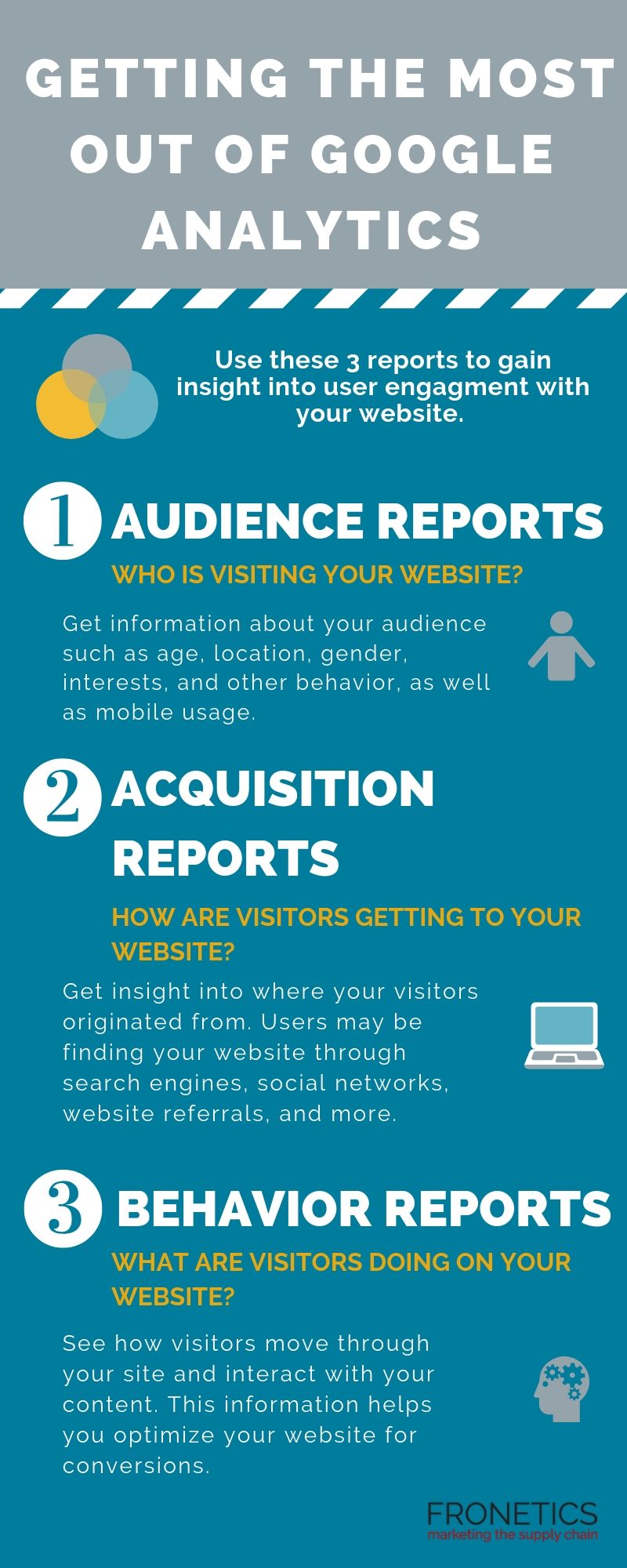
- Audience reports tell you who is visiting your website.
- Acquisition reports convey how are users getting to your website.
- Behavior reports show what visitors are doing on your website.
(Made with Canva)
Your website is your best opportunity to convert digital prospects into leads. But how can you learn who is browsing your website and what they are doing while they’re there? Most importantly, how can you get more of them to convert? Here’s where tools like Google Analytics can help.
Google Analytics is one of if not THE most comprehensive analytics tools available to digital marketers. But it can be very overwhelming if you don’t know how to navigate it. So, we’ve come up with the 3 Google Analytics reports you should be running if you want to understand how to get more visitors to convert on your website.
But, first, let’s start with the basics.
Understanding Google Analytics
At a fundamental level, Google Analytics helps you understand and make decisions based on the traffic that comes to your website. This free tool is a powerhouse that uses a JavaScript code to collect data surrounding how users interact with your website. It then processes that data and generates customizable reports for you within the platform.
I should say: the data you gain from Google Analytics is all the richer if you begin by setting up Goals on the platform. This way, Google Analytics can go to work for you, measuring how well your website is fulfilling your specific objectives. If you start by properly setting and configuring your goals, Google Analytics can provide you with critical information that’s specific to your strategy. Of course, you can always add to or adjust your goals, as you collect data.
Getting the most out of Google Analytics can empower you to make improvements to your website based on the data it collects for you. The more information you have about your site and its traffic, the more you can make adjustments to meet your objectives. Furthermore, the insights you gain from your metrics can help shape future objectives, to improve user experience on your site.
3 Google Analytics reports that are key to getting the most out of the platform
Using Google Analytics, you can gain insight into some of the most important questions surrounding user engagement with your website. In particular, these 3 reports are helpful in getting the most useful data for understanding lead conversion opportunities:
- Audience reports: Who is visiting your website?
- Acquisition reports: How are users getting to your website?
- Behavior reports: What are website visitors doing on your website?
Here’s what you need to know about each report.
1) Audience reports
As you create and publish content on your website, you need to know who’s reading/watching/viewing/listening to it. With Google Analytics, you can get information about your audience such as age, location, gender, interests, and other behavior.
As users are increasingly engaging with websites on mobile devices, we often encourage clients to monitor the Mobile report as well as other audience demographics. This report shows you what percentage of your audience comes from a mobile device, as compared to a desktop or tablet. You need this information, particularly because mobile device users tend to have different behavior and goals from those on desktops. If your traffic is heavily mobile, your site needs to be optimized for these visitors.
We also encourage clients to make use of Google Analytics’ audience benchmarking reports. These reports allow you to compare your results with aggregated industry data, giving you the context you need to set targets. Benchmarking can also give you insights into industry-wide trends and help you determine how you’re doing as compared to your competitors.
2) Acquisition reports
Knowing how visitors are getting to your website will empower you not only to improve your site, but to make strategic decisions surrounding your other digital channels. Google Analytics offers acquisition reports that provide insight into where your visitors originated from. Users may be finding your website through search engines, social networks, website referrals, and more.
Use the Acquisition Overview to get a quick overview of the top channels that are funneling visitors to your website. You can also see associated acquisition, behavior, and conversion details for each of these channels. If you have your Google Analytics Goals in place, the Acquisitions Overview report will display how well each channel is driving conversions.
Next, take a deeper dive in the Channels section, which gives you rich information about each of your channels. For example, if you click on the “Organic Search” channels, Google Analytics takes you to the Keywords report, which lets you know how you’re faring with specific search queries. Clicking the “Direct” channel will take you to the top landing pages for direct site visitors, and “Social” shows you your top-referring social networks.
3) Behavior reports
Once visitors are on your site, what are they doing there? If you’re getting the most out of Google Analytics, you can see how visitors move through your site and interact with your content – and, in turn, you can be strategic about optimizing your website for conversions.
Start with the Behavior Overview. Here, you’ll find a graph of the amount of traffic your website receives, as well as additional metrics such as Pageviews, Average Time on Page, Bounce Rate, and more.
For more insight, the Behavior Flow report shows you the path users typically take on your website. You can see the first page they view, all the way to the final page they typically visit before exiting your site. Here, you’re getting a visual of how long visitors stay on your website — and learn a bit about why they leave.
The bottom line: Google Analytics reports help you optimize your website
Data empowers you to make informed decisions and tailor your strategies to meet your objectives. Not only that, data can help you determine your objectives in the first place. Google Analytics is perhaps the most robust tool out there for gathering information and insights into essentially every aspect of your website. Make sure you’re making use of it.
What Google Analytics reports have you found most helpful?
Related posts: