by Fronetics | Jun 5, 2019 | Blog, Content Marketing, Logistics, Marketing, Robotics & Automation, Social Media, Supply Chain
When it comes to digital marketing, social media is here to stay. Here’s our four-step guide to leveraging social media for the robotics industry.
Highlights:
- Having a documented strategy is key to reap the benefits of social media marketing.
- Define your audience and establish concrete goals for social media campaigns.
- Set metrics and use data to adjust your strategy consistently over the long term.
The demand for high-performance robotic systems is growing steadily and showing no signs of slowing down. In fact, New Equipment Digest predicts that the robotics vertical within the materials-handling-equipment sector will grow by over 8%, reaching $20 billion by the year 2024. To capture the benefits of the sector’s growth, robotics companies need to invest in digital marketing. Social media for the robotics industry holds tremendous potential — if it’s leveraged properly.
In our work with clients across various verticals in the supply chain, including robotics, we frequently hear that they have been skeptical about the potential of B2B social media use. While social media management does require time and resources, robotics companies should absolutely be reaping the benefits of social media marketing.
Read on for tips on how to create a strategy and leverage social media for the robotics industry.
4 steps to developing a strategy for social media for the robotics industry
1) Define your audience.
For supply chain companies, one of the biggest predictors of success in a social media marketing campaign is a clearly documented strategy. A big part of that is defining your target audience. Chances are, you have some target buyer personas already. Keep these top of mind as you create your social media strategy.
What are the unique needs and challenges faced by your audience? Where do they go online for information? What are their goals? What do they value from you? The more you ask and answer questions about your audience, the better positioned you are to create a strong and effective social media strategy.
2) Determine your goals.
Next, consider what your goals are on social media. You’d be surprised how often this step gets skipped. Marketers are often pressed for time or resources and think of social media marketing itself as a goal, rather than defining specific, measurable objectives for their social media campaigns.
When it comes to social media for the robotics industry, common goals often include increasing brand awareness and authority, generating leads, or establishing thought leadership. But before you embark on a social media strategy, consider what your company specifically needs to achieve.
3) Define your metrics.
One of the best things about having documented goals for your social media strategy is that it helps you define what metrics you should be using to track your progress toward those goals. Measuring social media ROI is no easy task, but there are plenty of tools and strategies that can help. While your full list of metrics will be determined by the goals you set, robotics companies should be tracking at least these four metrics:
- Where traffic is coming from
- Revenue derived from posts
- Visitor behavior on your site
- Social media conversions
In addition to the analytics tools offered by social media platforms like Facebook, Twitter, Instagram, and LinkedIn, Google Analytics can give you a bird’s eye view of your social media efforts, as well as delving into detail on the metrics that matter most to you. For more, be sure to check out our guide to getting the most out of Google Analytics.
4) Choose your platforms.
Not all social media platforms are created equal. When it comes time to choose your social media platforms and create a strategy for each, it’s important for robotics companies to consider where their audience spends their time online (see step 1).
As you identify what social media channels are the best fit for your company, keep in mind that the characteristics of each platform should inform what content and how often you should be posting. Twitter, for example, lends itself to short-form, pithy content or links and frequent posting, while a more visual platform like Instagram only requires 1-2 posts per day.
Going forward: using your metrics to stay agile
Once your strategy is established, you can simply put it into place, start posting content, and forget about it, right? Wrong. Effective use of social media for the robotics industry requires ongoing evaluation and adjustment.
If you’ve defined the right metrics to track, the data you collect should help you determine where your efforts are successful and where your methods need to be adjusted. As you refine your strategy and learn the needs and preferences of your target audience, you’ll find that social media is an extremely effective tool for capturing leads, broadening your brand’s reach, and building your reputation.
Related posts:
by Fronetics | May 29, 2019 | Blog, Content Marketing, Data/Analytics, Marketing
These Google Analytics reports are crucial to understanding the visitors who are browsing your website and how you are more likely to get them to convert.
Highlights:
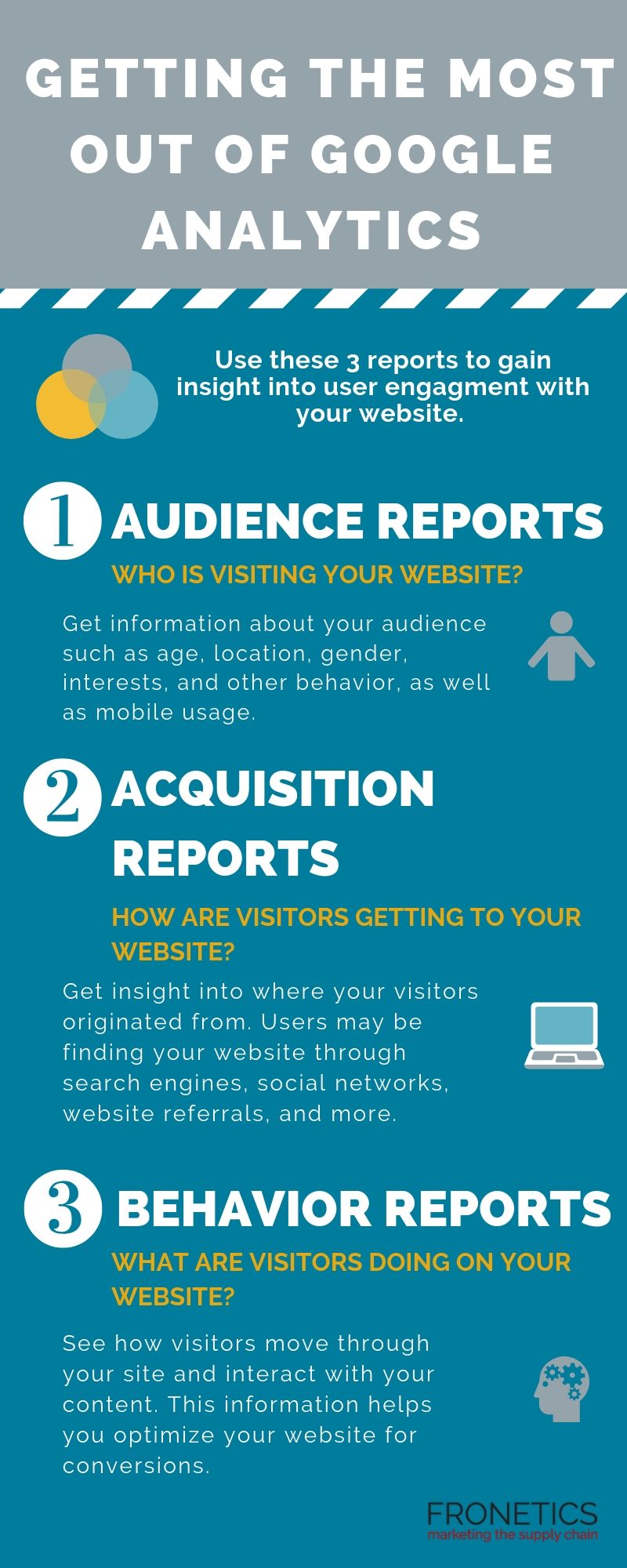
- Audience reports tell you who is visiting your website.
- Acquisition reports convey how are users getting to your website.
- Behavior reports show what visitors are doing on your website.
(Made with Canva)
Your website is your best opportunity to convert digital prospects into leads. But how can you learn who is browsing your website and what they are doing while they’re there? Most importantly, how can you get more of them to convert? Here’s where tools like Google Analytics can help.
Google Analytics is one of if not THE most comprehensive analytics tools available to digital marketers. But it can be very overwhelming if you don’t know how to navigate it. So, we’ve come up with the 3 Google Analytics reports you should be running if you want to understand how to get more visitors to convert on your website.
But, first, let’s start with the basics.
Understanding Google Analytics
At a fundamental level, Google Analytics helps you understand and make decisions based on the traffic that comes to your website. This free tool is a powerhouse that uses a JavaScript code to collect data surrounding how users interact with your website. It then processes that data and generates customizable reports for you within the platform.
I should say: the data you gain from Google Analytics is all the richer if you begin by setting up Goals on the platform. This way, Google Analytics can go to work for you, measuring how well your website is fulfilling your specific objectives. If you start by properly setting and configuring your goals, Google Analytics can provide you with critical information that’s specific to your strategy. Of course, you can always add to or adjust your goals, as you collect data.
Getting the most out of Google Analytics can empower you to make improvements to your website based on the data it collects for you. The more information you have about your site and its traffic, the more you can make adjustments to meet your objectives. Furthermore, the insights you gain from your metrics can help shape future objectives, to improve user experience on your site.
3 Google Analytics reports that are key to getting the most out of the platform
Using Google Analytics, you can gain insight into some of the most important questions surrounding user engagement with your website. In particular, these 3 reports are helpful in getting the most useful data for understanding lead conversion opportunities:
- Audience reports: Who is visiting your website?
- Acquisition reports: How are users getting to your website?
- Behavior reports: What are website visitors doing on your website?
Here’s what you need to know about each report.
1) Audience reports
As you create and publish content on your website, you need to know who’s reading/watching/viewing/listening to it. With Google Analytics, you can get information about your audience such as age, location, gender, interests, and other behavior.
As users are increasingly engaging with websites on mobile devices, we often encourage clients to monitor the Mobile report as well as other audience demographics. This report shows you what percentage of your audience comes from a mobile device, as compared to a desktop or tablet. You need this information, particularly because mobile device users tend to have different behavior and goals from those on desktops. If your traffic is heavily mobile, your site needs to be optimized for these visitors.
We also encourage clients to make use of Google Analytics’ audience benchmarking reports. These reports allow you to compare your results with aggregated industry data, giving you the context you need to set targets. Benchmarking can also give you insights into industry-wide trends and help you determine how you’re doing as compared to your competitors.
2) Acquisition reports
Knowing how visitors are getting to your website will empower you not only to improve your site, but to make strategic decisions surrounding your other digital channels. Google Analytics offers acquisition reports that provide insight into where your visitors originated from. Users may be finding your website through search engines, social networks, website referrals, and more.
Use the Acquisition Overview to get a quick overview of the top channels that are funneling visitors to your website. You can also see associated acquisition, behavior, and conversion details for each of these channels. If you have your Google Analytics Goals in place, the Acquisitions Overview report will display how well each channel is driving conversions.
Next, take a deeper dive in the Channels section, which gives you rich information about each of your channels. For example, if you click on the “Organic Search” channels, Google Analytics takes you to the Keywords report, which lets you know how you’re faring with specific search queries. Clicking the “Direct” channel will take you to the top landing pages for direct site visitors, and “Social” shows you your top-referring social networks.
3) Behavior reports
Once visitors are on your site, what are they doing there? If you’re getting the most out of Google Analytics, you can see how visitors move through your site and interact with your content – and, in turn, you can be strategic about optimizing your website for conversions.
Start with the Behavior Overview. Here, you’ll find a graph of the amount of traffic your website receives, as well as additional metrics such as Pageviews, Average Time on Page, Bounce Rate, and more.
For more insight, the Behavior Flow report shows you the path users typically take on your website. You can see the first page they view, all the way to the final page they typically visit before exiting your site. Here, you’re getting a visual of how long visitors stay on your website — and learn a bit about why they leave.
The bottom line: Google Analytics reports help you optimize your website
Data empowers you to make informed decisions and tailor your strategies to meet your objectives. Not only that, data can help you determine your objectives in the first place. Google Analytics is perhaps the most robust tool out there for gathering information and insights into essentially every aspect of your website. Make sure you’re making use of it.
What Google Analytics reports have you found most helpful?
Related posts:

by Fronetics | Apr 30, 2019 | Blog, Current Events, Marketing, Social Media, Video Marketing
Also, this month in social media news: LinkedIn adds a “Teammates” option to facilitate connections among colleagues, and Facebook is testing a Stories-like newsfeed.
Highlights:
- Facebook is giving users increased access to what information advertisers have on them.
- Instagram is considering joining Facebook in promoting communal video experiences.
- LinkedIn’s “Teammates” feature helps users prioritize content from close connections.
This month in social media news, Facebook is continuing to combat user privacy concerns by introducing a tool to provide greater transparency about the content they see on their Newsfeeds, both from connections and from advertisers. The platform is also continuing to explore the Stories trend, as it conducts early-stage testing of a layout that resembles the Stories feature more than it does the existing Newsfeed.
Both Instagram and LinkedIn are promoting greater community among users. Instagram is testing a group video viewing option, joining Facebook’s Watch Party, introduced last year. LinkedIn is rolling out a feature which allows users to prioritize content from their closest connections. Read on for a round-up of social media news.
Facebook Introduces a Feature to Assist Users in Understanding the Context of Content Appearing on the Newsfeed
Having been embroiled in ongoing privacy-related scandals, Facebookis making users’ safety and comfort using the platform a priority. To that end, the company has announced that it will be giving users greater control over the content that appears on their Newsfeeds, through the “Why am I seeing this post?” feature.
In 2014, the social media giant launched its similar feature, “Why am I seeing this ad?” which was geared toward projecting transparency in the company’s embattled relationship with users and their advertising content. Facebook announced simultaneously that it will be “making improvements” to the older feature. The new “Why am I seeing this post?” feature aims to help users understand the context for what shows up in their Newsfeeds, and it also allows them to control and manage content.
Marketers should be aware that users will now be able to find out when their profile information matches with the information on an advertiser’s list, as well as when an advertiser “saves their personal information in their database and other details such as if they (the users) were targeted by the advertiser through another marketing partner of theirs (advertisers).”
Instagram Tests a Communal Video Viewing Option
Social media platforms are continuing to push the boundaries of social experiences that are possible for users not in physical proximity. Back in 2018, Facebook rolled out its “Watch Party” option, and now Instagram is exploring jumping on the bandwagon, testing a similar function in its app.
The feature would allow users to view video content on Instagram with a friend, while simultaneously seeing their reactions on screen, using the phone’s camera, in a split-screen view. Users can also apply face filters and other visual tools to the personal feed. Instagram and Facebook’s features are part of a larger trend toward “multi-participatory consumption.”
LinkedIn Adds a New “Teammates” Option to Maintain Connections Among Colleagues
In an ongoing attempt to boost on-platform engagement, LinkedIn has introduced a new feature called “Teammates.” It enables users to put a priority on updates from immediate connections, content with which LinkedIn has found that its users are 60% more likely to engage than more distant connections. As users place a priority on updates from teammates, it will appear higher in their feeds.
The network is pushing the feature as promoting community within the workplace: “95% of working professionals think it’s a good idea to have friends at work, and 63% say they have relationships with their co-workers outside the office. Based on a recent study we shared last month, having friends at work can also help you advance your career.”
Marketers should take note, since it’s not immediately clear what the impact of this feature will be on branded content. Nonetheless, it emphasizes the value of cultivating meaningful connections on the platform, as potential clients will be more likely to mark these types of connections as “teammates,” placing a higher priority on their content.
Facebook is Testing a Stories-Like Swipeable Newsfeed
Stories features across the social media landscape continue to grow in popularity. In keeping with the trend, Facebook is experimenting with a Newsfeed layout which allows users to side-scroll or swipe between posts in their feed, rather than scrolling down. This is a potential significant re-design for the platform, and points to the fact that the Stories trend is here to stay.
If Facebook adopts the design, it would merge Stories and Newsfeed content into a single stream. The network emphasized to TechCrunchthat it is “in the very early stages of development,” and “still needs to conduct a lot more user research before any public experimentation can take place.”
Therefore, while it’s unlikely that a new Newsfeed is coming soon, what is clear is that social media platforms are experimenting with increasingly integrating Stories-style content into every aspect of the user experience.
Related posts:

by Fronetics | Mar 26, 2019 | Blog, Content Marketing, Logistics, Marketing, Supply Chain, Video Marketing
The popularity of video marketing is on the rise, and savvy supply chain marketers are using this medium to tell their brand’s story, broaden their audience, and generate leads.
Highlights:
- Use video to tell your brand’s story, broaden your audience, and generate leads.
- As marketing expands in a more visual direction, marketers should adjust their strategies to favor content that lends itself to this kind of storytelling.
- Consider accompanying data-heavy blog posts with explanatory animated videos, conducting and sharing video interviews with industry executives, or turning a case-study into an animated video presentation.
Video transcript:
I’m Frank Cavallaro, CEO and founder of Fronetics, and today I’m going to be talking about video marketing and the supply chain.
Video is the most popular content being consumed online today. And it shows no sign of letting up. Video let’s savvy marketers tell their brand’s story, broaden their audience, and generate more leads. Video allows the marketer to consistently deliver content that is visually stimulating and valuable.
[bctt tweet=”Using animated video for case studies makes them easier to understand for the user. And because they’re entertaining and engaging, there’s a huge ROI that comes along with them.” username=”Fronetics”]
Consider pairing data-heavy blog posts with some sort of video, whether its animated or a subject matter interview. Using animated video for case studies makes them easier to understand for the user. And because they’re entertaining and engaging, there’s a huge ROI that comes along with them.
When using video remember what you need is quality, high engaging, well researched content. For more information, visit us at fronetics.com.
Related posts:

by Fronetics | Mar 20, 2019 | Blog, Content Marketing, Marketing, Social Media
Many B2B organizations are using Instagram to grow business. Here are a dozen Instagram tips to help you use the platform effectively.
Highlights:
- Instagram has become the second most used social media platform, up from fourth in 2017.
- Audiences love real-time content, like Instagram Stories. It lets them feel a genuine, human connection — the creation of which sometimes poses a challenge for B2B marketers.
- An effective Instagram presence has the potential to grow brand awareness, improve your reputation, and generate qualified leads.
Recent research on social media use shows that 66% of brands now use Instagram. As of 2018, it was second-most used platform by businesses, up from fourth in 2017. If you’re considering using this social media network for your business, which you should be, our 12 Instagram tips can help you get started.
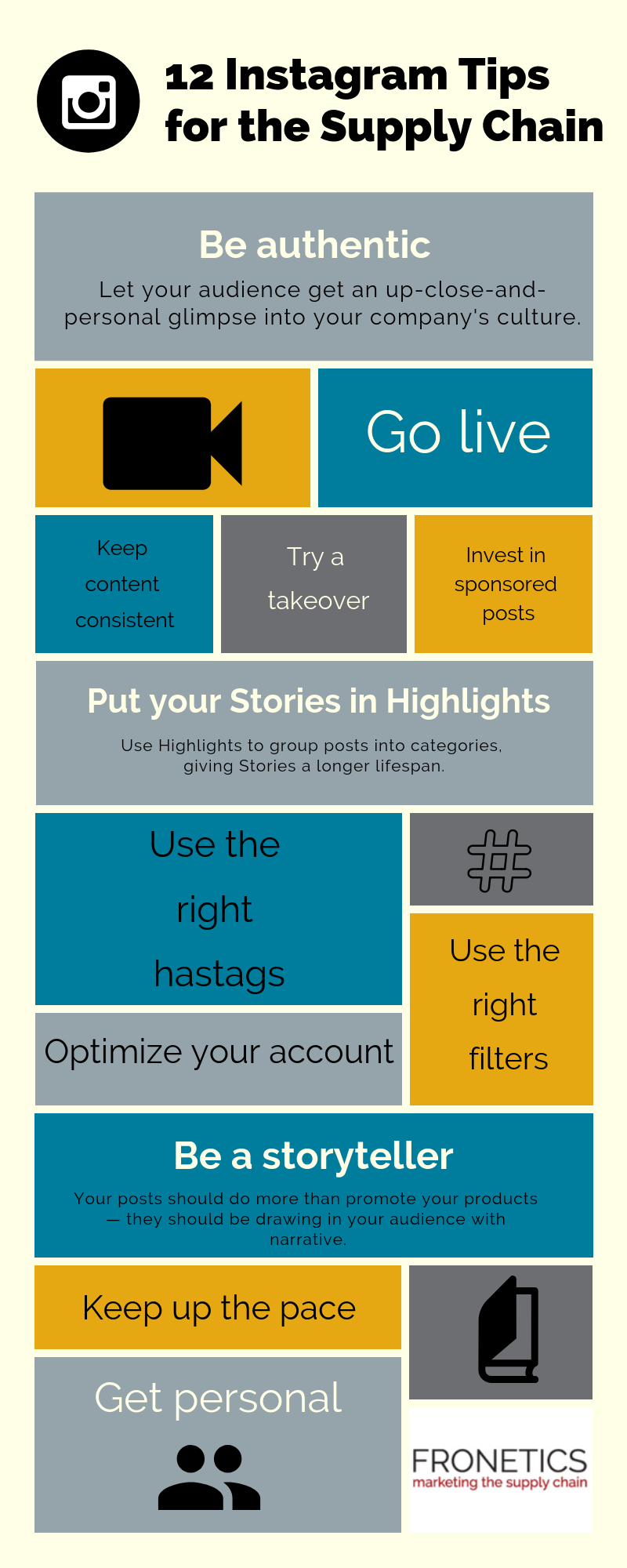
12 Instagram Tips for Supply Chain Companies
(Made with Canva)
1. Be authentic
Many supply chain companies often fall into the trap of using stock photography or overly staged promotional pictures of products. The ethos of Instagram is all about authenticity and personality. Let your audience get an up-close-and-personal glimpse into your company’s culture with real photos of the people, places, and things that make your business run every day.
2. Optimize your account
Before we get to anything fancy, take a step back and make sure your Instagram account is fully optimized. This means you need:
- a bio with a link to marketing or product pages related to a specific keyword or hashtag;
- image captions, which can reference the link in your bio;
- a search-friendly username; and
- a compelling profile image that reflects your company.
3. Go live
Live video is the “it” trend in social media marketing, with 63% of marketers reporting that they plan on adding it to their overall strategy. Audiences love real-time content, and it lets them feel a genuine, human connection — the creation of which sometimes poses a challenge for B2B marketers.
4. Put your Stories in Highlights
In addition to its Stories feature, Instagram now lets users create a featured group of “Highlights” in various categories on their profiles. Stories have only a 24-hour lifespan, so featuring your most effective Stories clips in Highlights gives them a second life and a chance to engage future followers. One of the best features of Stories and Highlights is that it allows companies to view and analyze how users have viewed and interacted with their content.
5. Keep up the pace
Instagram is one of the easiest social media platforms to post on. That means you can quickly snap photos wherever you are — say, at a conference or event, or even on your way into the office — and publish it instantly. This is great for reaching the coveted millennial audience, which seems to have an unquenchable thirst for consuming content, particularly images and graphics.
6. Keep your content consistent
Posting on a consistent timetable is crucial to maintaining an active following. Posting irregularly means you risk your followers forgetting about you, and posting all at once can annoy and drive followers away. Ideally, companies should post 2-3 times a day, but you’ll need to test how many times a day is most effective for your particular business in engaging your specific audience. For more, check out our guide to when to post on social media.
7. Try a takeover
Taking over the Instagram account of a partner company or customer is a great way to draw attention from an existing and relevant audience, providing mutual benefits to both parties.
8. Invest in sponsored posts and product reviews
Optimizing your account and following Instagram best practices will go a long way toward earning authentic followers that could become future leads and/or customers. But to really boost your impact, it pays to take advantage of influencer marketing on Instagram. Create a list of large accounts in your vertical (think industry media sites and partners), follow them, and reach out to their marketing team to ask about sponsored-post pricing. Be on the lookout for influencers with a high engagement rate relative to number of followers.
[bctt tweet=”Optimizing your account and following Instagram best practices will go a long way toward earning authentic followers that could become future leads and/or customers.” username=”Fronetics”]
9. Use the right hashtags
One of the most effective ways to grow your Instagram following is to use hashtags effectively. Since Instagram gives users the ability to follow hashtags that interest them, and they function as links to other relevant content, choosing the right hashtags is the ideal way to reach and engage your target audience.
Keep an eye on accounts of peer brands to stay up to date with the best hashtags to use. The most effective hashtags are short, memorable, and easy to read. You can also use an online tool like InconoSquare or Websta to find relevant hashtags for your business.
10. Use the right filters
Sure, filters are great for turning boring or poorly lit photos into more engaging images. But, it turns out that which filter you choose really does have an impact on engagement. These lighting and color presets offered by Instagram have the potential to create mood and style in your image content. According to Iconosquare, these 10 filters are currently the most popular on Instagram:
- Normal (No Filter)
- Clarendon
- Juno
- Lark
- Ludwig
- Gingham
- Valencia
- X-Pro II
- Lo-fi
- Amaro
11. Be a storyteller
Instagram is all about visual storytelling. Your posts should do more than promote your products — they should be drawing in your audience with narrative told through a visual format. Instagram Stories are an ideal way to engage your audience!
12. Get personal
Go in deep and personal with your customers by answering their questions via 10-second videos. You let your viewers feel like they’re being heard. Plus, short videos are ideal for reposting.
The Bottom Line
Instagram is an extremely effective tool for B2B businesses. These Instagram tips for using the platform will help you create and nurture a loyal, engaged audience base. In turn, an effective Instagram presence has the potential to grow brand awareness, improve your reputation, and generate qualified leads.
Related posts: